 Ivan Cernja
How to Deploy AI-Generated Code to Production
Taking backends from Cursor, Claude Code, Copilot, or Codex to AWS and GCP
You can deploy AI-generated backend code to production using infrastructure-from-code tooling that provisions databases, handles secrets, and manages deployments automatically. This approach works with code from Cursor, Claude Code, Copilot, Codex, or any AI assistant that generates TypeScript or Go backends. You can deploy to your own AWS or GCP account, or self-host using Docker images.
AI assistants write application logic well, but they can't provision your cloud databases or configure deployment pipelines. Someone still needs to handle the infrastructure. This guide covers a workflow that automates that infrastructure layer, taking AI-generated code from local prototype to production on AWS or GCP in minutes.
The Infrastructure Problem
When you ask Claude Code or Cursor to build a REST API, you get working application code. Running that code in production requires:
- Cloud account configuration
- Database provisioning and connection management
- Secret and environment variable handling
- Container builds and registry management
- Deployment pipelines
- Observability setup
AI assistants can generate Terraform configs or Dockerfiles for these tasks, but someone still needs to connect the pieces, debug issues, and maintain the infrastructure over time.
Infrastructure from Code
Encore.ts takes a different approach. Instead of configuring infrastructure separately, you declare what you need directly in your TypeScript code. Databases, Pub/Sub, cron jobs, and secrets are provisioned automatically based on these declarations, both locally and in your cloud account. The open-source framework has over 11,000 GitHub stars and is used in production by companies like Groupon.
This pairs well with AI-generated code. The AI writes the application logic following Encore conventions, and Encore handles the infrastructure. The deployment path is built into the framework rather than bolted on afterward.
From Prompt to Production
This walkthrough covers building a URL shortener with AI-generated code and deploying it to AWS.
Step 1: Generate the Code
A prompt like this works with Cursor, Claude Code, or Copilot:
Build me a URL shortener API with Encore.ts. I need:
- POST /shorten that takes a URL and returns a short code
- GET /:code that redirects to the original URL
- Store URLs in a PostgreSQL database
- Track click counts
Use Encore.ts conventions: api() for endpoints, SQLDatabase for the database.
This prompt produces code similar to the following:
// url/encore.service.ts
import { Service } from "encore.dev/service";

export default new Service("url");
// url/db.ts
import { SQLDatabase } from "encore.dev/storage/sqldb";

export const db = new SQLDatabase("url", {
  migrations: "./migrations",
});
-- url/migrations/001_create_urls.up.sql
CREATE TABLE urls (
  id SERIAL PRIMARY KEY,
  code TEXT UNIQUE NOT NULL,
  original_url TEXT NOT NULL,
  clicks INTEGER NOT NULL DEFAULT 0,
  created_at TIMESTAMP WITH TIME ZONE DEFAULT NOW()
);

CREATE INDEX urls_code_idx ON urls(code);
// url/url.ts
import { api, APIError } from "encore.dev/api";
import { db } from "./db";

interface ShortenRequest {
  url: string;
}

interface ShortenResponse {
  code: string;
  shortUrl: string;
}

export const shorten = api(
  { expose: true, method: "POST", path: "/shorten" },
  async (req: ShortenRequest): Promise<ShortenResponse> => {
    // Generate a random 6-character code
    const code = Math.random().toString(36).substring(2, 8);

    await db.exec`
      INSERT INTO urls (code, original_url)
      VALUES (${code}, ${req.url})
    `;

    return {
      code,
      shortUrl: `https://your-domain.com/${code}`,
    };
  }
);

export const redirect = api(
  { expose: true, method: "GET", path: "/:code" },
  async ({ code }: { code: string }): Promise<{ url: string }> => {
    const row = await db.queryRow<{ original_url: string }>`
      UPDATE urls
      SET clicks = clicks + 1
      WHERE code = ${code}
      RETURNING original_url
    `;

    if (!row) {
      throw APIError.notFound("URL not found");
    }

    return { url: row.original_url };
  }
);

interface StatsResponse {
  code: string;
  originalUrl: string;
  clicks: number;
}

export const stats = api(
  { expose: true, method: "GET", path: "/:code/stats" },
  async ({ code }: { code: string }): Promise<StatsResponse> => {
    const row = await db.queryRow<{
      code: string;
      original_url: string;
      clicks: number;
    }>`
      SELECT code, original_url, clicks FROM urls WHERE code = ${code}
    `;

    if (!row) {
      throw APIError.notFound("URL not found");
    }

    return {
      code: row.code,
      originalUrl: row.original_url,
      clicks: row.clicks,
    };
  }
);
This generates a complete URL shortener with database schema, migrations, and type-safe endpoints. The code follows Encore conventions, which means it includes everything needed for deployment.
Step 2: Set Up the Project
If you don't have Encore installed:
# macOS
brew install encoredev/tap/encore

# Linux
curl -L https://encore.dev/install.sh | bash

# Windows
iwr https://encore.dev/install.ps1 | iex
Create a new project and paste in the AI-generated code:
encore app create url-shortener --example=ts/empty
cd url-shortener
Create the directory structure and files:
mkdir -p url/migrations
Add the files the AI generated (url/encore.service.ts, url/db.ts, url/url.ts, and the migration file).
Step 3: Run Locally
Start the development server:
encore run
Encore provisions a local PostgreSQL database, runs migrations, starts the API server, and opens a local development dashboard at localhost:9400. No Docker or manual database setup required.

Test it:
# Shorten a URL
curl -X POST http://localhost:4000/shorten \
  -H "Content-Type: application/json" \
  -d '{"url": "https://encore.dev/docs"}'

# Get stats
curl http://localhost:4000/abc123/stats
Step 4: Deploy to Production
Connect your app to Encore Cloud (free tier available):
encore app link
Deploy with a git push:
git add -A
git commit -m "URL shortener"
git push encore
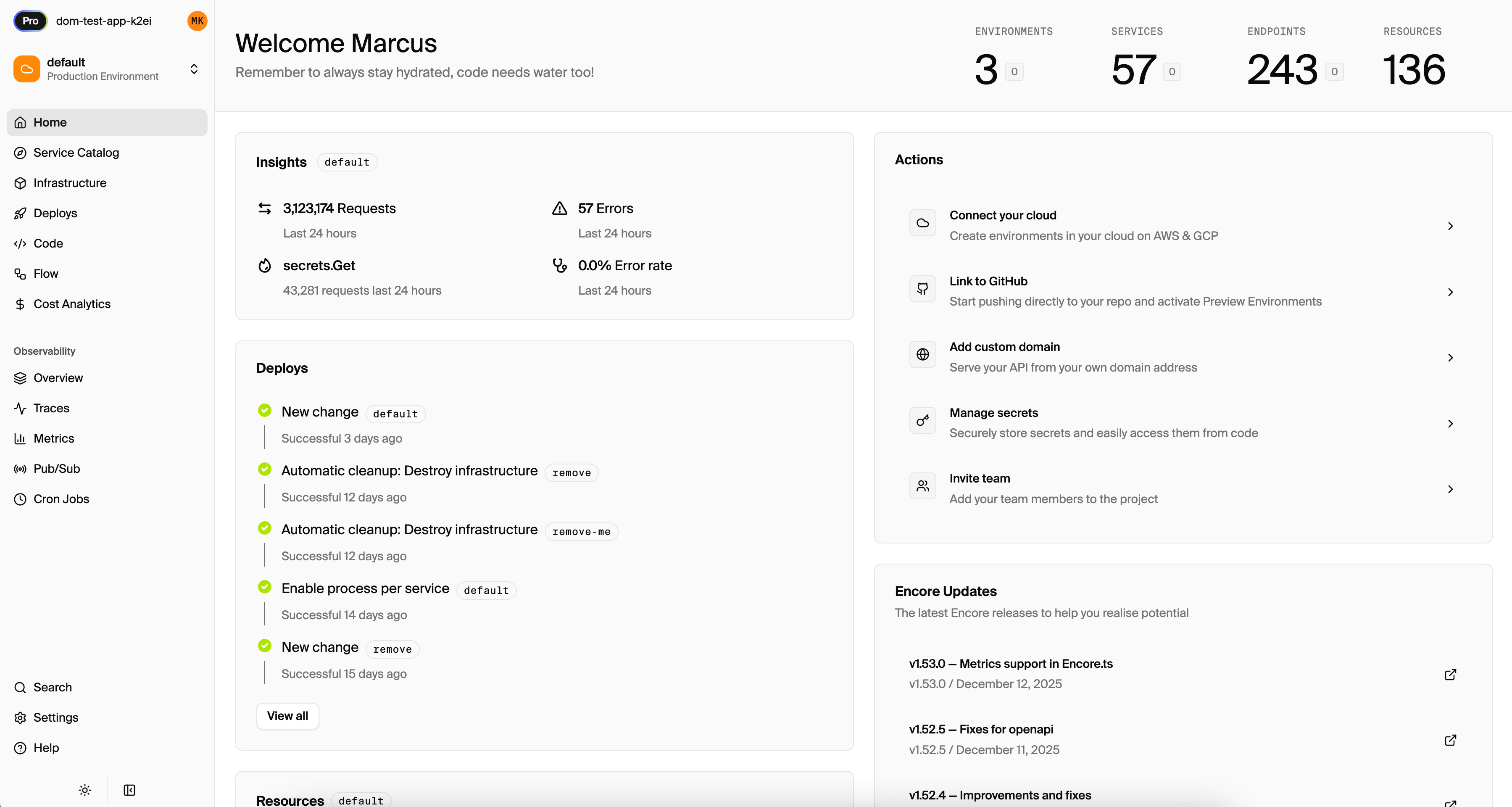
Encore builds the application, provisions a PostgreSQL database (AWS RDS or GCP Cloud SQL), runs migrations, configures networking and TLS, and deploys with zero downtime. The entire process takes about five minutes.
Deployment Options
Encore Cloud to your AWS/GCP account: The approach shown above. Encore Cloud manages the deployment pipeline and provisions infrastructure in your own cloud account. You maintain ownership of all resources.
Self-hosting with Docker: If you prefer to manage your own infrastructure, generate a Docker image:
encore build docker my-app:v1
This produces a Docker image you can deploy to any container platform: AWS ECS, Google Cloud Run, Kubernetes, or your own servers. See the self-hosting documentation for details.
Why This Works
Encore connects generated code to production infrastructure through a few mechanisms:
Infrastructure is declared in code. When you write new SQLDatabase("url", {...}), you're declaring that this service needs a PostgreSQL database. Encore provisions it automatically based on that declaration.
Type safety catches errors early. AI-generated code may contain subtle bugs. TypeScript catches many at compile time, and Encore's request validation rejects invalid requests before they reach your handlers.
No configuration drift. There's no Terraform to maintain separately, no Docker Compose to keep in sync, no environment variables to manage across environments. The code is the source of truth.
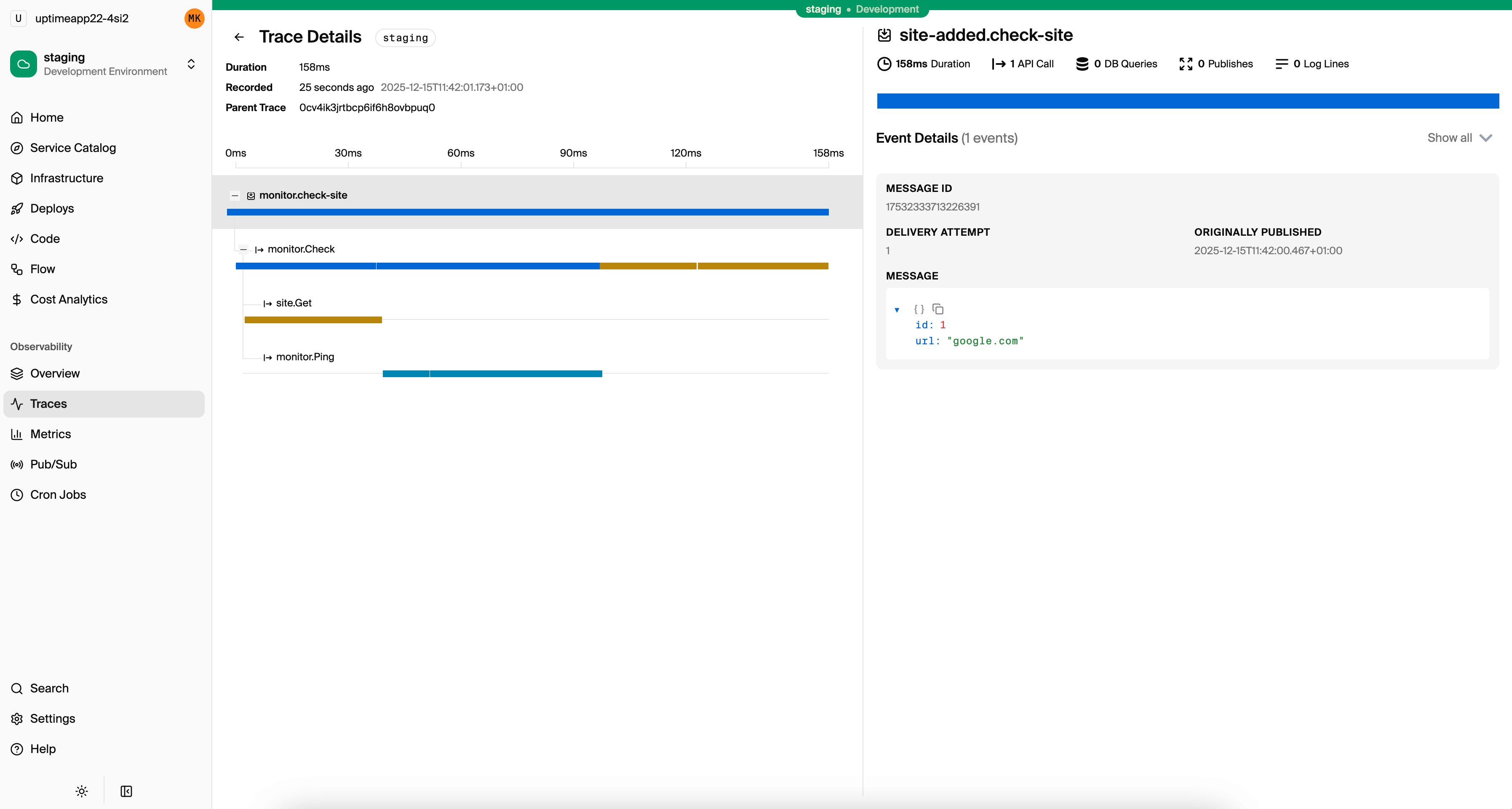
Observability is automatic. Every request is traced, and database queries appear in traces. Production debugging works without manual instrumentation.
Guardrails for AI-Generated Code
AI-generated code benefits from validation layers that catch errors before they reach production. Encore provides several:
Type Validation
If the AI generates an endpoint expecting a number but a client sends a string, Encore rejects the request before your code runs:
interface CreateUserRequest {
  age: number; // Must be a number, not "25"
}

export const createUser = api(
  { expose: true, method: "POST", path: "/users" },
  async (req: CreateUserRequest) => {
    // req.age is guaranteed to be a number
  }
);
Compile-Time Checks
The AI might generate code that calls a service incorrectly. With Encore's generated clients, you get compile-time errors:
import { users } from "~encore/clients";

// TypeScript error if the API signature doesn't match
const user = await users.get({ id: "123" });
Infrastructure Validation
Declare a database in one service and try to access it from another without proper setup? Encore's compiler catches it. The AI can't accidentally create security holes in your infrastructure.
Automatic Rollbacks
If a deployment fails health checks, Encore rolls back automatically. This adds a safety net for AI-generated code that passes local testing but fails in production.
AI Tool Integration
Encore provides built-in support for AI coding assistants through LLM instructions and an MCP server. See the AI integration documentation for setup instructions for Cursor, Claude Code, Copilot, and other tools.
With these integrations, AI assistants generate code that follows Encore conventions, and can query your running application to verify behavior before you deploy.
Beyond CRUD: Full Infrastructure from Prompts
The URL shortener example covers basic CRUD, but AI assistants can generate complete backend infrastructure when given the right prompts. Here's what that looks like in practice.
Generating Pub/Sub Event Processing
Prompt:
Add analytics tracking to the URL shortener. When a URL is shortened, publish an event. Create a separate analytics service that subscribes to these events and stores daily click statistics. Use Encore.ts Pub/Sub.
The AI generates:
// url/events.ts
import { Topic } from "encore.dev/pubsub";

export interface URLShortenedEvent {
  code: string;
  originalUrl: string;
  timestamp: Date;
}

export const urlShortened = new Topic<URLShortenedEvent>("url-shortened", {
  deliveryGuarantee: "at-least-once",
});
// analytics/analytics.ts
import { Subscription } from "encore.dev/pubsub";
import { urlShortened } from "../url/events";
import { db } from "./db";

const _ = new Subscription(urlShortened, "track-analytics", {
  handler: async (event) => {
    await db.exec`
      INSERT INTO daily_stats (date, urls_created)
      VALUES (CURRENT_DATE, 1)
      ON CONFLICT (date) DO UPDATE SET urls_created = daily_stats.urls_created + 1
    `;
  },
});
Encore provisions the Pub/Sub infrastructure automatically. Events appear in distributed traces.
Generating Scheduled Jobs
Prompt:
Add a daily cleanup job that removes URLs that haven't been clicked in 90 days. Use Encore.ts cron jobs, run at 3 AM UTC.
import { CronJob } from "encore.dev/cron";
import { api } from "encore.dev/api";
import { db } from "./db";

const _ = new CronJob("cleanup-stale-urls", {
  title: "Remove URLs with no clicks in 90 days",
  schedule: "0 3 * * *",
  endpoint: cleanupStaleUrls,
});

export const cleanupStaleUrls = api({}, async () => {
  const result = await db.exec`
    DELETE FROM urls
    WHERE clicks = 0
    AND created_at < NOW() - INTERVAL '90 days'
  `;
  console.log(`Removed ${result.rowsAffected} stale URLs`);
});
Generating Object Storage
Prompt:
Add QR code generation to the URL shortener. When a URL is shortened, generate a QR code image and store it. Return a public URL to the QR code. Use Encore.ts object storage.
import { Bucket } from "encore.dev/storage/objects";
import QRCode from "qrcode";

const qrCodes = new Bucket("qr-codes", { public: true, versioned: false });

export const shorten = api(
  { expose: true, method: "POST", path: "/shorten" },
  async (req: ShortenRequest): Promise<ShortenResponse> => {
    const code = generateCode();
    const shortUrl = `https://your-domain.com/${code}`;

    // Generate QR code
    const qrBuffer = await QRCode.toBuffer(shortUrl);
    await qrCodes.upload(`${code}.png`, qrBuffer, { contentType: "image/png" });

    // Store URL
    await db.exec`INSERT INTO urls (code, original_url) VALUES (${code}, ${req.url})`;

    return {
      code,
      shortUrl,
      qrCodeUrl: qrCodes.publicUrl(`${code}.png`),
    };
  }
);
Generating Authentication
Prompt:
Add authentication to the URL shortener. Users should log in to create URLs. Track which user created each URL. Use JWT tokens with Encore.ts auth handlers.
The AI generates auth handlers, protected endpoints, and user association. See How to Add Authentication for the complete pattern.
Why This Works
Each infrastructure primitive (Pub/Sub, cron, storage, auth) follows a consistent pattern in Encore:
- Declare what you need in TypeScript
- Encore provisions it automatically
- Type safety catches errors at compile time
AI assistants can learn these patterns from documentation or existing code in your project. After a few prompts, they generate Encore-style infrastructure declarations accurately.
The Bigger Picture
As AI improves at generating application code, infrastructure becomes the bottleneck. The pattern that works here applies beyond Encore: declare infrastructure in code, let tooling handle provisioning, and focus on application logic rather than deployment mechanics.
The combination of AI-generated code and infrastructure-from-code tooling removes two of the biggest time sinks in backend development: writing boilerplate and configuring infrastructure.
Want to jump straight to a running app? Clone this starter and deploy it to your own cloud.