 Ivan Cernja
How to Deploy to AWS Without Terraform
Infrastructure provisioning from your application code
Terraform is powerful, but it comes with overhead: learning HCL, managing state files, understanding AWS resource configurations, and keeping infrastructure code in sync with application code. For many teams, this overhead doesn't match the value delivered.
This guide shows how to deploy to AWS without writing any infrastructure configuration, using an approach where infrastructure is derived from your application code.
What You Skip
With traditional Terraform deployment, you'd write:
# vpc.tf - 50+ lines for VPC, subnets, NAT gateways
resource "aws_vpc" "main" {
  cidr_block = "10.0.0.0/16"
}

resource "aws_subnet" "private" {
  count             = 2
  vpc_id            = aws_vpc.main.id
  cidr_block        = cidrsubnet(aws_vpc.main.cidr_block, 8, count.index)
  availability_zone = data.aws_availability_zones.available.names[count.index]
}

# ... NAT gateways, route tables, internet gateway

# rds.tf - 30+ lines for database
resource "aws_db_instance" "main" {
  identifier           = "myapp"
  engine              = "postgres"
  engine_version      = "15"
  instance_class      = "db.t3.micro"
  allocated_storage   = 20
  # ... security groups, subnet groups, parameter groups
}

# ecs.tf - 100+ lines for ECS cluster, task definitions, services
resource "aws_ecs_cluster" "main" {
  name = "myapp"
}

resource "aws_ecs_task_definition" "app" {
  family                   = "myapp"
  requires_compatibilities = ["FARGATE"]
  network_mode            = "awsvpc"
  cpu                     = 256
  memory                  = 512
  # ... container definitions, IAM roles, logging
}

# alb.tf - 40+ lines for load balancer
# iam.tf - 50+ lines for roles and policies
# ecr.tf - repository configuration
# cloudwatch.tf - logging and monitoring
That's 300+ lines of HCL before your application runs. Plus state management, variable files, and backend configuration.
The Alternative: Infrastructure from Code
Instead of describing infrastructure, you write application code that declares what it needs:
// users/db.ts
import { SQLDatabase } from "encore.dev/storage/sqldb";

const db = new SQLDatabase("users", {
  migrations: "./migrations",
});
// users/api.ts
import { api } from "encore.dev/api";
import { db } from "./db";

export const getUser = api(
  { expose: true, method: "GET", path: "/users/:id" },
  async ({ id }: { id: string }) => {
    return await db.queryRow`SELECT * FROM users WHERE id = ${id}`;
  }
);
Deploy with:
git push encore
Encore analyzes your code, determines you need a VPC, RDS PostgreSQL, ECS cluster, load balancer, and supporting infrastructure, then provisions it in your AWS account.
Step-by-Step Deployment
1. Install and Create Project
# Install the CLI
curl -L https://encore.dev/install.sh | bash

# Create a new project
encore app create my-api --example=ts/hello-world
cd my-api
2. Add a Database
Create a service with a database:
// tasks/encore.service.ts
import { Service } from "encore.dev/service";
export default new Service("tasks");
// tasks/db.ts
import { SQLDatabase } from "encore.dev/storage/sqldb";

export const db = new SQLDatabase("tasks", {
  migrations: "./migrations",
});
-- tasks/migrations/001_create_tasks.up.sql
CREATE TABLE tasks (
  id UUID PRIMARY KEY DEFAULT gen_random_uuid(),
  title TEXT NOT NULL,
  completed BOOLEAN DEFAULT false,
  created_at TIMESTAMP DEFAULT NOW()
);
3. Build the API
// tasks/api.ts
import { api, APIError } from "encore.dev/api";
import { db } from "./db";

interface Task {
  id: string;
  title: string;
  completed: boolean;
}

export const create = api(
  { expose: true, method: "POST", path: "/tasks" },
  async ({ title }: { title: string }): Promise<Task> => {
    const task = await db.queryRow<Task>`
      INSERT INTO tasks (title) VALUES (${title})
      RETURNING id, title, completed
    `;
    return task!;
  }
);

export const list = api(
  { expose: true, method: "GET", path: "/tasks" },
  async (): Promise<{ tasks: Task[] }> => {
    const rows = db.query<Task>`SELECT id, title, completed FROM tasks`;
    const tasks = [];
    for await (const row of rows) {
      tasks.push(row);
    }
    return { tasks };
  }
);
4. Test Locally
encore run
Encore provisions a local PostgreSQL database and runs your migrations. No Docker setup required.
5. Connect AWS Account
Sign up for Encore Cloud and connect your AWS account:
- Go to your app settings
- Navigate to Cloud > AWS
- Follow the wizard to create an IAM role
The wizard creates a role with permissions to provision the specific resources your application needs.
6. Deploy
git add -A
git commit -m "Task API"
git push encore
Encore:
- Analyzes your code to determine infrastructure requirements
- Creates a VPC with appropriate subnets
- Provisions RDS PostgreSQL with security groups
- Sets up ECS Fargate for your services
- Configures Application Load Balancer with HTTPS
- Runs database migrations
- Deploys your application
First deployment takes 5-10 minutes. Subsequent deployments are faster.
What Gets Provisioned
After deployment, your AWS account contains:
Networking:
- VPC with public and private subnets
- NAT Gateway for outbound traffic
- Security groups with least-privilege rules
- Route tables and internet gateway
Database:
- RDS PostgreSQL in private subnet
- Automated backups enabled
- Credentials in Secrets Manager
- Connection pooling configured
Compute:
- ECS Cluster with Fargate
- Task definitions with appropriate sizing
- Auto-scaling policies
- CloudWatch logging
Load Balancing:
- Application Load Balancer
- HTTPS with ACM certificate
- Health checks configured
- Target groups
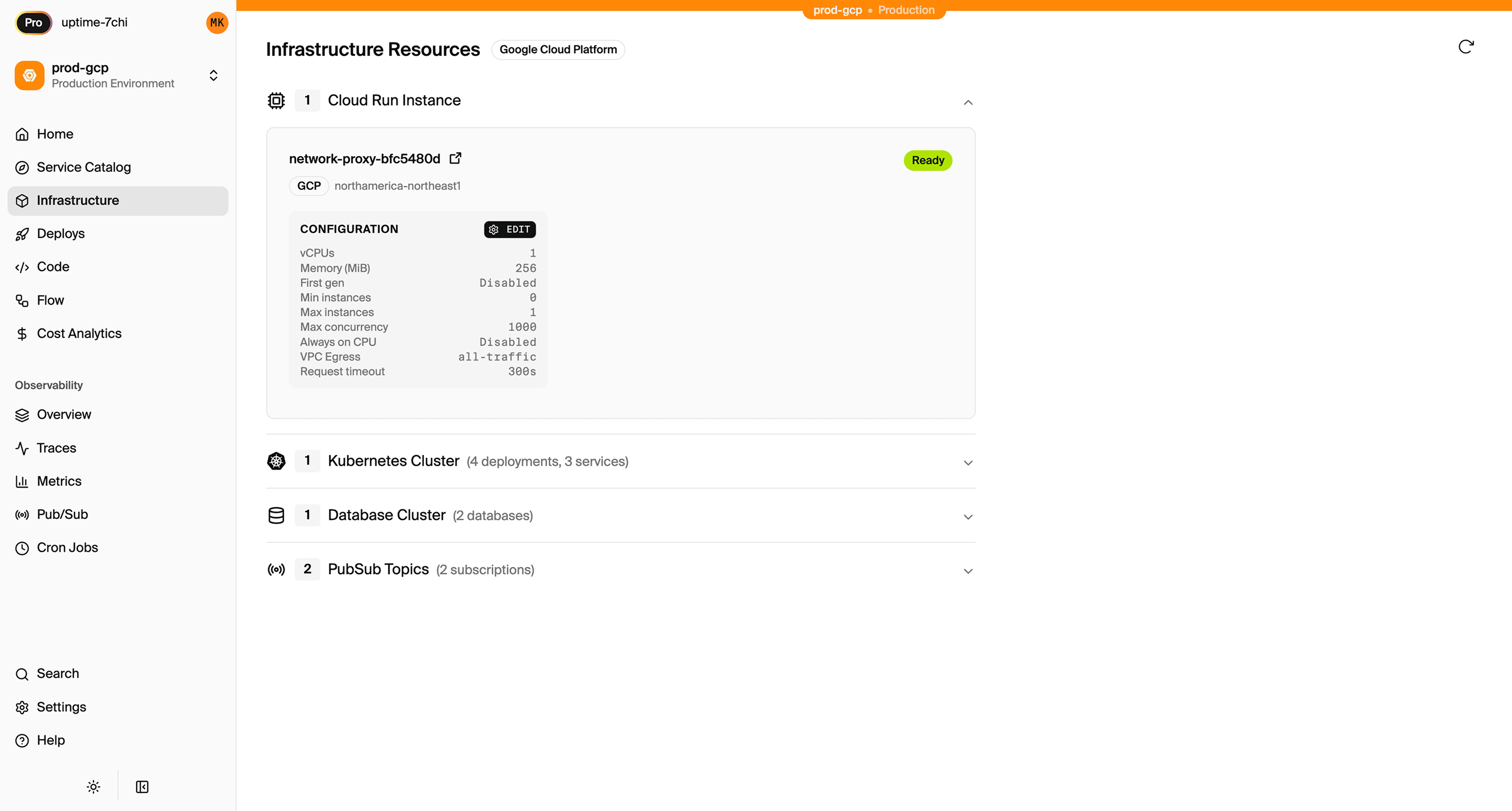
You can see all resources in the AWS console. They're standard AWS resources, not abstracted or hidden. Encore's dashboard also provides a unified view of everything that was provisioned, with configuration and status per environment:
Adding More Infrastructure
As your application grows, add infrastructure by declaring it in code.
Pub/Sub
import { Topic, Subscription } from "encore.dev/pubsub";

const taskCreated = new Topic<{ taskId: string }>("task-created", {
  deliveryGuarantee: "at-least-once",
});

// Publish
await taskCreated.publish({ taskId: task.id });

// Subscribe
const _ = new Subscription(taskCreated, "notify", {
  handler: async (event) => {
    await sendNotification(event.taskId);
  },
});
Deploys as SQS queues with appropriate IAM policies.
Cron Jobs
import { CronJob } from "encore.dev/cron";

const _ = new CronJob("cleanup", {
  title: "Clean up old tasks",
  every: "24h",
  endpoint: cleanupOldTasks,
});

export const cleanupOldTasks = api({}, async () => {
  await db.exec`DELETE FROM tasks WHERE completed = true AND created_at < NOW() - INTERVAL '30 days'`;
});
Deploys as EventBridge scheduled rules.
Object Storage
import { Bucket } from "encore.dev/storage/objects";

const attachments = new Bucket("attachments", { versioned: false });

// Upload
await attachments.upload("file.pdf", data);

// Download
const content = await attachments.download("file.pdf");
Deploys as S3 bucket with appropriate policies.
Secrets
import { secret } from "encore.dev/config";

const apiKey = secret("StripeAPIKey");

// Use in your code
const stripe = new Stripe(apiKey());
Store secrets via CLI:
encore secret set --type prod StripeAPIKey
Secrets are stored securely and injected at runtime.
Multiple Environments
Create environments in the Encore Cloud dashboard:
# Deploy to staging
git push encore staging

# Deploy to production
git push encore production
Each environment gets isolated infrastructure:
- Separate VPC
- Separate database
- Separate ECS cluster
- No resource sharing
Comparison: Terraform vs Infrastructure-from-Code
| Aspect | Terraform | Encore |
|---|---|---|
| Lines of code | 300+ for basic app | 0 (just application code) |
| Learning curve | HCL + AWS knowledge | Your application language |
| State management | Manual (S3, locking) | Automatic |
| Drift detection | terraform plan | Automatic |
| Local development | Separate tooling | Integrated |
| Multi-environment | Workspaces/directories | Dashboard + git push |
When This Approach Works
Infrastructure-from-code works well when:
- Your infrastructure is standard: databases, APIs, queues, cron jobs
- You don't have DevOps specialists and developers own deployment
- You want fast iteration without infrastructure bottlenecks
- Local development simplicity matters
Consider Terraform when:
- You need resources not supported (custom networking, specialized services)
- You have a platform team that manages infrastructure separately
- Compliance requires explicit infrastructure review
Self-Hosting Option
If you prefer to manage your own infrastructure, Encore can generate Terraform:
encore infra generate
This produces Terraform files you can customize and deploy yourself. Best of both worlds: start with automatic provisioning, export to Terraform when needed.
Getting Started
# Install
curl -L https://encore.dev/install.sh | bash

# Create project
encore app create my-api

# Run locally
cd my-api
encore run

# Deploy to AWS
encore app link
git add -A && git commit -m "Initial commit"
git push encore
Want to jump straight to a running app? Clone this starter and deploy it to your own cloud.