
 Ivan Cernja
Appwrite gives you a self-hostable backend, which is more control than most BaaS platforms. But self-hosting means managing servers, updates, and scaling yourself. Migrating to GCP with Encore gives you managed infrastructure while keeping ownership of your cloud account.
The traditional path to GCP means learning Terraform and stitching together Cloud SQL, Cloud Run, and other services yourself. That trades one set of operational headaches for another.
This guide takes a different approach: migrating to your own GCP project using Encore and Encore Cloud. Encore is an open-source TypeScript backend framework (11k+ GitHub stars) where you define infrastructure as type-safe objects in your code: databases, Pub/Sub, cron jobs, object storage. Encore Cloud then provisions these resources in your GCP project using managed services like Cloud SQL, GCP Pub/Sub, and Cloud Storage.
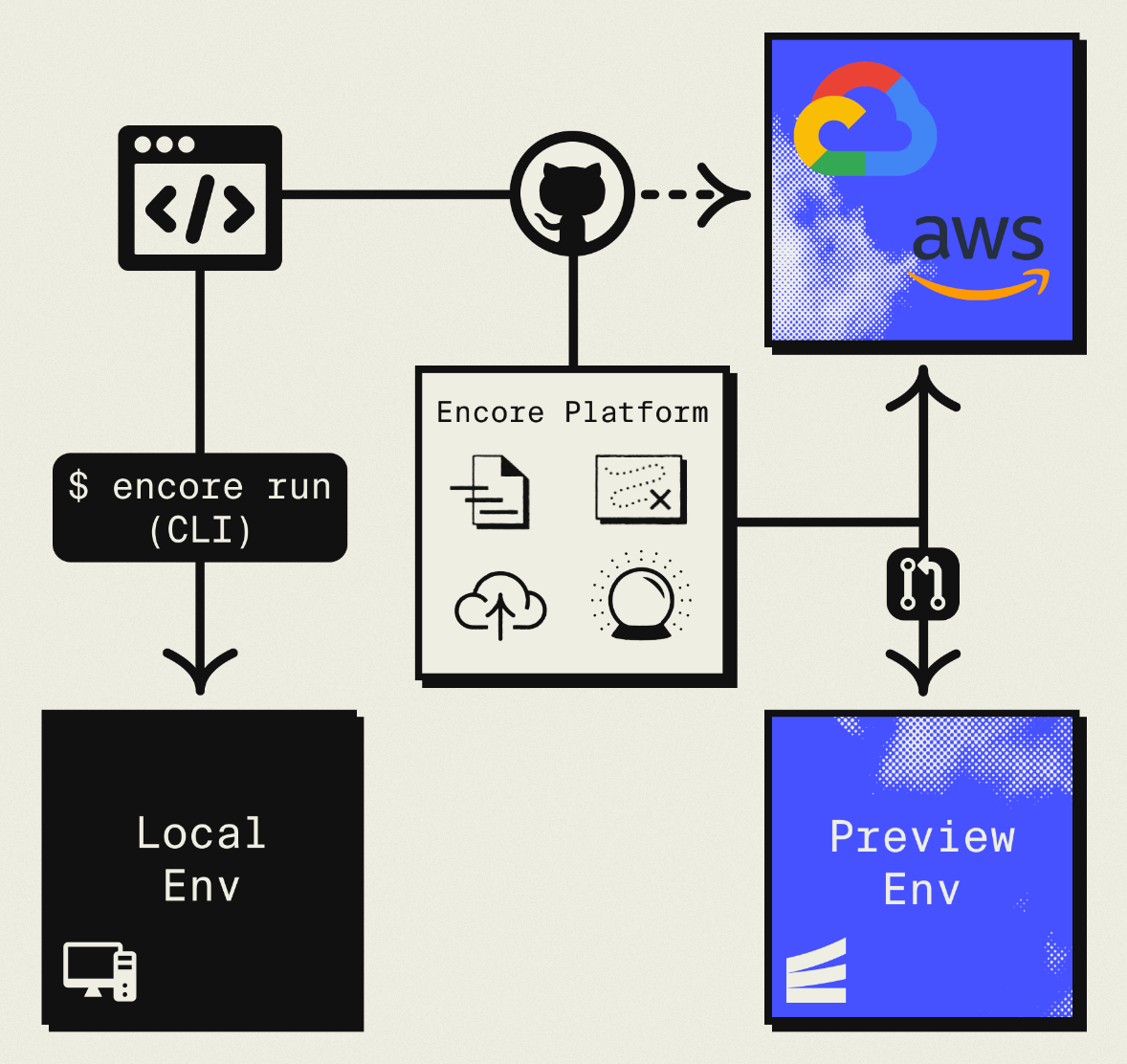
The result is GCP infrastructure you own and control, but without the DevOps overhead of self-hosting or Terraform. Companies like Groupon already use this approach to power their backends at scale.
What You're Migrating
| Appwrite Component | GCP Equivalent (via Encore) |
|---|---|
| Databases (MariaDB) | Cloud SQL PostgreSQL |
| Authentication | Encore Auth (or Clerk, WorkOS, etc.) |
| Storage | Google Cloud Storage |
| Functions | Cloud Run |
| Realtime | GCP Pub/Sub |
The database migration requires converting from MariaDB to PostgreSQL, which means some syntax differences in queries.
Why GCP?
Managed infrastructure: No more patching servers or managing Docker containers. Cloud Run and Cloud SQL are fully managed.
PostgreSQL: Move from MariaDB to PostgreSQL for better JSON support, more extensions, and a larger ecosystem.
Cloud Run performance: Fast cold starts and automatic scaling.
GCP ecosystem: Access to BigQuery, Vertex AI, and other Google services.
What Encore Handles For You
When you deploy to GCP through Encore Cloud, every resource gets production defaults: VPC placement, least-privilege IAM service accounts, encryption at rest, automated backups where applicable, and Cloud Logging. You don't configure this per resource. It's automatic.
Encore follows GCP best practices and gives you guardrails. You can review infrastructure changes before they're applied, and everything runs in your own GCP project so you maintain full control.
Here's what that looks like in practice:
import { SQLDatabase } from "encore.dev/storage/sqldb";
import { Bucket } from "encore.dev/storage/objects";
import { Topic } from "encore.dev/pubsub";
import { CronJob } from "encore.dev/cron";

const db = new SQLDatabase("main", { migrations: "./migrations" });
const uploads = new Bucket("uploads", { versioned: false });
const events = new Topic<OrderEvent>("events", { deliveryGuarantee: "at-least-once" });
const _ = new CronJob("daily-cleanup", { schedule: "0 0 * * *", endpoint: cleanup });
This provisions Cloud SQL, GCS, Pub/Sub, and Cloud Scheduler with proper networking, IAM, and monitoring. You write TypeScript or Go, Encore handles the Terraform. The only Encore-specific parts are the import statements. Your business logic is standard TypeScript, so you're not locked in.
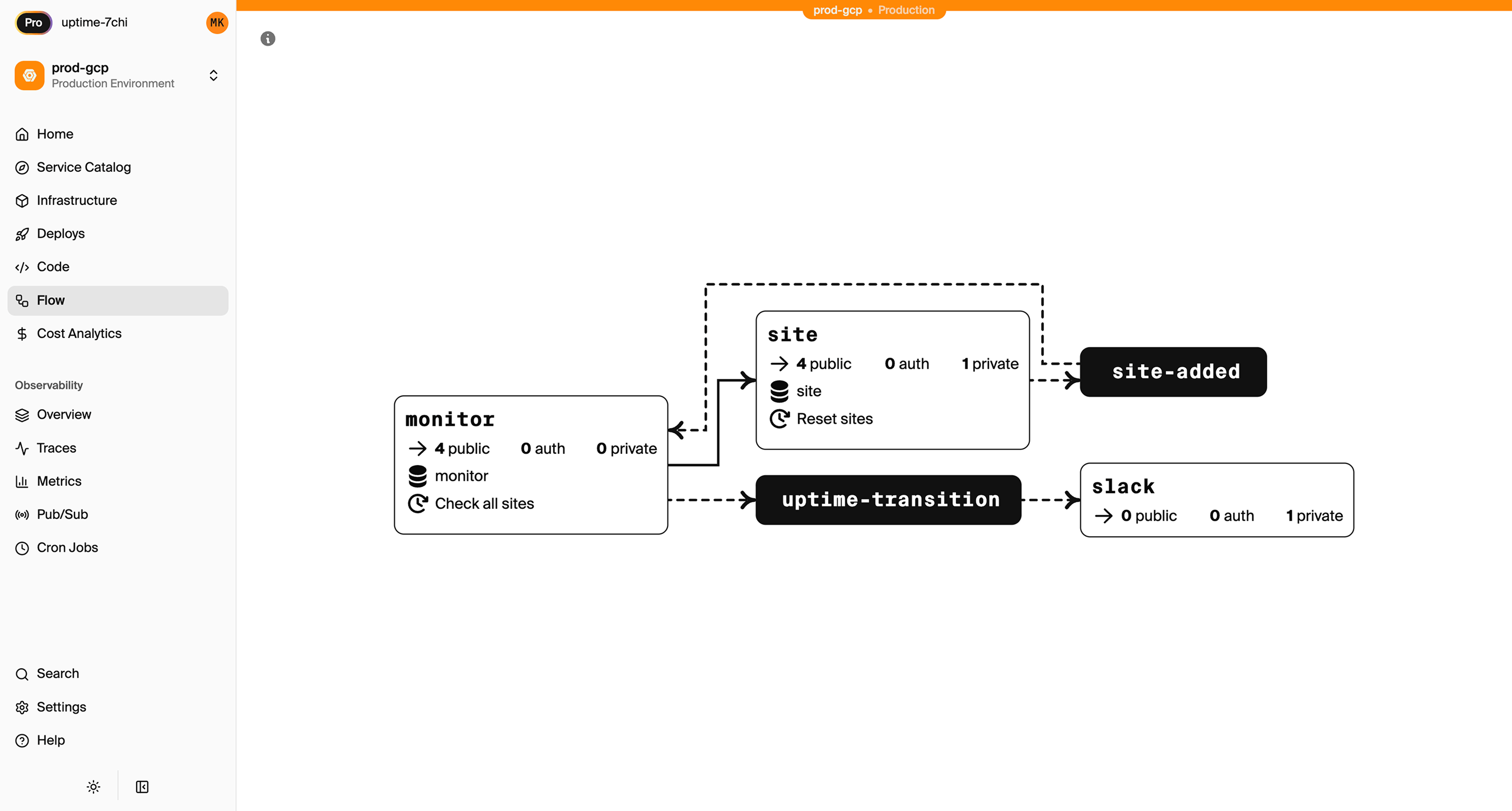
Encore Cloud visualizes how your services connect, including Pub/Sub topics, cron jobs, and database dependencies:
See the infrastructure primitives docs for the full list of supported resources.
Step 1: Migrate Your Database
Appwrite uses MariaDB. You'll design a PostgreSQL schema and migrate data.
Export from Appwrite
# Export collections using Appwrite CLI
appwrite databases listDocuments \
  --databaseId=main \
  --collectionId=users > users.json

appwrite databases listDocuments \
  --databaseId=main \
  --collectionId=posts > posts.json
Design PostgreSQL Schema
Map Appwrite collections to relational tables:
-- migrations/001_initial.up.sql
CREATE TABLE users (
  id TEXT PRIMARY KEY,
  email TEXT UNIQUE NOT NULL,
  name TEXT NOT NULL,
  role TEXT DEFAULT 'user',
  created_at TIMESTAMPTZ DEFAULT NOW(),
  updated_at TIMESTAMPTZ DEFAULT NOW()
);

CREATE TABLE posts (
  id TEXT PRIMARY KEY,
  author_id TEXT NOT NULL REFERENCES users(id),
  title TEXT NOT NULL,
  content TEXT,
  published BOOLEAN DEFAULT false,
  created_at TIMESTAMPTZ DEFAULT NOW()
);

CREATE INDEX posts_author_idx ON posts(author_id);
CREATE INDEX posts_published_idx ON posts(published) WHERE published = true;
Set Up the Encore Database
import { SQLDatabase } from "encore.dev/storage/sqldb";

const db = new SQLDatabase("main", { migrations: "./migrations" });
// That's it. Encore provisions Cloud SQL PostgreSQL based on this declaration.
Migrate Data
Write a script to transform Appwrite JSON to PostgreSQL:
import * as fs from "fs";
import { Pool } from "pg";

const pg = new Pool({ connectionString: process.env.DATABASE_URL });

interface AppwriteDoc {
  $id: string;
  $createdAt: string;
  $updatedAt: string;
  [key: string]: unknown;
}

async function migrateUsers() {
  const data: { documents: AppwriteDoc[] } = JSON.parse(
    fs.readFileSync("./users.json", "utf8")
  );

  for (const doc of data.documents) {
    await pg.query(
      `INSERT INTO users (id, email, name, role, created_at, updated_at)
       VALUES ($1, $2, $3, $4, $5, $6)
       ON CONFLICT (id) DO NOTHING`,
      [doc.$id, doc.email, doc.name, doc.role || "user",
       new Date(doc.$createdAt), new Date(doc.$updatedAt)]
    );
  }
  console.log(`Migrated ${data.documents.length} users`);
}

migrateUsers().catch(console.error);
Update Your Queries
Before (Appwrite SDK):
import { Client, Databases, Query } from "appwrite";

const client = new Client()
  .setEndpoint("https://cloud.appwrite.io/v1")
  .setProject("project-id");

const databases = new Databases(client);

const result = await databases.listDocuments(
  "main",
  "posts",
  [Query.equal("published", true), Query.orderDesc("$createdAt")]
);
After (Encore):
import { api } from "encore.dev/api";

interface Post {
  id: string;
  authorId: string;
  title: string;
  content: string;
  published: boolean;
  createdAt: Date;
}

export const listPublishedPosts = api(
  { method: "GET", path: "/posts", expose: true },
  async (): Promise<{ posts: Post[] }> => {
    const rows = await db.query<Post>`
      SELECT id, author_id as "authorId", title, content, published,
             created_at as "createdAt"
      FROM posts
      WHERE published = true
      ORDER BY created_at DESC
      LIMIT 50
    `;

    const posts: Post[] = [];
    for await (const post of rows) {
      posts.push(post);
    }
    return { posts };
  }
);
Step 2: Implement Authentication
Replace Appwrite Auth with Encore's auth handler:
import { authHandler, Gateway } from "encore.dev/auth";
import { api, APIError } from "encore.dev/api";
import { SignJWT, jwtVerify } from "jose";
import { verify, hash } from "@node-rs/argon2";
import { secret } from "encore.dev/config";

const jwtSecret = secret("JWTSecret");

interface AuthParams {
  authorization: string;
}

interface AuthData {
  userID: string;
  email: string;
}

export const auth = authHandler<AuthParams, AuthData>(
  async (params) => {
    const token = params.authorization.replace("Bearer ", "");

    try {
      const { payload } = await jwtVerify(
        token,
        new TextEncoder().encode(jwtSecret())
      );

      return {
        userID: payload.sub as string,
        email: payload.email as string,
      };
    } catch {
      throw APIError.unauthenticated("Invalid token");
    }
  }
);

export const gateway = new Gateway({ authHandler: auth });

export const login = api(
  { method: "POST", path: "/auth/login", expose: true },
  async (req: { email: string; password: string }): Promise<{ token: string }> => {
    const user = await db.queryRow<{ id: string; email: string; passwordHash: string }>`
      SELECT id, email, password_hash as "passwordHash"
      FROM users WHERE email = ${req.email}
    `;

    if (!user || !(await verify(user.passwordHash, req.password))) {
      throw APIError.unauthenticated("Invalid credentials");
    }

    const token = await new SignJWT({ email: user.email })
      .setProtectedHeader({ alg: "HS256" })
      .setSubject(user.id)
      .setIssuedAt()
      .setExpirationTime("7d")
      .sign(new TextEncoder().encode(jwtSecret()));

    return { token };
  }
);
Step 3: Migrate Storage to GCS
import { Bucket } from "encore.dev/storage/objects";

const files = new Bucket("files", { versioned: false });

export const uploadFile = api(
  { method: "POST", path: "/files", expose: true, auth: true },
  async (req: { filename: string; data: Buffer; contentType: string }): Promise<{ url: string }> => {
    await files.upload(req.filename, req.data, {
      contentType: req.contentType,
    });
    return { url: files.publicUrl(req.filename) };
  }
);

export const deleteFile = api(
  { method: "DELETE", path: "/files/:filename", expose: true, auth: true },
  async ({ filename }: { filename: string }): Promise<{ deleted: boolean }> => {
    await files.remove(filename);
    return { deleted: true };
  }
);
Step 4: Migrate Functions to Cloud Run
Appwrite Functions become Encore APIs:
Before (Appwrite Function):
module.exports = async function (req, res) {
  const payload = JSON.parse(req.payload);
  // Process...
  res.json({ success: true });
};
After (Encore):
import { api } from "encore.dev/api";

export const processData = api(
  { method: "POST", path: "/process", expose: true, auth: true },
  async (req: { data: Record<string, unknown> }): Promise<{ success: boolean }> => {
    // Process...
    return { success: true };
  }
);
Step 5: Replace Realtime with Pub/Sub
import { Topic, Subscription } from "encore.dev/pubsub";

interface PostEvent {
  postId: string;
  action: "created" | "updated" | "deleted";
}

const postEvents = new Topic<PostEvent>("post-events", {
  deliveryGuarantee: "at-least-once",
});

// Publish when posts change
export const createPost = api(
  { method: "POST", path: "/posts", expose: true, auth: true },
  async (req: { title: string; content: string }): Promise<Post> => {
    const auth = getAuthData()!;

    const post = await db.queryRow<Post>`
      INSERT INTO posts (author_id, title, content)
      VALUES (${auth.userID}, ${req.title}, ${req.content})
      RETURNING id, author_id as "authorId", title, content, published, created_at as "createdAt"
    `;

    await postEvents.publish({ postId: post!.id, action: "created" });

    return post!;
  }
);

// Subscribe to handle events
const _ = new Subscription(postEvents, "notify-subscribers", {
  handler: async (event) => {
    await notifySubscribers(event.postId, event.action);
  },
});
Step 6: Deploy to GCP
- Connect GCP project in Encore Cloud. See the GCP setup guide for details.
- Push your code:
git push encore main - Run data migration scripts
- Migrate storage files:
gsutil -m rsync -r ./appwrite-files gs://your-encore-bucket
What Gets Provisioned
- Cloud SQL PostgreSQL for databases
- Google Cloud Storage for files
- Cloud Run for your APIs
- GCP Pub/Sub for messaging
- Cloud Logging for observability
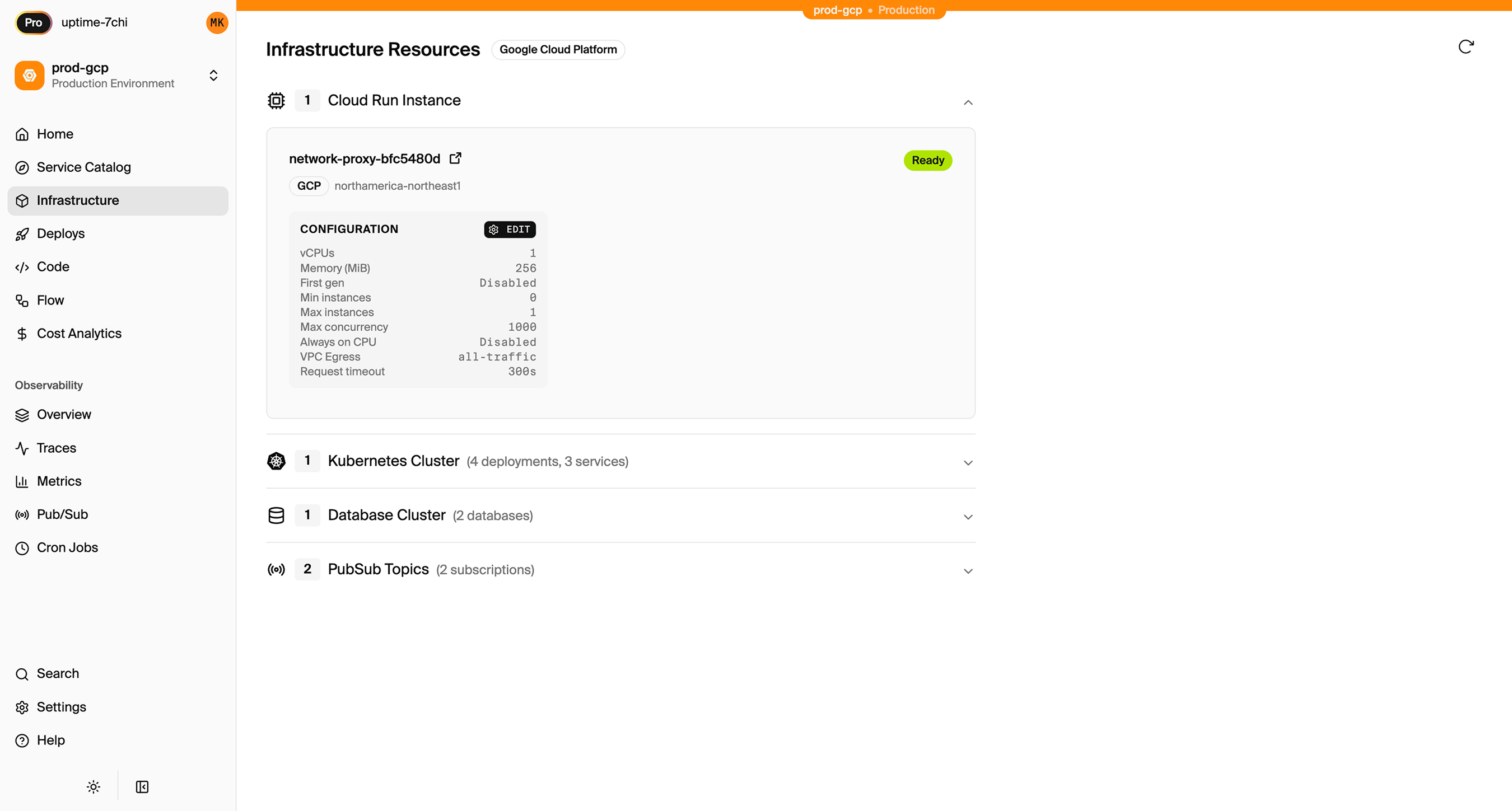
Encore Cloud also gives you a dashboard showing all provisioned infrastructure across environments:
Migration Checklist
- Export Appwrite collections as JSON
- Design PostgreSQL schema
- Write data migration scripts
- Implement auth handler
- Migrate storage files to GCS
- Convert Functions to Encore APIs
- Replace Realtime with Pub/Sub
- Update frontend SDK calls to REST API
- Test in preview environment
- Deploy and monitor
Wrapping Up
Migrating from Appwrite to GCP removes self-hosting complexity while keeping infrastructure ownership. Cloud Run provides similar developer experience to Appwrite Functions, and Cloud SQL gives you more query power than MariaDB.
Try deploying a TypeScript backend to your own GCP account:
Want to jump straight to a running app? Clone this starter and deploy it to your own cloud.