 Ivan Cernja
How to Migrate from Appwrite to AWS
Move from Appwrite to your own AWS account for more control

Appwrite offers a self-hostable backend-as-a-service, which sets it apart from fully managed platforms like Firebase or Supabase. You can run it on your own servers, which gives you more control. But self-hosting also means you're responsible for scaling, updates, backups, and security patches.
Migrating to AWS with Encore gives you managed infrastructure without the operational overhead. You keep infrastructure ownership (it's your AWS account) while offloading the infrastructure management.
The traditional path to AWS means learning Terraform or CloudFormation and stitching together RDS, Lambda, S3, and other services yourself. That trades one set of operational headaches for another.
This guide takes a different approach: migrating to your own AWS account using Encore and Encore Cloud. Encore is an open-source TypeScript backend framework (11k+ GitHub stars) where you define infrastructure as type-safe objects in your code: databases, Pub/Sub, cron jobs, object storage. Encore Cloud then provisions these resources in your AWS account using managed services like RDS, SQS, and S3.
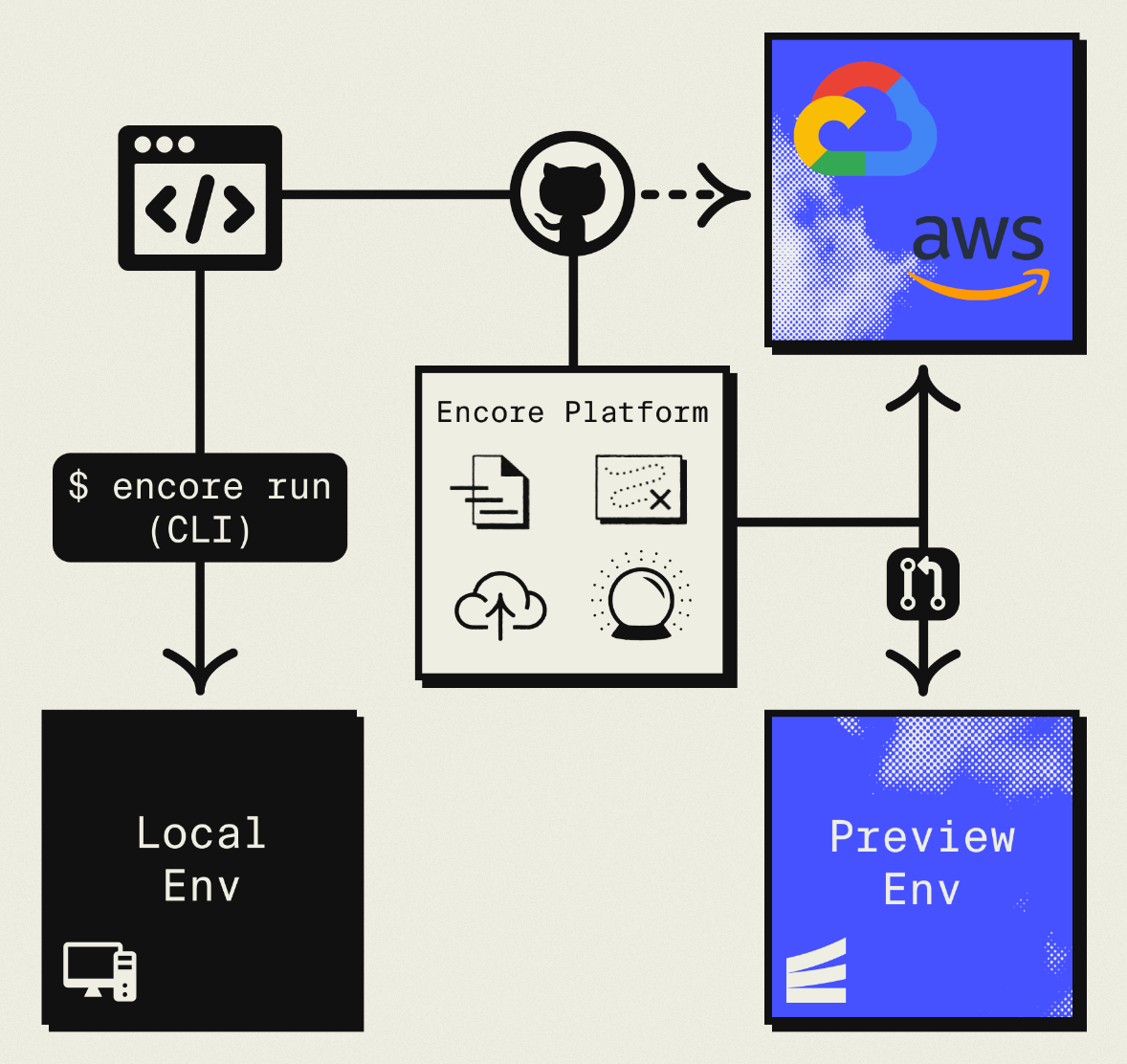
The result is AWS infrastructure you own and control, but without the DevOps overhead of self-hosting or Terraform. Companies like Groupon already use this approach to power their backends at scale.
What You're Migrating
| Appwrite Component | AWS Equivalent (via Encore) |
|---|---|
| Databases (MariaDB) | Amazon RDS PostgreSQL |
| Authentication | Encore Auth (or Clerk, WorkOS, etc.) |
| Storage | Amazon S3 |
| Functions | Fargate |
| Realtime | SNS/SQS Pub/Sub |
The database migration involves switching from MariaDB to PostgreSQL, which means some query syntax changes. Everything else maps fairly directly.
Why Teams Migrate from Appwrite
Managed infrastructure: Running Appwrite requires managing Docker containers, databases, and storage. Whether you're self-hosting or using Appwrite Cloud, you're dealing with their infrastructure decisions. With AWS via Encore, you get managed infrastructure in your own account.
PostgreSQL instead of MariaDB: Appwrite uses MariaDB. PostgreSQL offers better JSON support, more extensions, and a larger ecosystem of tools. It's also what most modern backend frameworks expect.
AWS scale and services: Direct access to AWS's global infrastructure, managed services, and enterprise features like compliance certifications.
Cost efficiency: Self-hosted Appwrite requires server management. Appwrite Cloud pricing can get expensive. AWS with reserved capacity provides predictable costs.
What Encore Handles For You
When you deploy to AWS through Encore Cloud, every resource gets production defaults: private VPC placement, least-privilege IAM roles, encryption at rest, automated backups where applicable, and CloudWatch logging. You don't configure this per resource. It's automatic.
Encore follows AWS best practices and gives you guardrails. You can review infrastructure changes before they're applied, and everything runs in your own AWS account so you maintain full control.
Here's what that looks like in practice:
import { SQLDatabase } from "encore.dev/storage/sqldb";
import { Bucket } from "encore.dev/storage/objects";
import { Topic } from "encore.dev/pubsub";
import { CronJob } from "encore.dev/cron";

const db = new SQLDatabase("main", { migrations: "./migrations" });
const uploads = new Bucket("uploads", { versioned: false });
const events = new Topic<OrderEvent>("events", { deliveryGuarantee: "at-least-once" });
const _ = new CronJob("daily-cleanup", { schedule: "0 0 * * *", endpoint: cleanup });
This provisions RDS, S3, SNS/SQS, and CloudWatch Events with proper networking, IAM, and monitoring. You write TypeScript or Go, Encore handles the Terraform. The only Encore-specific parts are the import statements. Your business logic is standard TypeScript, so you're not locked in.
Encore Cloud visualizes how your services connect, including Pub/Sub topics, cron jobs, and database dependencies:
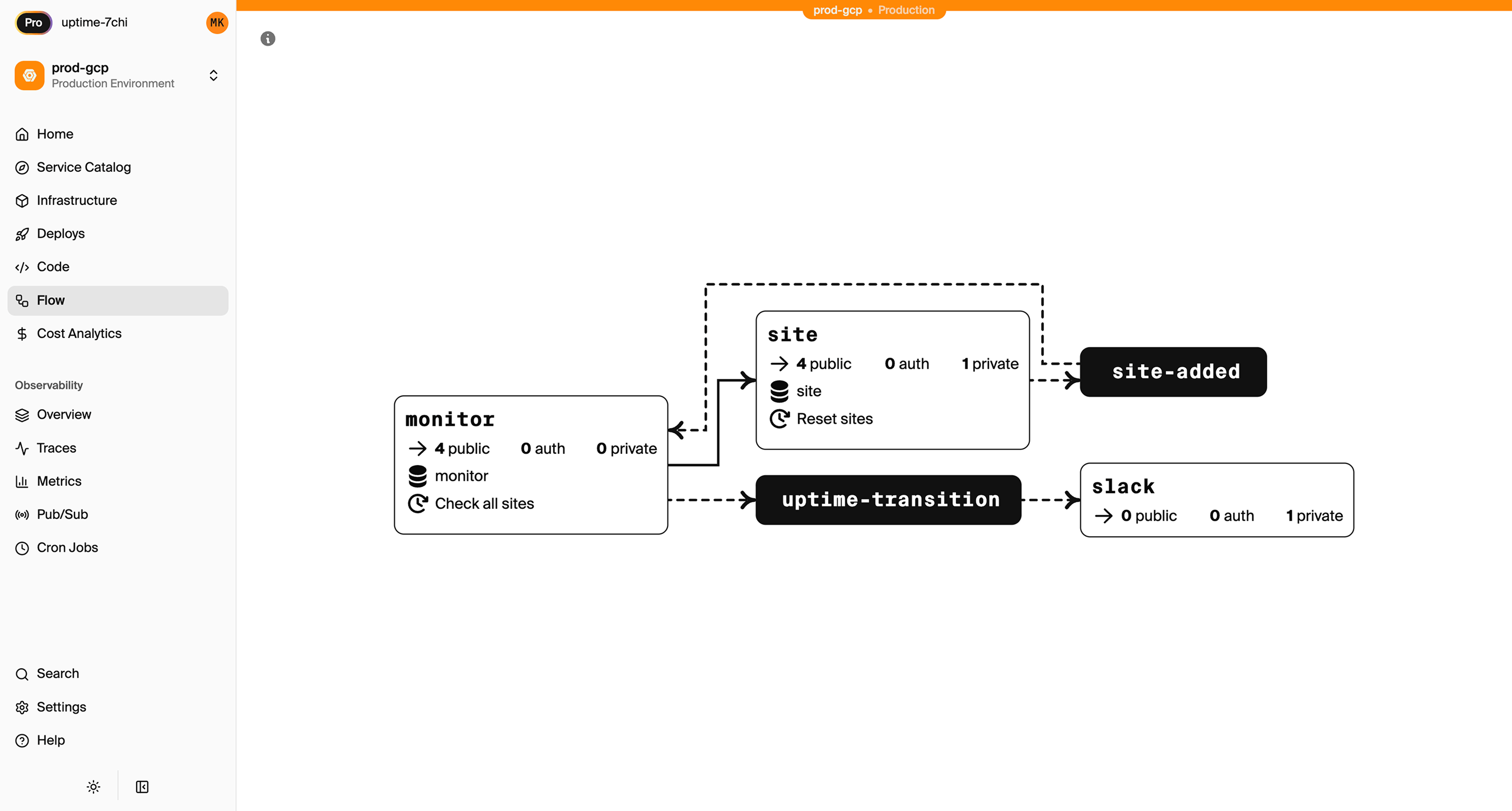
See the infrastructure primitives docs for the full list of supported resources.
Step 1: Migrate Your Database
Appwrite uses MariaDB, so you're migrating to a different database system. The core concepts are similar, but syntax differs in places.
Export from Appwrite
Use the Appwrite CLI or dashboard to export your data:
# Export collections as JSON
appwrite databases listDocuments \
  --databaseId=main \
  --collectionId=users \
  > users.json

appwrite databases listDocuments \
  --databaseId=main \
  --collectionId=posts \
  > posts.json
Repeat for each collection you need to migrate.
Design Your PostgreSQL Schema
Map Appwrite collections to PostgreSQL tables:
Appwrite collection definition:
{
  "$id": "users",
  "name": "users",
  "attributes": [
    { "key": "email", "type": "string", "required": true },
    { "key": "name", "type": "string", "required": true },
    { "key": "role", "type": "string", "default": "user" }
  ]
}
PostgreSQL schema:
-- migrations/001_users.up.sql
CREATE TABLE users (
  id TEXT PRIMARY KEY DEFAULT gen_random_uuid()::text,
  email TEXT UNIQUE NOT NULL,
  name TEXT NOT NULL,
  role TEXT DEFAULT 'user',
  created_at TIMESTAMPTZ DEFAULT NOW(),
  updated_at TIMESTAMPTZ DEFAULT NOW()
);

CREATE INDEX users_email_idx ON users(email);
CREATE INDEX users_role_idx ON users(role);
Set Up the Encore Database
import { SQLDatabase } from "encore.dev/storage/sqldb";

const db = new SQLDatabase("main", {
  migrations: "./migrations",
});
That's the complete database definition. Encore analyzes this at compile time and provisions RDS PostgreSQL when you deploy.
Write a Migration Script
Transform your exported JSON into PostgreSQL inserts:
// scripts/migrate-data.ts
import * as fs from "fs";
import { Pool } from "pg";

const pg = new Pool({ connectionString: process.env.DATABASE_URL });

interface AppwriteDocument {
  $id: string;
  $createdAt: string;
  $updatedAt: string;
  [key: string]: unknown;
}

async function migrateUsers() {
  const data: { documents: AppwriteDocument[] } = JSON.parse(
    fs.readFileSync("./users.json", "utf8")
  );

  for (const doc of data.documents) {
    await pg.query(
      `INSERT INTO users (id, email, name, role, created_at, updated_at)
       VALUES ($1, $2, $3, $4, $5, $6)
       ON CONFLICT (id) DO NOTHING`,
      [doc.$id, doc.email, doc.name, doc.role || "user",
       new Date(doc.$createdAt), new Date(doc.$updatedAt)]
    );
  }

  console.log(`Migrated ${data.documents.length} users`);
}

migrateUsers().catch(console.error);
Update Your Queries
Before (Appwrite SDK):
import { Client, Databases, Query } from "appwrite";

const client = new Client()
  .setEndpoint("https://cloud.appwrite.io/v1")
  .setProject("project-id");

const databases = new Databases(client);

// List users with role 'admin'
const result = await databases.listDocuments(
  "main",
  "users",
  [Query.equal("role", "admin")]
);
After (Encore):
import { api } from "encore.dev/api";

interface User {
  id: string;
  email: string;
  name: string;
  role: string;
  createdAt: Date;
}

export const getAdmins = api(
  { method: "GET", path: "/users/admins", expose: true },
  async (): Promise<{ users: User[] }> => {
    const rows = await db.query<User>`
      SELECT id, email, name, role, created_at as "createdAt"
      FROM users
      WHERE role = 'admin'
      ORDER BY created_at DESC
    `;

    const users: User[] = [];
    for await (const user of rows) {
      users.push(user);
    }
    return { users };
  }
);
With PostgreSQL, you can write queries that would require multiple Appwrite calls:
// Get users with their post counts
export const getUsersWithPostCounts = api(
  { method: "GET", path: "/users/stats", expose: true },
  async (): Promise<{ users: UserWithStats[] }> => {
    const rows = await db.query<UserWithStats>`
      SELECT u.id, u.email, u.name, u.role,
             COUNT(p.id) as "postCount"
      FROM users u
      LEFT JOIN posts p ON u.id = p.author_id
      GROUP BY u.id
      ORDER BY "postCount" DESC
    `;

    const users: UserWithStats[] = [];
    for await (const user of rows) {
      users.push(user);
    }
    return { users };
  }
);
Step 2: Migrate Authentication
Appwrite Auth provides user management, sessions, OAuth, and more. You'll replace it with Encore's auth handler.
import { authHandler, Gateway } from "encore.dev/auth";
import { api, APIError } from "encore.dev/api";
import { verify, hash } from "@node-rs/argon2";
import { SignJWT, jwtVerify } from "jose";
import { secret } from "encore.dev/config";

const jwtSecret = secret("JWTSecret");

interface AuthParams {
  authorization: string;
}

interface AuthData {
  userID: string;
  email: string;
}

export const auth = authHandler<AuthParams, AuthData>(
  async (params) => {
    const token = params.authorization.replace("Bearer ", "");

    try {
      const { payload } = await jwtVerify(
        token,
        new TextEncoder().encode(jwtSecret())
      );

      return {
        userID: payload.sub as string,
        email: payload.email as string,
      };
    } catch {
      throw APIError.unauthenticated("Invalid token");
    }
  }
);

export const gateway = new Gateway({ authHandler: auth });

// Login endpoint
export const login = api(
  { method: "POST", path: "/auth/login", expose: true },
  async (req: { email: string; password: string }): Promise<{ token: string }> => {
    const user = await db.queryRow<{ id: string; email: string; passwordHash: string }>`
      SELECT id, email, password_hash as "passwordHash"
      FROM users WHERE email = ${req.email}
    `;

    if (!user) {
      throw APIError.unauthenticated("Invalid credentials");
    }

    const valid = await verify(user.passwordHash, req.password);
    if (!valid) {
      throw APIError.unauthenticated("Invalid credentials");
    }

    const token = await new SignJWT({ email: user.email })
      .setProtectedHeader({ alg: "HS256" })
      .setSubject(user.id)
      .setIssuedAt()
      .setExpirationTime("7d")
      .sign(new TextEncoder().encode(jwtSecret()));

    return { token };
  }
);

// Signup endpoint
export const signup = api(
  { method: "POST", path: "/auth/signup", expose: true },
  async (req: { email: string; password: string; name: string }): Promise<{ token: string }> => {
    const passwordHash = await hash(req.password);

    const user = await db.queryRow<{ id: string }>`
      INSERT INTO users (email, name, password_hash)
      VALUES (${req.email}, ${req.name}, ${passwordHash})
      RETURNING id
    `;

    const token = await new SignJWT({ email: req.email })
      .setProtectedHeader({ alg: "HS256" })
      .setSubject(user!.id)
      .setIssuedAt()
      .setExpirationTime("7d")
      .sign(new TextEncoder().encode(jwtSecret()));

    return { token };
  }
);
You'll need to add a password_hash column to your users table for this approach.
Step 3: Migrate Storage to S3
Appwrite Storage becomes S3:
Before (Appwrite):
import { Storage } from "appwrite";

const storage = new Storage(client);

// Upload
const file = await storage.createFile("uploads", ID.unique(), document);

// Get URL
const url = storage.getFileView("uploads", fileId);
After (Encore):
import { Bucket } from "encore.dev/storage/objects";

const uploads = new Bucket("uploads", { versioned: false });

export const uploadFile = api(
  { method: "POST", path: "/files", expose: true, auth: true },
  async (req: { filename: string; data: Buffer; contentType: string }): Promise<{ url: string }> => {
    await uploads.upload(req.filename, req.data, {
      contentType: req.contentType,
    });
    return { url: uploads.publicUrl(req.filename) };
  }
);

export const deleteFile = api(
  { method: "DELETE", path: "/files/:filename", expose: true, auth: true },
  async ({ filename }: { filename: string }): Promise<{ deleted: boolean }> => {
    await uploads.remove(filename);
    return { deleted: true };
  }
);
Migrate Existing Files
Download files from Appwrite and upload to S3:
# Use Appwrite CLI to list and download files
appwrite storage listFiles --bucketId=uploads

# Download each file and upload to S3 after Encore deployment
aws s3 cp ./downloaded-files/ s3://your-encore-bucket/ --recursive
Step 4: Migrate Functions
Appwrite Functions become Encore APIs:
Before (Appwrite Function):
module.exports = async function (req, res) {
  const payload = JSON.parse(req.payload);
  const { userId, action } = payload;

  // Process...

  res.json({ success: true, processed: action });
};
After (Encore API):
import { api } from "encore.dev/api";

interface ProcessRequest {
  userId: string;
  action: string;
}

export const processAction = api(
  { method: "POST", path: "/process", expose: true, auth: true },
  async (req: ProcessRequest): Promise<{ success: boolean; processed: string }> => {
    // Process...

    return { success: true, processed: req.action };
  }
);
Encore APIs have typed request/response schemas and built-in validation.
Step 5: Migrate Realtime to Pub/Sub
Appwrite Realtime provides WebSocket subscriptions. Replace with Pub/Sub for backend event handling:
Before (Appwrite Realtime):
client.subscribe("documents", (response) => {
  if (response.events.includes("databases.*.collections.*.documents.*.create")) {
    console.log("Document created:", response.payload);
  }
});
After (Encore Pub/Sub):
import { Topic, Subscription } from "encore.dev/pubsub";

interface DocumentEvent {
  documentId: string;
  collectionId: string;
  action: "create" | "update" | "delete";
  data: Record<string, unknown>;
}

export const documentEvents = new Topic<DocumentEvent>("document-events", {
  deliveryGuarantee: "at-least-once",
});

// Publish when documents change
export const createDocument = api(
  { method: "POST", path: "/documents", expose: true, auth: true },
  async (req: CreateDocumentRequest): Promise<Document> => {
    const doc = await saveDocument(req);

    await documentEvents.publish({
      documentId: doc.id,
      collectionId: req.collectionId,
      action: "create",
      data: req.data,
    });

    return doc;
  }
);

// Subscribe to handle events
const _ = new Subscription(documentEvents, "handle-document-events", {
  handler: async (event) => {
    console.log(`Document ${event.action}:`, event.documentId);
    // Process the event...
  },
});
For client-side real-time updates, you'll need WebSockets or polling. Encore supports streaming APIs for this use case.
Step 6: Deploy to AWS
- Connect AWS account in Encore Cloud. See the AWS setup guide for details.
- Push your code:
git push encore main - Run data migration scripts against the RDS instance
- Migrate storage files to S3
- Update frontend to use new API endpoints
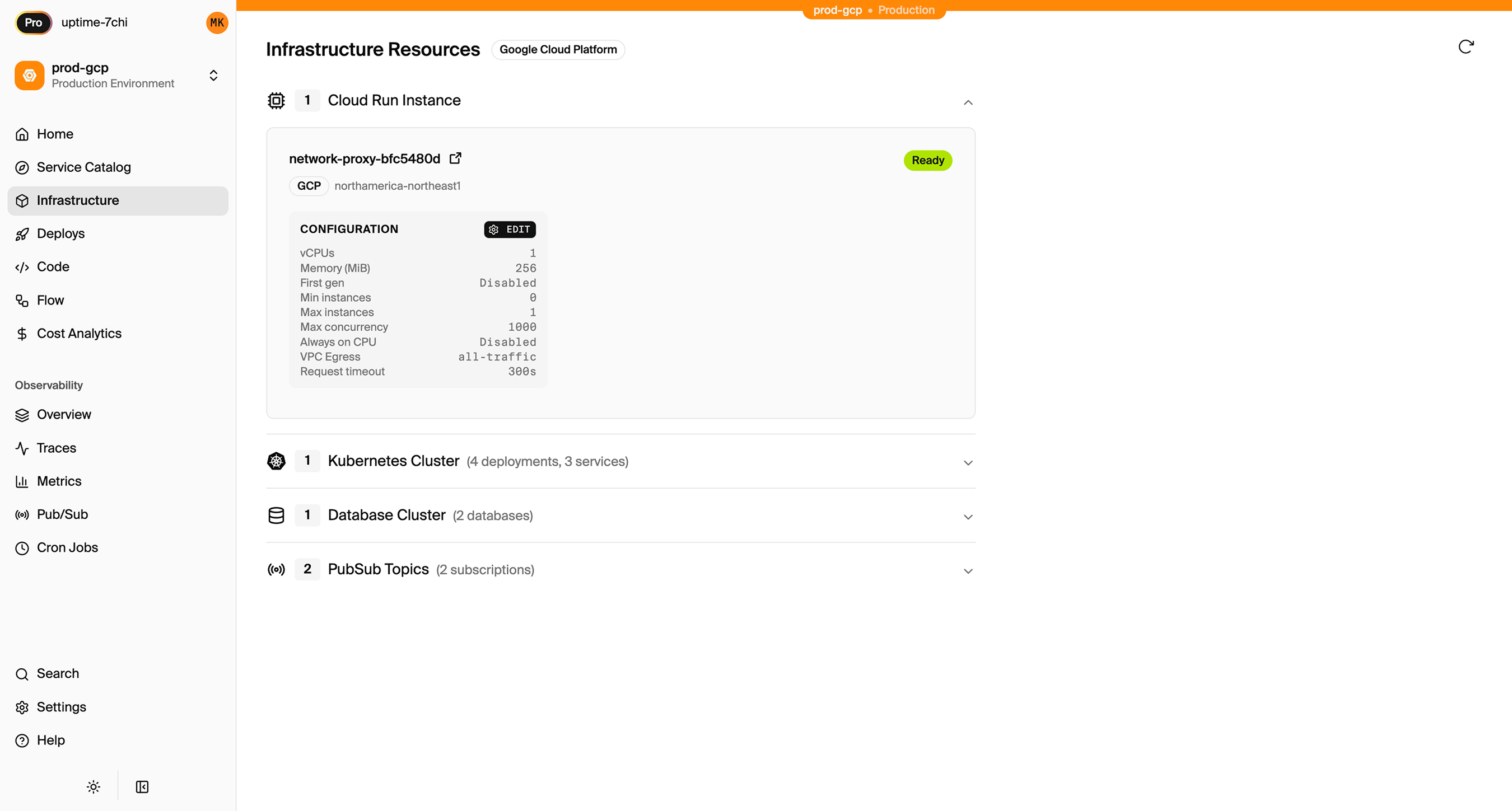
What Gets Provisioned
- RDS PostgreSQL for your database
- S3 for file storage
- Fargate for compute
- SNS/SQS for Pub/Sub
- CloudWatch for logs and metrics
- IAM roles with least-privilege access
Encore Cloud also gives you a dashboard showing all provisioned infrastructure across environments:
Migration Checklist
- Export Appwrite database collections as JSON
- Design PostgreSQL schema
- Write data migration scripts
- Add password_hash column for auth migration
- Implement auth handler and login/signup endpoints
- Migrate storage files to S3
- Convert Appwrite Functions to Encore APIs
- Replace Realtime subscriptions with Pub/Sub
- Update frontend SDK calls to REST API
- Test in preview environment
- Deploy and run migrations
- Verify and monitor
Wrapping Up
Migrating from Appwrite to AWS removes the operational overhead of self-hosting while keeping infrastructure ownership. You get managed services in your own AWS account, with the cost predictability and compliance capabilities that come with it.
The main work is converting MariaDB to PostgreSQL and implementing your own auth. Once that's done, the rest maps fairly directly.
Try deploying a TypeScript backend to your own AWS account:
Want to jump straight to a running app? Clone this starter and deploy it to your own cloud.