 Ivan Cernja
How to Migrate from Firebase to GCP (Cloud SQL)
Stay on Google Cloud but move from Firestore to PostgreSQL for better data modeling

Firebase is technically part of Google Cloud, but it operates as a separate, managed platform. You don't control the infrastructure. Migrating to standard GCP services gives you more control while staying in the Google ecosystem.
The main change is moving from Firestore's document model to Cloud SQL's relational PostgreSQL. This requires schema design and data transformation, but you gain SQL's query power and the broader PostgreSQL ecosystem.
The traditional path means learning Terraform, writing infrastructure config, and stitching together Cloud SQL, Cloud Run, and Cloud Storage yourself. That's a steep learning curve when you're used to Firebase's integrated experience.
This guide takes a different approach: migrating to your own GCP project using Encore and Encore Cloud. Encore is an open-source TypeScript backend framework (11k+ GitHub stars) where you define infrastructure as type-safe objects in your code: databases, Pub/Sub, cron jobs, object storage. Encore Cloud then provisions these resources in your GCP project using managed services like Cloud SQL, GCP Pub/Sub, and Cloud Storage.
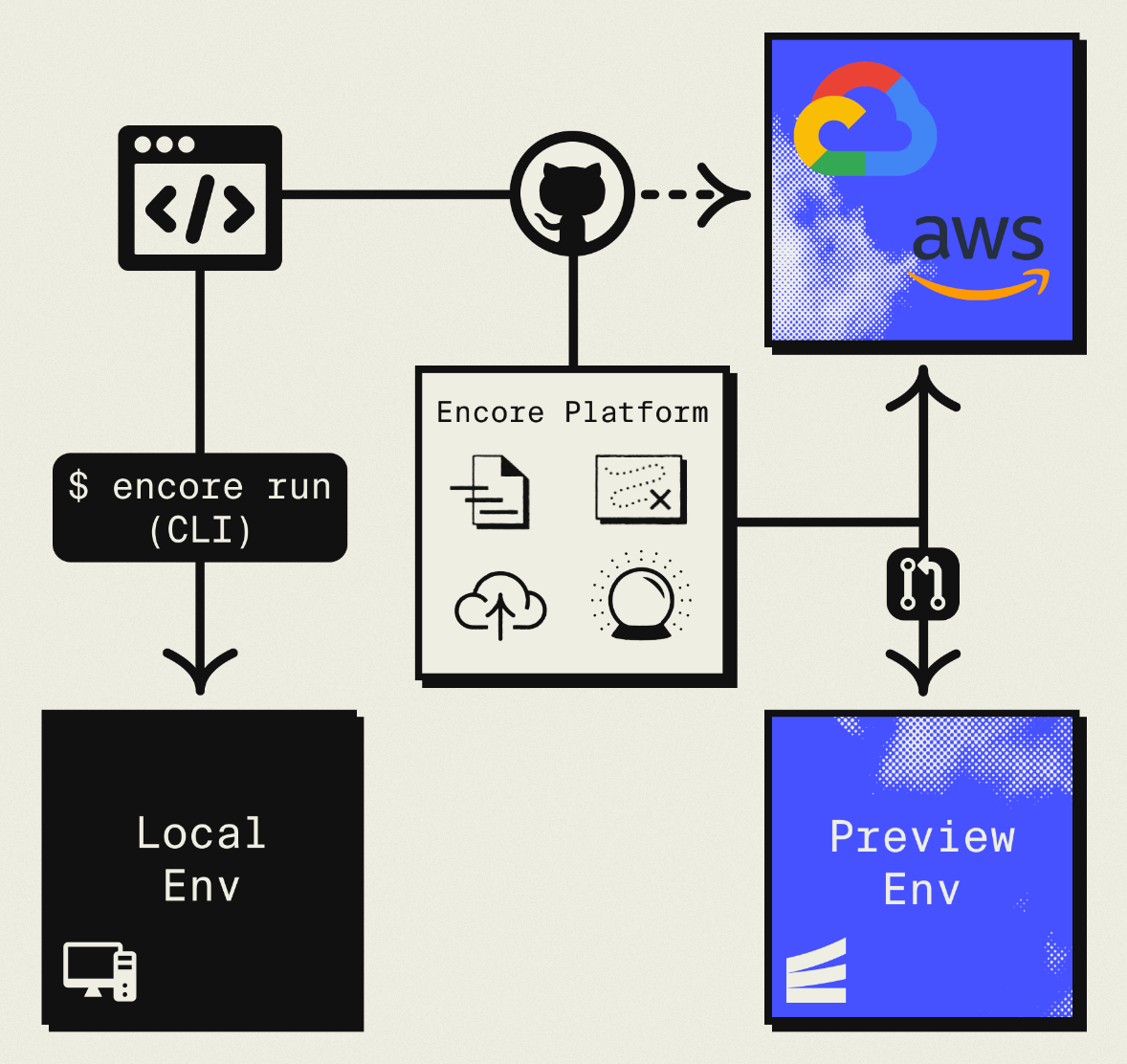
The result is GCP infrastructure you own and control, but without the DevOps overhead. Companies like Groupon already use this approach to power their backends at scale.
What You're Migrating
| Firebase Component | GCP Equivalent (via Encore) |
|---|---|
| Firestore | Cloud SQL PostgreSQL |
| Firebase Auth | Encore Auth (or Clerk, WorkOS, etc.) |
| Cloud Storage for Firebase | Google Cloud Storage |
| Cloud Functions | Cloud Run |
| Cloud Messaging | GCP Pub/Sub |
Why Stay on GCP?
Familiar ecosystem: If your team knows GCP, staying on Google Cloud reduces context switching and learning curve.
Network efficiency: Keeping everything in GCP avoids cross-cloud egress costs and latency.
Existing GCP credits: Many startups have GCP credits. Moving to standard GCP services lets you keep using them.
GCP-specific services: Easy integration with BigQuery, Vertex AI, Cloud Armor, and other Google services.
What Encore Handles For You
When you deploy to GCP through Encore Cloud, every resource gets production defaults: VPC placement, least-privilege IAM service accounts, encryption at rest, automated backups where applicable, and Cloud Logging. You don't configure this per resource. It's automatic.
Encore follows GCP best practices and gives you guardrails. You can review infrastructure changes before they're applied, and everything runs in your own GCP project so you maintain full control.
Here's what that looks like in practice:
import { SQLDatabase } from "encore.dev/storage/sqldb";
import { Bucket } from "encore.dev/storage/objects";
import { Topic } from "encore.dev/pubsub";
import { CronJob } from "encore.dev/cron";

const db = new SQLDatabase("main", { migrations: "./migrations" });
const uploads = new Bucket("uploads", { versioned: false });
const events = new Topic<OrderEvent>("events", { deliveryGuarantee: "at-least-once" });
const _ = new CronJob("daily-cleanup", { schedule: "0 0 * * *", endpoint: cleanup });
This provisions Cloud SQL, GCS, Pub/Sub, and Cloud Scheduler with proper networking, IAM, and monitoring. You write TypeScript or Go, Encore handles the Terraform. The only Encore-specific parts are the import statements. Your business logic is standard TypeScript, so you're not locked in.
Encore Cloud visualizes how your services connect, including Pub/Sub topics, cron jobs, and database dependencies:
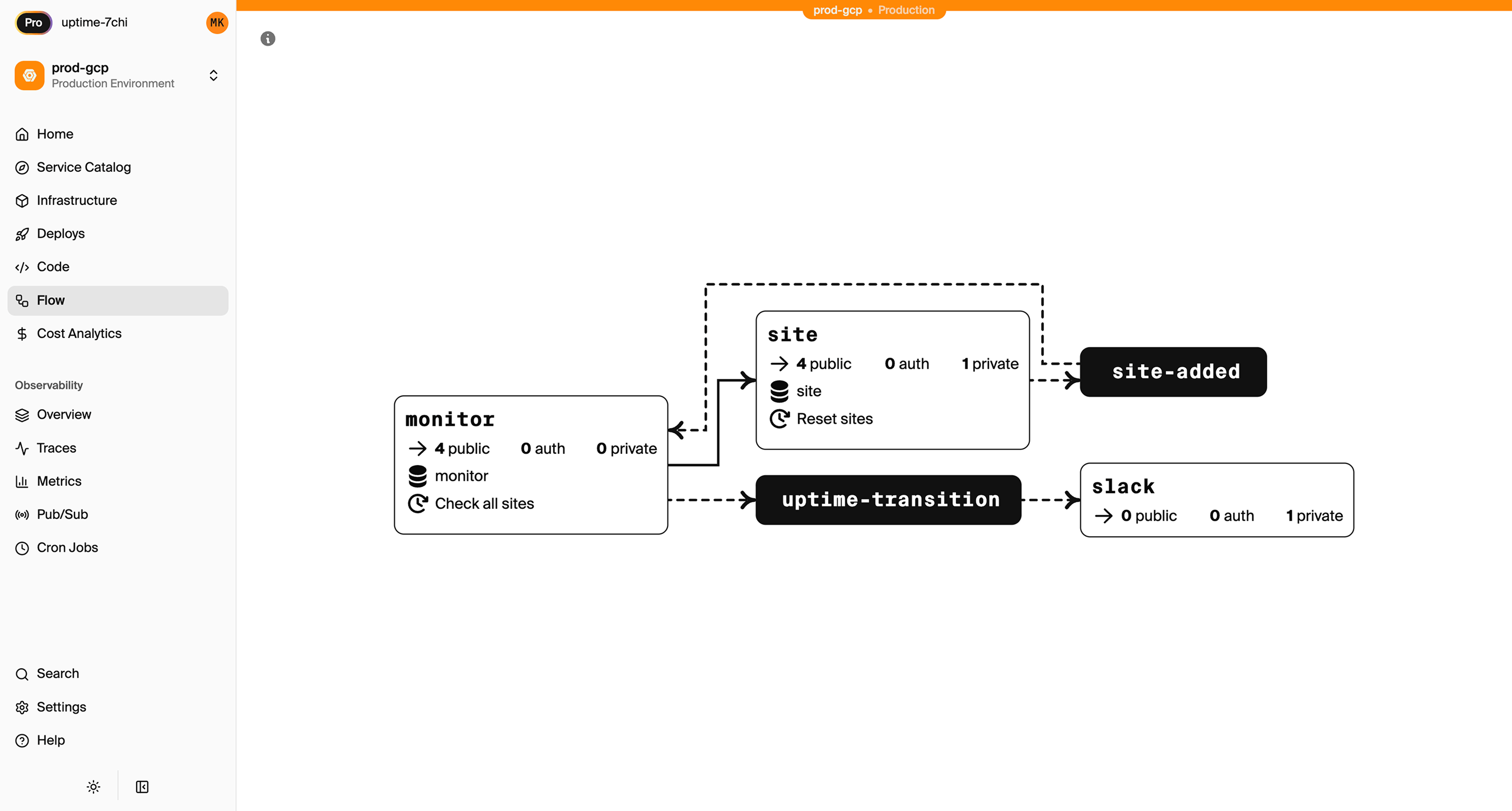
See the infrastructure primitives docs for the full list of supported resources.
Step 1: Migrate Firestore to Cloud SQL
This is the main work. You're converting a document database to a relational database.
Map Collections to Tables
Firestore structure:
users/{userId}
  name: "Alice"
  email: "alice@example.com"

orders/{orderId}
  userId: "user123"
  items: [{productId, quantity, price}]
  total: 150.00
  status: "shipped"
PostgreSQL schema:
-- migrations/001_schema.up.sql
CREATE TABLE users (
  id TEXT PRIMARY KEY,
  name TEXT NOT NULL,
  email TEXT UNIQUE NOT NULL,
  created_at TIMESTAMPTZ DEFAULT NOW()
);

CREATE TABLE orders (
  id TEXT PRIMARY KEY,
  user_id TEXT NOT NULL REFERENCES users(id),
  total DECIMAL(10,2) NOT NULL,
  status TEXT DEFAULT 'pending',
  created_at TIMESTAMPTZ DEFAULT NOW()
);

CREATE TABLE order_items (
  id SERIAL PRIMARY KEY,
  order_id TEXT NOT NULL REFERENCES orders(id) ON DELETE CASCADE,
  product_id TEXT NOT NULL,
  quantity INTEGER NOT NULL,
  price DECIMAL(10,2) NOT NULL
);

CREATE INDEX orders_user_idx ON orders(user_id);
CREATE INDEX order_items_order_idx ON order_items(order_id);
Notice how the nested items array becomes a separate order_items table with a foreign key. Relationships are explicit in the schema rather than implied by document paths.
Set Up the Encore Database
import { SQLDatabase } from "encore.dev/storage/sqldb";

const db = new SQLDatabase("main", {
  migrations: "./migrations",
});
That's the complete database definition. Encore analyzes this at compile time and provisions Cloud SQL PostgreSQL when you deploy.
Export and Transform Firestore Data
Use the Firebase CLI to export:
firebase firestore:export gs://your-bucket/firestore-backup
Then write a migration script:
// scripts/migrate-firestore.ts
import * as admin from "firebase-admin";
import { Pool } from "pg";

admin.initializeApp();
const firestore = admin.firestore();
const pg = new Pool({ connectionString: process.env.DATABASE_URL });

async function migrateUsers() {
  const snapshot = await firestore.collection("users").get();

  for (const doc of snapshot.docs) {
    const data = doc.data();
    await pg.query(
      `INSERT INTO users (id, name, email, created_at)
       VALUES ($1, $2, $3, $4)
       ON CONFLICT (id) DO NOTHING`,
      [doc.id, data.name, data.email, data.createdAt?.toDate() || new Date()]
    );
  }
  console.log(`Migrated ${snapshot.size} users`);
}

async function migrateOrders() {
  const snapshot = await firestore.collection("orders").get();

  for (const doc of snapshot.docs) {
    const data = doc.data();

    // Insert order
    await pg.query(
      `INSERT INTO orders (id, user_id, total, status, created_at)
       VALUES ($1, $2, $3, $4, $5)
       ON CONFLICT (id) DO NOTHING`,
      [doc.id, data.userId, data.total, data.status, data.createdAt?.toDate()]
    );

    // Insert order items
    for (const item of data.items || []) {
      await pg.query(
        `INSERT INTO order_items (order_id, product_id, quantity, price)
         VALUES ($1, $2, $3, $4)`,
        [doc.id, item.productId, item.quantity, item.price]
      );
    }
  }
  console.log(`Migrated ${snapshot.size} orders`);
}

async function main() {
  await migrateUsers();
  await migrateOrders();
  await pg.end();
}

main().catch(console.error);
Rewrite Your Queries
Before (Firestore):
// Get user with orders - requires two separate reads
const userDoc = await firestore.doc(`users/${userId}`).get();
const ordersSnapshot = await firestore
  .collection("orders")
  .where("userId", "==", userId)
  .orderBy("createdAt", "desc")
  .get();

const user = { id: userDoc.id, ...userDoc.data() };
const orders = ordersSnapshot.docs.map(doc => ({ id: doc.id, ...doc.data() }));
After (Encore with SQL):
import { api } from "encore.dev/api";

interface User {
  id: string;
  name: string;
  email: string;
}

interface Order {
  id: string;
  total: number;
  status: string;
  createdAt: Date;
}

export const getUserWithOrders = api(
  { method: "GET", path: "/users/:userId", expose: true },
  async ({ userId }: { userId: string }): Promise<{ user: User; orders: Order[] }> => {
    const user = await db.queryRow<User>`
      SELECT id, name, email FROM users WHERE id = ${userId}
    `;

    if (!user) throw new Error("User not found");

    const orderRows = await db.query<Order>`
      SELECT id, total, status, created_at as "createdAt"
      FROM orders
      WHERE user_id = ${userId}
      ORDER BY created_at DESC
    `;

    const orders: Order[] = [];
    for await (const order of orderRows) {
      orders.push(order);
    }

    return { user, orders };
  }
);
Or get everything in a single query with a JOIN:
export const getOrderWithItems = api(
  { method: "GET", path: "/orders/:orderId", expose: true },
  async ({ orderId }: { orderId: string }): Promise<OrderWithItems> => {
    const order = await db.queryRow<Order>`
      SELECT id, user_id as "userId", total, status, created_at as "createdAt"
      FROM orders WHERE id = ${orderId}
    `;

    if (!order) throw new Error("Order not found");

    const itemRows = await db.query<OrderItem>`
      SELECT product_id as "productId", quantity, price
      FROM order_items WHERE order_id = ${orderId}
    `;

    const items: OrderItem[] = [];
    for await (const item of itemRows) {
      items.push(item);
    }

    return { ...order, items };
  }
);
Step 2: Migrate Firebase Auth
You can keep Firebase Auth temporarily while migrating, then move to your own implementation.
Keep Firebase Auth During Migration
import { authHandler, Gateway } from "encore.dev/auth";
import { APIError } from "encore.dev/api";
import * as admin from "firebase-admin";

admin.initializeApp();

interface AuthParams {
  authorization: string;
}

interface AuthData {
  userID: string;
  email: string;
}

export const auth = authHandler<AuthParams, AuthData>(
  async (params) => {
    const token = params.authorization.replace("Bearer ", "");

    try {
      const decoded = await admin.auth().verifyIdToken(token);
      return {
        userID: decoded.uid,
        email: decoded.email || "",
      };
    } catch {
      throw APIError.unauthenticated("Invalid token");
    }
  }
);

export const gateway = new Gateway({ authHandler: auth });
Migrate to Custom Auth Later
Once stable, implement your own JWT-based auth:
import { SignJWT, jwtVerify } from "jose";
import { verify, hash } from "@node-rs/argon2";

// ... login, signup, and token verification endpoints
Step 3: Migrate Cloud Storage
Firebase Storage and GCS are the same underlying service. Migration is mainly about updating how you access files.
import { Bucket } from "encore.dev/storage/objects";

const uploads = new Bucket("uploads", { versioned: false });

export const uploadFile = api(
  { method: "POST", path: "/files", expose: true, auth: true },
  async (req: { filename: string; data: Buffer; contentType: string }): Promise<{ url: string }> => {
    await uploads.upload(req.filename, req.data, {
      contentType: req.contentType,
    });
    return { url: uploads.publicUrl(req.filename) };
  }
);
Copy Files Between Buckets
If you want to move files to a new bucket:
gsutil -m cp -r gs://your-firebase-bucket/* gs://your-new-bucket/
Step 4: Migrate Cloud Functions to Cloud Run
Cloud Functions become Encore APIs deployed to Cloud Run:
Before (Firebase Functions):
import * as functions from "firebase-functions";
import * as admin from "firebase-admin";

export const createOrder = functions.https.onCall(async (data, context) => {
  if (!context.auth) {
    throw new functions.https.HttpsError("unauthenticated", "Must be logged in");
  }

  const { items } = data;
  const total = items.reduce(
    (sum: number, item: any) => sum + item.price * item.quantity,
    0
  );

  const orderRef = await admin.firestore().collection("orders").add({
    userId: context.auth.uid,
    items,
    total,
    status: "pending",
    createdAt: admin.firestore.FieldValue.serverTimestamp(),
  });

  return { orderId: orderRef.id };
});
After (Encore):
import { api } from "encore.dev/api";
import { getAuthData } from "~encore/auth";

interface OrderItem {
  productId: string;
  quantity: number;
  price: number;
}

export const createOrder = api(
  { method: "POST", path: "/orders", expose: true, auth: true },
  async (req: { items: OrderItem[] }): Promise<{ orderId: string; total: number }> => {
    const auth = getAuthData()!;
    const total = req.items.reduce(
      (sum, item) => sum + item.price * item.quantity,
      0
    );

    const orderId = generateId();

    await db.exec`
      INSERT INTO orders (id, user_id, total, status)
      VALUES (${orderId}, ${auth.userID}, ${total}, 'pending')
    `;

    for (const item of req.items) {
      await db.exec`
        INSERT INTO order_items (order_id, product_id, quantity, price)
        VALUES (${orderId}, ${item.productId}, ${item.quantity}, ${item.price})
      `;
    }

    return { orderId, total };
  }
);
Step 5: Replace Firestore Triggers with Pub/Sub
Firestore triggers fire automatically when documents change. Replace with explicit Pub/Sub:
Before (Firestore trigger):
export const onNewOrder = functions.firestore
  .document("orders/{orderId}")
  .onCreate(async (snap, context) => {
    const order = snap.data();
    await sendOrderConfirmation(order.userId, context.params.orderId);
  });
After (Explicit Pub/Sub):
import { Topic, Subscription } from "encore.dev/pubsub";

interface OrderCreatedEvent {
  orderId: string;
  userId: string;
  total: number;
}

const orderCreated = new Topic<OrderCreatedEvent>("order-created", {
  deliveryGuarantee: "at-least-once",
});

// In createOrder endpoint, publish after inserting:
await orderCreated.publish({
  orderId,
  userId: auth.userID,
  total,
});

// Subscribe to handle the event
const _ = new Subscription(orderCreated, "send-confirmation", {
  handler: async (event) => {
    await sendOrderConfirmation(event.userId, event.orderId);
  },
});
This approach is more explicit. You decide when to publish events, making the data flow easier to understand and test.
Step 6: Deploy to GCP
- Connect your GCP project in the Encore Cloud dashboard. See the GCP setup guide for details.
- Push your code:
git push encore main - Run your data migration script against Cloud SQL
- Update your frontend to use new API endpoints
- Test in preview environment
- Update DNS and go live
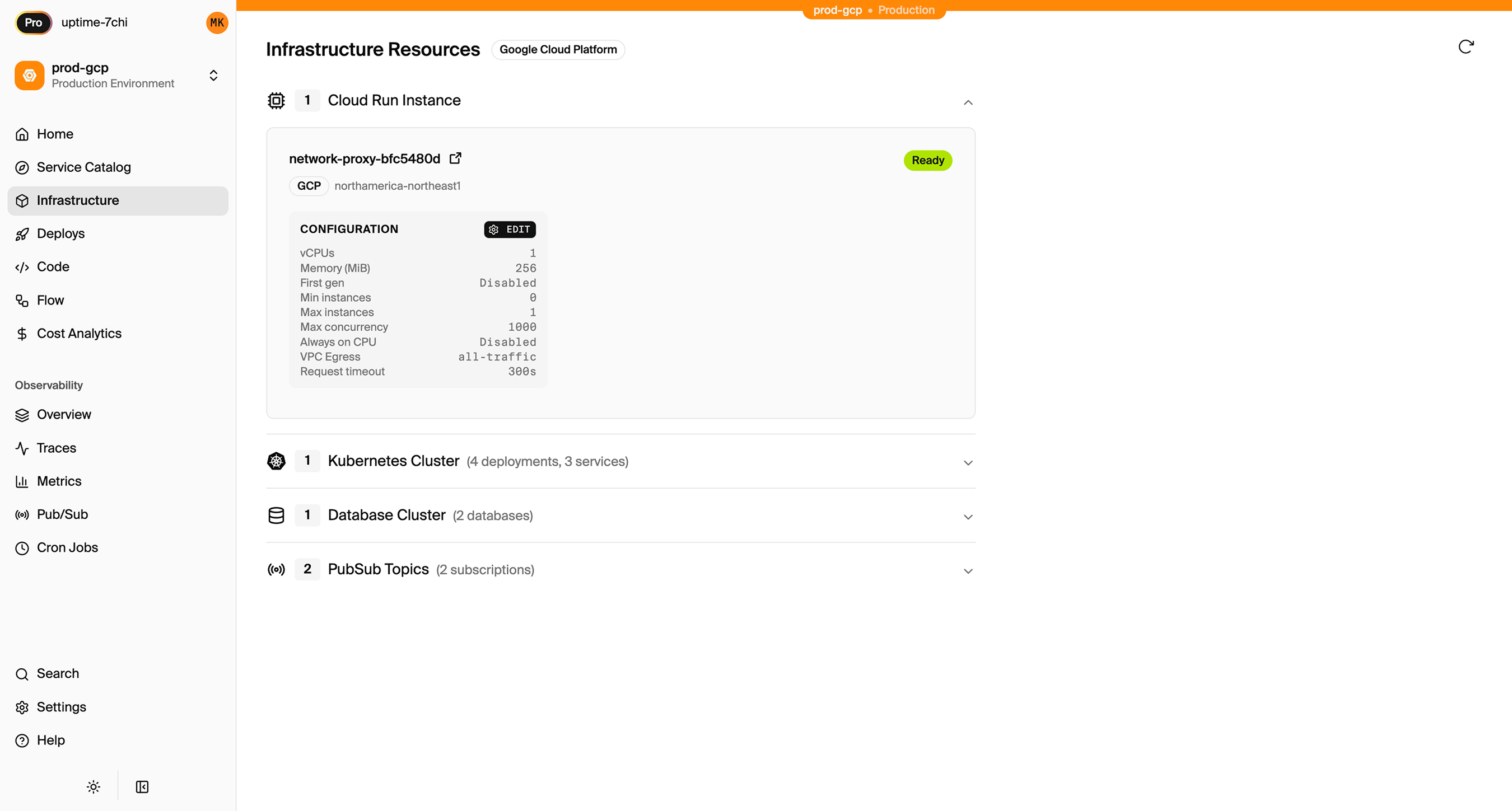
What Gets Provisioned
Encore creates in your GCP project:
- Cloud SQL PostgreSQL for your database
- Google Cloud Storage for files
- GCP Pub/Sub for messaging
- Cloud Run for your APIs
- Cloud Logging for logs
- IAM service accounts with appropriate permissions
You have full access through the Google Cloud Console.
Encore Cloud also gives you a dashboard showing all provisioned infrastructure across environments:
Migration Checklist
- Design relational schema from Firestore collections
- Write data migration scripts
- Create Encore app with database migrations
- Deploy to get Cloud SQL instance
- Run data migration
- Rewrite queries from Firestore SDK to SQL
- Keep Firebase Auth working during transition
- Move Cloud Storage files (or update bucket references)
- Convert Cloud Functions to Encore APIs
- Replace Firestore triggers with Pub/Sub
- Update frontend SDK calls to REST API
- Test in preview environment
- Gradual production rollout
Wrapping Up
Migrating from Firebase to standard GCP services gives you a relational database, infrastructure control, and removes Firebase SDK dependencies. You stay in the Google ecosystem but with more flexibility.
Encore handles the GCP infrastructure provisioning while you focus on converting your data model and application code.
Try deploying a TypeScript backend to your own GCP account:
Want to jump straight to a running app? Clone this starter and deploy it to your own cloud.