 Ivan Cernja
How to Migrate from Firebase to AWS
Move from Firebase to your own AWS account for SQL databases, lower costs, and more control

Firebase gets you building fast. Firestore, Auth, Cloud Functions, Storage, and Hosting all work together with minimal configuration. But that convenience comes with tradeoffs that become apparent as your application grows.
The most common pain point is Firestore's document model. It works for simple data, but once you need joins, aggregations, or complex queries, you start fighting the database. Adding denormalization and composite indexes only gets you so far.
The traditional path to AWS means learning Terraform or CloudFormation, writing infrastructure config, and stitching together RDS, Lambda, S3, and Cognito yourself. That's a steep learning curve when you're used to Firebase's integrated experience.
This guide takes a different approach: migrating to your own AWS account using Encore and Encore Cloud. Encore is an open-source TypeScript backend framework (11k+ GitHub stars) where you define infrastructure as type-safe objects in your code: databases, Pub/Sub, cron jobs, object storage. Encore Cloud then provisions these resources in your AWS account using managed services like RDS, SQS, and S3.
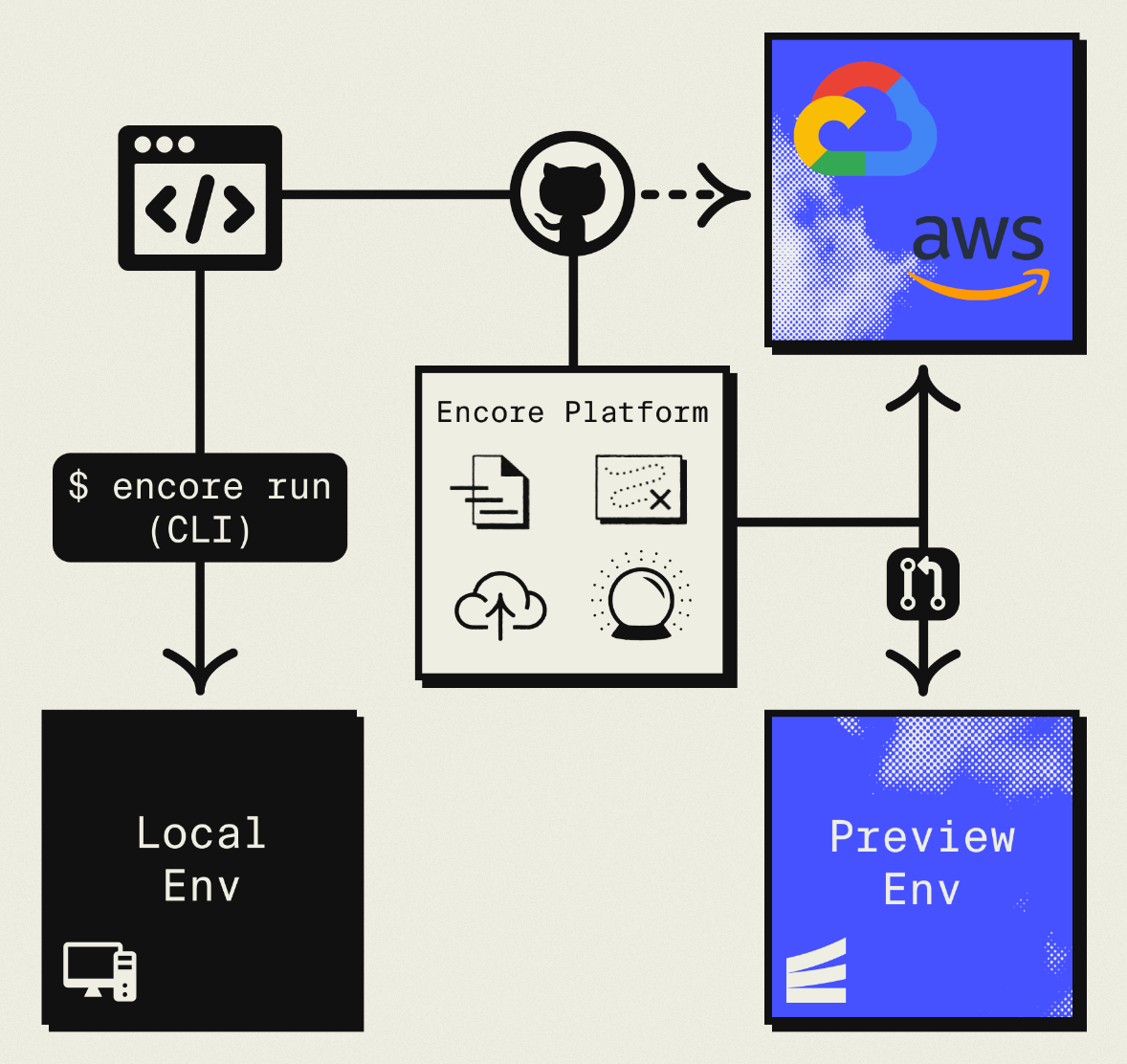
The result is AWS infrastructure you own and control, but without the DevOps overhead. The biggest change is moving from Firestore to PostgreSQL, but you gain SQL's query power and the broader ecosystem. Companies like Groupon already use this approach to power their backends at scale.
What You're Migrating
| Firebase Component | AWS Equivalent (via Encore) |
|---|---|
| Firestore / Realtime Database | Amazon RDS PostgreSQL |
| Firebase Auth | Encore Auth (or Clerk, WorkOS, etc.) |
| Cloud Storage | Amazon S3 |
| Cloud Functions | Fargate |
| Cloud Messaging (FCM) | Amazon SNS |
The database migration requires the most thought since you're changing data models. Everything else maps fairly directly.
Why Teams Migrate from Firebase
Relational data: Firestore is a document database. When your data has relationships, you end up with denormalization, multiple reads, or client-side joins. PostgreSQL handles relationships naturally with foreign keys and JOIN queries.
Query flexibility: Firestore requires indexes for every query pattern. PostgreSQL lets you query however you want, with indexes for optimization rather than correctness.
Cost predictability: Firebase charges per read, write, and storage. A single page load might trigger dozens of reads. PostgreSQL charges for compute and storage, which is more predictable and often cheaper at scale.
No vendor lock-in: Firebase's SDKs and data format create tight coupling. PostgreSQL and S3 are portable to any cloud.
Infrastructure control: Firebase doesn't expose the underlying infrastructure. With AWS, you get VPCs, security groups, and compliance controls.
What Encore Handles For You
When you deploy to AWS through Encore Cloud, every resource gets production defaults: private VPC placement, least-privilege IAM roles, encryption at rest, automated backups where applicable, and CloudWatch logging. You don't configure this per resource. It's automatic.
Encore follows AWS best practices and gives you guardrails. You can review infrastructure changes before they're applied, and everything runs in your own AWS account so you maintain full control.
Here's what that looks like in practice:
import { SQLDatabase } from "encore.dev/storage/sqldb";
import { Bucket } from "encore.dev/storage/objects";
import { Topic } from "encore.dev/pubsub";
import { CronJob } from "encore.dev/cron";

const db = new SQLDatabase("main", { migrations: "./migrations" });
const uploads = new Bucket("uploads", { versioned: false });
const events = new Topic<OrderEvent>("events", { deliveryGuarantee: "at-least-once" });
const _ = new CronJob("daily-cleanup", { schedule: "0 0 * * *", endpoint: cleanup });
This provisions RDS, S3, SNS/SQS, and CloudWatch Events with proper networking, IAM, and monitoring. You write TypeScript or Go, Encore handles the Terraform. The only Encore-specific parts are the import statements. Your business logic is standard TypeScript, so you're not locked in.
Encore Cloud visualizes how your services connect, including Pub/Sub topics, cron jobs, and database dependencies:
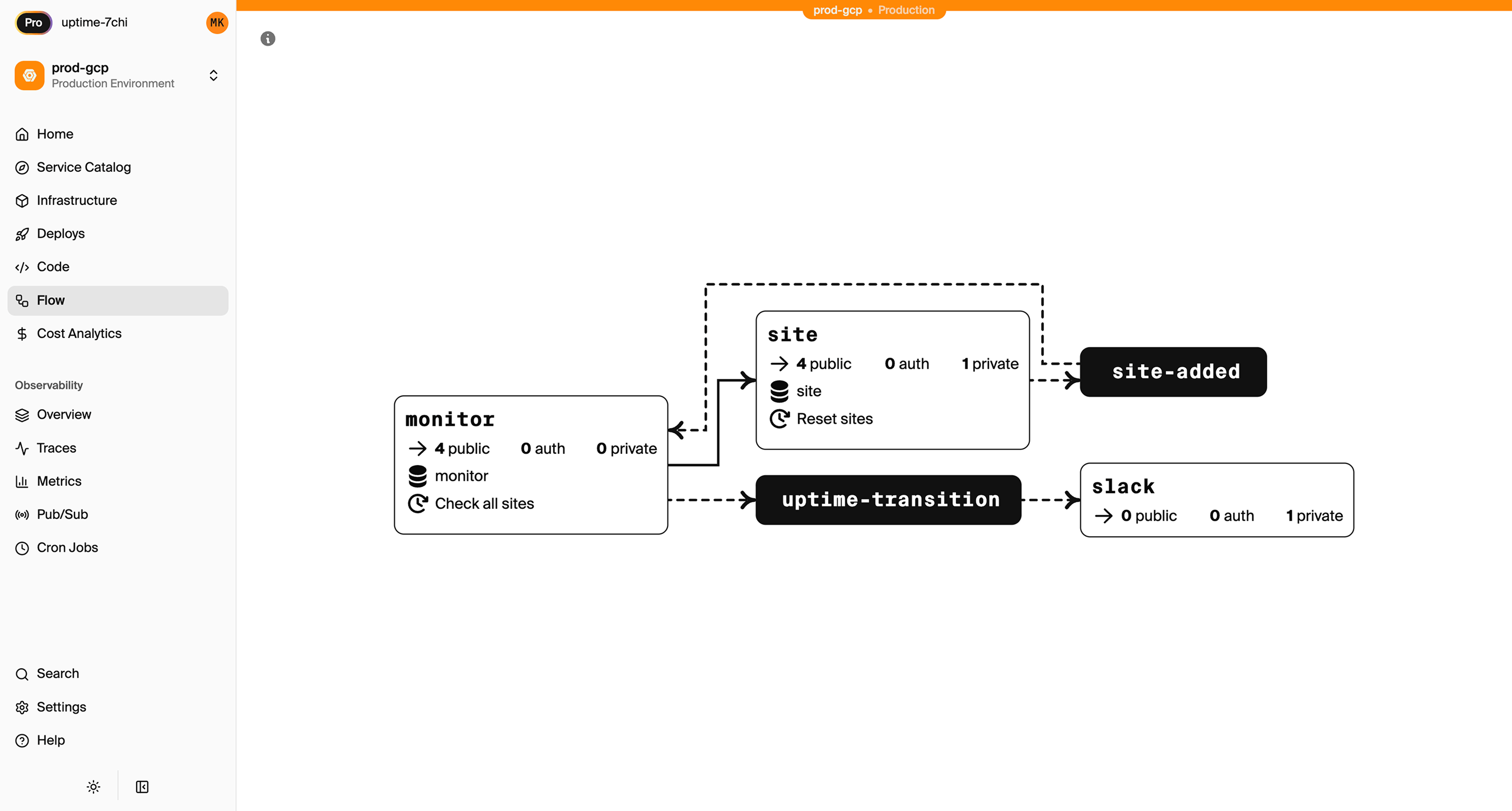
See the infrastructure primitives docs for the full list of supported resources.
Step 1: Migrate from Firestore to PostgreSQL
This is the biggest change. You're not just moving data; you're redesigning how it's stored.
Map Your Data Model
Start by mapping Firestore collections to relational tables. Nested documents become separate tables with foreign keys.
Firestore structure:
users/
  {userId}/
    email: "user@example.com"
    name: "John Doe"
    createdAt: Timestamp

posts/
  {postId}/
    authorId: "user123"
    title: "My Post"
    content: "..."
    likes: 42
    comments/
      {commentId}/
        authorId: "user456"
        text: "Great post!"
PostgreSQL schema:
-- migrations/001_initial.up.sql
CREATE TABLE users (
  id TEXT PRIMARY KEY,
  email TEXT UNIQUE NOT NULL,
  name TEXT NOT NULL,
  created_at TIMESTAMPTZ DEFAULT NOW()
);

CREATE TABLE posts (
  id TEXT PRIMARY KEY,
  author_id TEXT NOT NULL REFERENCES users(id),
  title TEXT NOT NULL,
  content TEXT,
  likes INTEGER DEFAULT 0,
  created_at TIMESTAMPTZ DEFAULT NOW()
);

CREATE TABLE comments (
  id TEXT PRIMARY KEY,
  post_id TEXT NOT NULL REFERENCES posts(id) ON DELETE CASCADE,
  author_id TEXT NOT NULL REFERENCES users(id),
  text TEXT NOT NULL,
  created_at TIMESTAMPTZ DEFAULT NOW()
);

CREATE INDEX posts_author_idx ON posts(author_id);
CREATE INDEX comments_post_idx ON comments(post_id);
Notice how the nested comments subcollection becomes its own table with a post_id foreign key. This is the core shift: relationships are explicit in the schema rather than implicit in document paths.
Export and Transform Firestore Data
Use the Firebase CLI to export:
firebase firestore:export gs://your-bucket/firestore-backup
Then write a migration script to transform documents into rows. Here's a pattern:
// scripts/migrate-firestore.ts
import * as admin from "firebase-admin";
import { Pool } from "pg";

admin.initializeApp();
const firestore = admin.firestore();
const pg = new Pool({ connectionString: process.env.DATABASE_URL });

async function migrateUsers() {
  console.log("Migrating users...");
  const snapshot = await firestore.collection("users").get();

  for (const doc of snapshot.docs) {
    const data = doc.data();
    await pg.query(
      `INSERT INTO users (id, email, name, created_at)
       VALUES ($1, $2, $3, $4)
       ON CONFLICT (id) DO NOTHING`,
      [doc.id, data.email, data.name, data.createdAt?.toDate() || new Date()]
    );
  }
  console.log(`Migrated ${snapshot.size} users`);
}

async function migratePosts() {
  console.log("Migrating posts...");
  const snapshot = await firestore.collection("posts").get();

  for (const doc of snapshot.docs) {
    const data = doc.data();
    await pg.query(
      `INSERT INTO posts (id, author_id, title, content, likes, created_at)
       VALUES ($1, $2, $3, $4, $5, $6)
       ON CONFLICT (id) DO NOTHING`,
      [doc.id, data.authorId, data.title, data.content, data.likes || 0,
       data.createdAt?.toDate() || new Date()]
    );

    // Migrate subcollection
    const comments = await doc.ref.collection("comments").get();
    for (const commentDoc of comments.docs) {
      const commentData = commentDoc.data();
      await pg.query(
        `INSERT INTO comments (id, post_id, author_id, text, created_at)
         VALUES ($1, $2, $3, $4, $5)
         ON CONFLICT (id) DO NOTHING`,
        [commentDoc.id, doc.id, commentData.authorId, commentData.text,
         commentData.createdAt?.toDate() || new Date()]
      );
    }
  }
  console.log(`Migrated ${snapshot.size} posts`);
}

async function main() {
  await migrateUsers();
  await migratePosts();
  await pg.end();
  console.log("Migration complete");
}

main().catch(console.error);
Run this against your production RDS instance after the first Encore deploy.
Rewrite Your Queries
The query syntax changes from Firestore's chained methods to SQL:
Before (Firestore):
const snapshot = await firestore
  .collection("posts")
  .where("authorId", "==", userId)
  .orderBy("createdAt", "desc")
  .limit(10)
  .get();

const posts = snapshot.docs.map(doc => ({ id: doc.id, ...doc.data() }));
After (Encore):
import { api } from "encore.dev/api";
import { SQLDatabase } from "encore.dev/storage/sqldb";

const db = new SQLDatabase("main", { migrations: "./migrations" });
// That's it. Encore provisions RDS PostgreSQL based on this declaration.

interface Post {
  id: string;
  authorId: string;
  title: string;
  content: string;
  likes: number;
  createdAt: Date;
}

export const getUserPosts = api(
  { method: "GET", path: "/users/:userId/posts", expose: true },
  async ({ userId }: { userId: string }): Promise<{ posts: Post[] }> => {
    const rows = await db.query<Post>`
      SELECT id, author_id as "authorId", title, content, likes,
             created_at as "createdAt"
      FROM posts
      WHERE author_id = ${userId}
      ORDER BY created_at DESC
      LIMIT 10
    `;

    const posts: Post[] = [];
    for await (const row of rows) {
      posts.push(row);
    }
    return { posts };
  }
);
With SQL, you can also write queries that were difficult or impossible in Firestore:
// Get posts with author info in a single query
export const getPostsWithAuthors = api(
  { method: "GET", path: "/posts", expose: true },
  async (): Promise<{ posts: PostWithAuthor[] }> => {
    const rows = await db.query<PostWithAuthor>`
      SELECT p.id, p.title, p.content, p.likes, p.created_at as "createdAt",
             u.name as "authorName", u.email as "authorEmail"
      FROM posts p
      JOIN users u ON p.author_id = u.id
      ORDER BY p.created_at DESC
      LIMIT 20
    `;

    const posts: PostWithAuthor[] = [];
    for await (const row of rows) {
      posts.push(row);
    }
    return { posts };
  }
);
One query instead of N+1.
Step 2: Migrate Firebase Auth
Firebase Auth handles user management, email verification, password reset, and OAuth. You have a few options for replacement.
Option A: Build Custom Auth
Implement auth yourself with Encore's auth handler:
import { authHandler, Gateway } from "encore.dev/auth";
import { api, APIError } from "encore.dev/api";
import { verify, hash } from "@node-rs/argon2";
import { SignJWT, jwtVerify } from "jose";

const JWT_SECRET = new TextEncoder().encode(process.env.JWT_SECRET);

interface AuthParams {
  authorization: string;
}

interface AuthData {
  userID: string;
  email: string;
}

export const auth = authHandler<AuthParams, AuthData>(
  async (params) => {
    const token = params.authorization.replace("Bearer ", "");

    try {
      const { payload } = await jwtVerify(token, JWT_SECRET);
      return {
        userID: payload.sub as string,
        email: payload.email as string,
      };
    } catch {
      throw APIError.unauthenticated("Invalid token");
    }
  }
);

export const gateway = new Gateway({ authHandler: auth });
You'll also need login, signup, and password reset endpoints. This gives you full control but requires more implementation work.
Option B: Use a Third-Party Auth Service
Clerk, Auth0, Supabase Auth, or WorkOS can replace Firebase Auth. Your Encore auth handler just verifies their tokens:
import { createRemoteJWKSet, jwtVerify } from "jose";

const JWKS = createRemoteJWKSet(
  new URL("https://your-clerk-instance/.well-known/jwks.json")
);

export const auth = authHandler<AuthParams, AuthData>(
  async (params) => {
    const token = params.authorization.replace("Bearer ", "");
    const { payload } = await jwtVerify(token, JWKS);

    return {
      userID: payload.sub as string,
      email: payload.email as string,
    };
  }
);
Migrating Existing Users
Firebase Auth allows exporting users, including password hashes. You can import these into your new system:
- Export from Firebase Console (Authentication > Users > Export)
- Import users with their Firebase password hashes
- On login, verify with Firebase's scrypt variant or prompt for password reset
The details depend on whether you're using custom auth or a third-party service.
Step 3: Migrate Cloud Storage to S3
Firebase Storage maps to S3. Define a bucket in Encore:
import { Bucket } from "encore.dev/storage/objects";

const files = new Bucket("files", { versioned: false });

export const uploadFile = api(
  { method: "POST", path: "/files", expose: true },
  async (req: { filename: string; data: Buffer; contentType: string }) => {
    await files.upload(req.filename, req.data, {
      contentType: req.contentType,
    });
    return { url: files.publicUrl(req.filename) };
  }
);

export const getFile = api(
  { method: "GET", path: "/files/:filename", expose: true },
  async ({ filename }: { filename: string }) => {
    return await files.download(filename);
  }
);
Migrate Existing Files
Download from Firebase Storage and upload to your new S3 bucket:
# Download from Firebase
gsutil -m cp -r gs://your-firebase-bucket ./backup

# Upload to S3 after Encore deployment
aws s3 sync ./backup s3://your-encore-bucket
For large file sets, consider using AWS DataSync or running the migration in chunks.
Step 4: Migrate Cloud Functions
Firebase Cloud Functions become Encore APIs:
Before (Firebase Functions):
import * as functions from "firebase-functions";

export const processOrder = functions.https.onRequest(async (req, res) => {
  const { items } = req.body;
  const total = items.reduce((sum: number, item: any) =>
    sum + item.price * item.quantity, 0);

  res.json({ orderId: generateId(), total });
});
After (Encore):
import { api } from "encore.dev/api";

interface OrderItem {
  productId: string;
  quantity: number;
  price: number;
}

interface ProcessOrderRequest {
  items: OrderItem[];
}

interface ProcessOrderResponse {
  orderId: string;
  total: number;
}

export const processOrder = api(
  { method: "POST", path: "/orders", expose: true },
  async (req: ProcessOrderRequest): Promise<ProcessOrderResponse> => {
    const total = req.items.reduce(
      (sum, item) => sum + item.price * item.quantity,
      0
    );

    const orderId = await createOrder(req.items, total);
    return { orderId, total };
  }
);
Encore APIs have type-safe request/response schemas, automatic validation, and built-in observability.
Replace Firestore Triggers with Pub/Sub
Firestore triggers fire automatically when documents change. Replace them with explicit Pub/Sub:
Before (Firestore trigger):
export const onOrderCreated = functions.firestore
  .document("orders/{orderId}")
  .onCreate(async (snapshot, context) => {
    const order = snapshot.data();
    await sendConfirmationEmail(order.customerEmail);
  });
After (Encore Pub/Sub):
import { Topic, Subscription } from "encore.dev/pubsub";

interface OrderCreatedEvent {
  orderId: string;
  customerEmail: string;
  items: OrderItem[];
}

export const orderCreated = new Topic<OrderCreatedEvent>("order-created", {
  deliveryGuarantee: "at-least-once",
});

// Publish when creating an order
export const createOrder = api(
  { method: "POST", path: "/orders", expose: true },
  async (req: ProcessOrderRequest): Promise<ProcessOrderResponse> => {
    const order = await saveOrder(req);

    await orderCreated.publish({
      orderId: order.id,
      customerEmail: req.email,
      items: req.items,
    });

    return { orderId: order.id, total: order.total };
  }
);

// Subscribe to send confirmation emails
const _ = new Subscription(orderCreated, "send-confirmation", {
  handler: async (event) => {
    await sendConfirmationEmail(event.customerEmail, event.orderId);
  },
});
This is more explicit than implicit triggers. You decide when to publish events, making the data flow easier to understand and test.
Step 5: Deploy to AWS
- Connect your AWS account in the Encore Cloud dashboard. See the AWS setup guide for details.
- Push your code:
git push encore main - Run your data migration script against the provisioned RDS instance
- Update your frontend to use new API endpoints
- Test thoroughly in preview environment
- Update DNS and go live
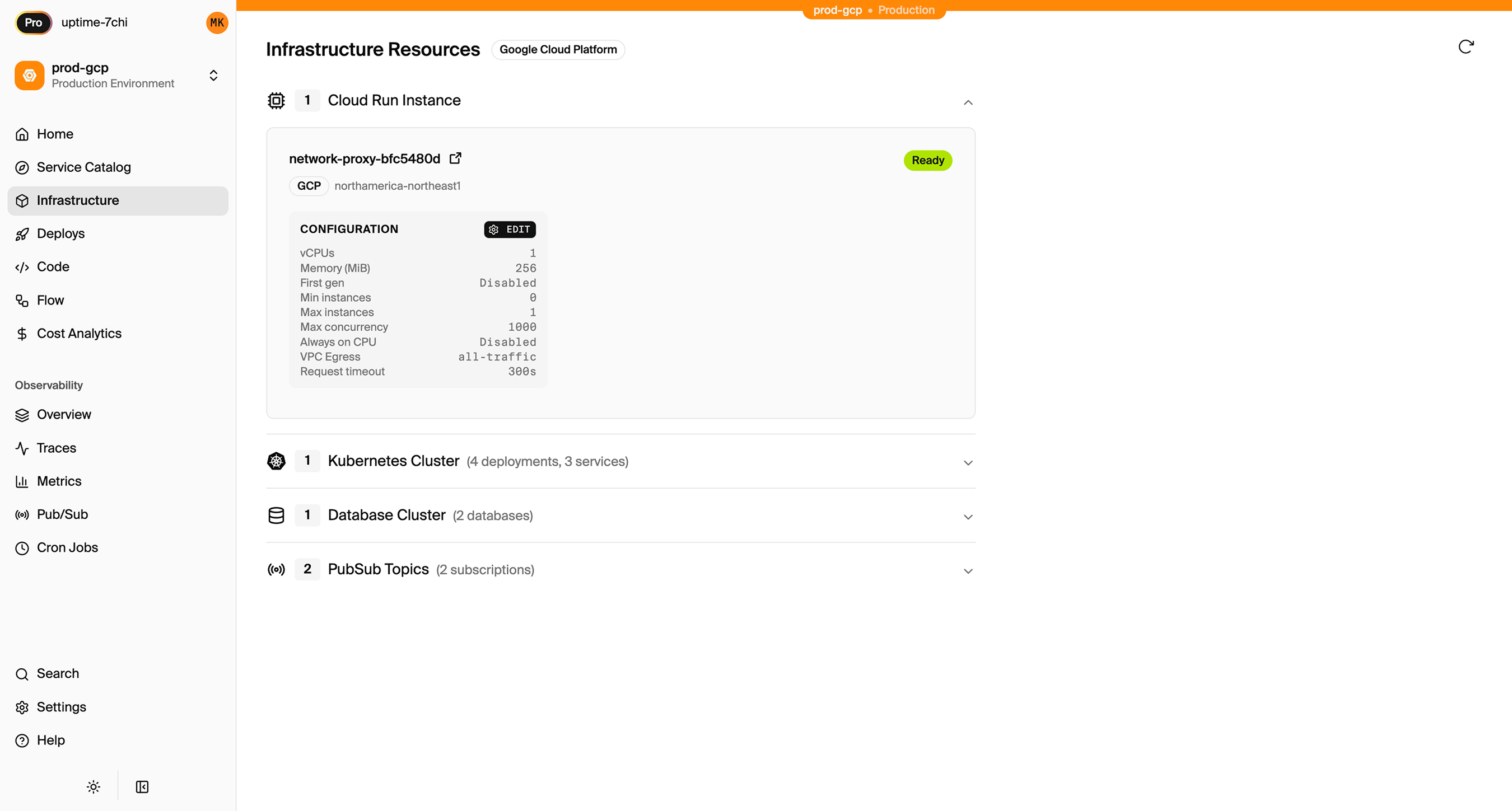
What Gets Provisioned
Encore creates in your AWS account:
- RDS PostgreSQL for your relational database
- S3 buckets for object storage
- SNS/SQS for Pub/Sub messaging
- Fargate for compute
- CloudWatch for logs and metrics
- IAM roles with least-privilege access
You maintain full access through the AWS console.
Encore Cloud also gives you a dashboard showing all provisioned infrastructure across environments:
Migration Checklist
- Map Firestore collections to PostgreSQL tables
- Design migration scripts for data transformation
- Decide on auth approach (custom or third-party)
- Export Firebase Auth users
- Create Encore app with database and migrations
- Deploy to get RDS instance
- Run data migration scripts
- Convert Cloud Functions to Encore APIs
- Replace Firestore triggers with Pub/Sub
- Migrate Cloud Storage files to S3
- Update frontend to use new APIs
- Test in preview environment
- Gradual rollout to production
Wrapping Up
Migrating from Firebase to AWS is a larger project than other platform migrations because you're changing database paradigms. The Firestore-to-PostgreSQL conversion requires schema design and data transformation, not just moving bytes.
The payoff is a more flexible data model, predictable costs, and infrastructure you control. Encore handles the AWS provisioning so you can focus on the application logic.
Try deploying a TypeScript backend to your own AWS account:
Want to jump straight to a running app? Clone this starter and deploy it to your own cloud.