
 Ivan Cernja
Railway gives you a clean deployment experience where you push code and get a URL. For straightforward apps, that's often enough, but it gets harder when your backend needs to talk to other infrastructure. Railway doesn't support VPC peering, so there's no way to privately connect to existing cloud services, and Railway's Postgres doesn't have read replicas or point-in-time recovery. Cloud SQL on GCP has both out of the box, and running in your own GCP account means your backend can sit in the same private network as your other services.
The traditional path to GCP means learning Terraform or Deployment Manager, writing infrastructure config, and becoming your own DevOps team. That's a big jump from Railway's simplicity.
This guide takes a different approach: migrating to your own GCP project using Encore and Encore Cloud. Encore is an open-source TypeScript backend framework (11k+ GitHub stars) where you define infrastructure as type-safe objects in your code: databases, Pub/Sub, cron jobs, object storage. Encore Cloud then provisions these resources in your GCP project using managed services like Cloud SQL, GCP Pub/Sub, and Cloud Storage.
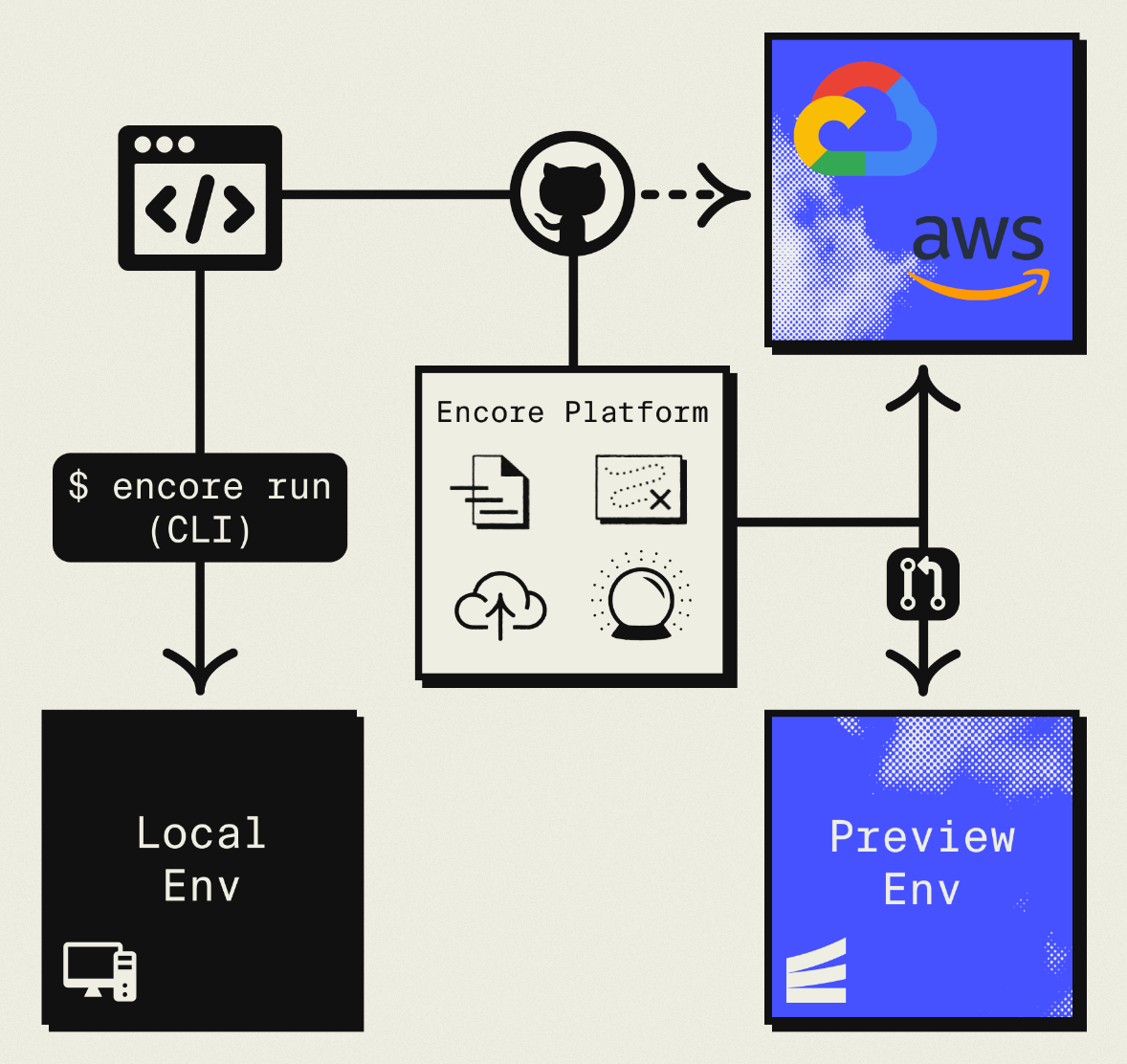
The result is GCP infrastructure you own and control, but with a developer experience similar to Railway: push code, get a deployment. No Terraform to learn, no YAML to maintain. Companies like Groupon already use this approach to power their backends at scale.
What You're Migrating
| Railway Component | GCP Equivalent (via Encore) |
|---|---|
| Railway Services | Cloud Run |
| Railway Postgres | Cloud SQL |
| Railway Redis | GCP Pub/Sub or Memorystore |
| Railway Cron | Cloud Scheduler |
| Railway Variables | Secret Manager |
Why GCP?
Cloud Run performance: Similar to Railway's deployment model with fast cold starts, automatic scaling, and scale-to-zero. The migration feels natural.
Sustained use discounts: GCP automatically reduces costs as your usage increases, without requiring reserved capacity purchases.
GCP ecosystem: BigQuery for analytics, Vertex AI for machine learning, Cloud Storage for files, and other Google services.
Infrastructure control: VPC networking, IAM policies, and compliance controls you don't get on Railway.
What Encore Handles For You
When you deploy to GCP through Encore Cloud, every resource gets production defaults: VPC placement, least-privilege IAM service accounts, encryption at rest, automated backups where applicable, and Cloud Logging. You don't configure this per resource. It's automatic.
Encore follows GCP best practices and gives you guardrails. You can review infrastructure changes before they're applied, and everything runs in your own GCP project so you maintain full control.
Here's what that looks like in practice:
import { SQLDatabase } from "encore.dev/storage/sqldb";
import { Bucket } from "encore.dev/storage/objects";
import { Topic } from "encore.dev/pubsub";
import { CronJob } from "encore.dev/cron";

const db = new SQLDatabase("main", { migrations: "./migrations" });
const uploads = new Bucket("uploads", { versioned: false });
const events = new Topic<OrderEvent>("events", { deliveryGuarantee: "at-least-once" });
const _ = new CronJob("daily-cleanup", { schedule: "0 0 * * *", endpoint: cleanup });
This provisions Cloud SQL, GCS, Pub/Sub, and Cloud Scheduler with proper networking, IAM, and monitoring. You write TypeScript or Go, Encore handles the Terraform. The only Encore-specific parts are the import statements. Your business logic is standard TypeScript, so you're not locked in.
Encore Cloud visualizes how your services connect, including Pub/Sub topics, cron jobs, and database dependencies:
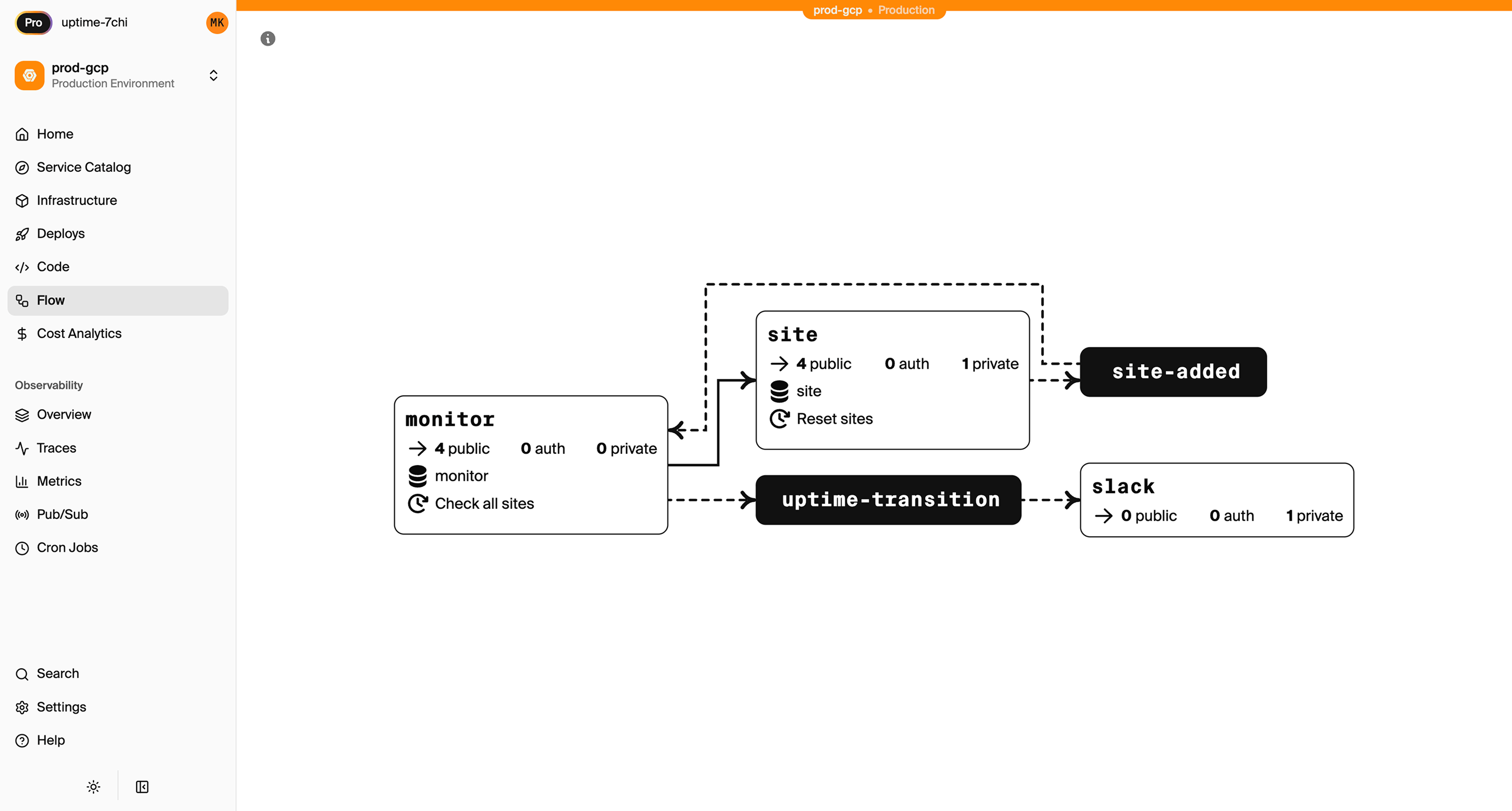
See the infrastructure primitives docs for the full list of supported resources.
Step 1: Migrate Your Services
Railway services become Encore APIs that deploy to Cloud Run:
Railway service: Requires a Dockerfile or Nixpacks configuration.
Encore:
import { api } from "encore.dev/api";
import { SQLDatabase } from "encore.dev/storage/sqldb";

const db = new SQLDatabase("main", { migrations: "./migrations" });

interface User {
  id: string;
  email: string;
  name: string;
  createdAt: Date;
}

export const getUsers = api(
  { method: "GET", path: "/users", expose: true },
  async (): Promise<{ users: User[] }> => {
    const rows = await db.query<User>`
      SELECT id, email, name, created_at as "createdAt"
      FROM users
      ORDER BY created_at DESC
    `;

    const users: User[] = [];
    for await (const user of rows) {
      users.push(user);
    }
    return { users };
  }
);

export const createUser = api(
  { method: "POST", path: "/users", expose: true },
  async (req: { email: string; name: string }): Promise<User> => {
    const user = await db.queryRow<User>`
      INSERT INTO users (email, name)
      VALUES (${req.email}, ${req.name})
      RETURNING id, email, name, created_at as "createdAt"
    `;
    return user!;
  }
);
No Dockerfile needed. Encore analyzes your code and provisions Cloud Run services with appropriate container images, networking, and scaling.
If you have multiple Railway services, create separate Encore services:
// api/encore.service.ts
import { Service } from "encore.dev/service";
export default new Service("api");

// admin/encore.service.ts
import { Service } from "encore.dev/service";
export default new Service("admin");
Step 2: Migrate PostgreSQL to Cloud SQL
Railway and GCP both use PostgreSQL, so this is a data transfer.
Export from Railway
Get your connection string from the Railway dashboard:
pg_dump "postgresql://postgres:password@containers-us-west-xxx.railway.app:5432/railway" > backup.sql
Set Up the Encore Database
import { SQLDatabase } from "encore.dev/storage/sqldb";

const db = new SQLDatabase("main", {
  migrations: "./migrations",
});
That's the complete database definition. Encore analyzes this at compile time and provisions Cloud SQL PostgreSQL when you deploy.
Copy your migration files to ./migrations, or create them from your current schema:
# Generate initial migration from existing schema
pg_dump --schema-only "your-railway-connection" > migrations/001_initial.up.sql
Import to Cloud SQL
After your first Encore deploy:
# Get the Cloud SQL connection
encore db conn-uri main --env=production

# Import
psql "your-cloud-sql-connection" < backup.sql
Step 3: Migrate Cron Jobs
Railway cron services become Encore CronJobs:
Railway (separate cron service):
{
  "$schema": "https://railway.app/railway.schema.json",
  "deploy": {
    "cronSchedule": "0 3 * * *"
  }
}
Encore:
import { CronJob } from "encore.dev/cron";
import { api } from "encore.dev/api";

export const syncData = api(
  { method: "POST", path: "/internal/sync" },
  async (): Promise<{ synced: number }> => {
    const count = await performDataSync();
    return { synced: count };
  }
);

const _ = new CronJob("daily-sync", {
  title: "Daily data sync",
  schedule: "0 3 * * *",
  endpoint: syncData,
});
The cron definition lives with the code it runs. On GCP, Encore uses Cloud Scheduler to trigger the endpoint.
Step 4: Replace Redis
If you're using Railway Redis, the migration depends on your use case.
For Job Queues: Use GCP Pub/Sub
import { Topic, Subscription } from "encore.dev/pubsub";

interface Task {
  id: string;
  action: string;
  data: Record<string, unknown>;
}

const taskQueue = new Topic<Task>("tasks", {
  deliveryGuarantee: "at-least-once",
});

// Enqueue from your API
export const enqueueTask = api(
  { method: "POST", path: "/tasks", expose: true },
  async (req: Task): Promise<{ queued: boolean }> => {
    await taskQueue.publish(req);
    return { queued: true };
  }
);

// Process tasks
const _ = new Subscription(taskQueue, "process-tasks", {
  handler: async (task) => {
    await processTask(task.id, task.action, task.data);
  },
});
For Caching: Consider Alternatives
- Memorystore: Provision separately via GCP Console
- Database caching: PostgreSQL table with TTL
- In-memory: For short-lived, request-scoped data
For Pub/Sub: Use Encore Pub/Sub
Redis pub/sub maps directly to the Topic and Subscription model shown above.
Step 5: Migrate Secrets
Railway environment variables become Encore secrets:
# Set secrets
encore secret set --type=production StripeKey
encore secret set --type=production JWTSecret
Use them in code:
import { secret } from "encore.dev/config";

const stripeKey = secret("StripeKey");

// Use the secret
const stripe = new Stripe(stripeKey());
Step 6: Deploy to GCP
- Connect your GCP project in Encore Cloud. See the GCP setup guide for details.
- Push your code:
git push encore main - Import database data after the first deploy
- Update DNS
- Verify and deprecate Railway services
What Gets Provisioned
- Cloud Run for your services
- Cloud SQL PostgreSQL for databases
- GCP Pub/Sub for messaging
- Cloud Scheduler for cron jobs
- Cloud Logging for logs
- IAM service accounts with appropriate permissions
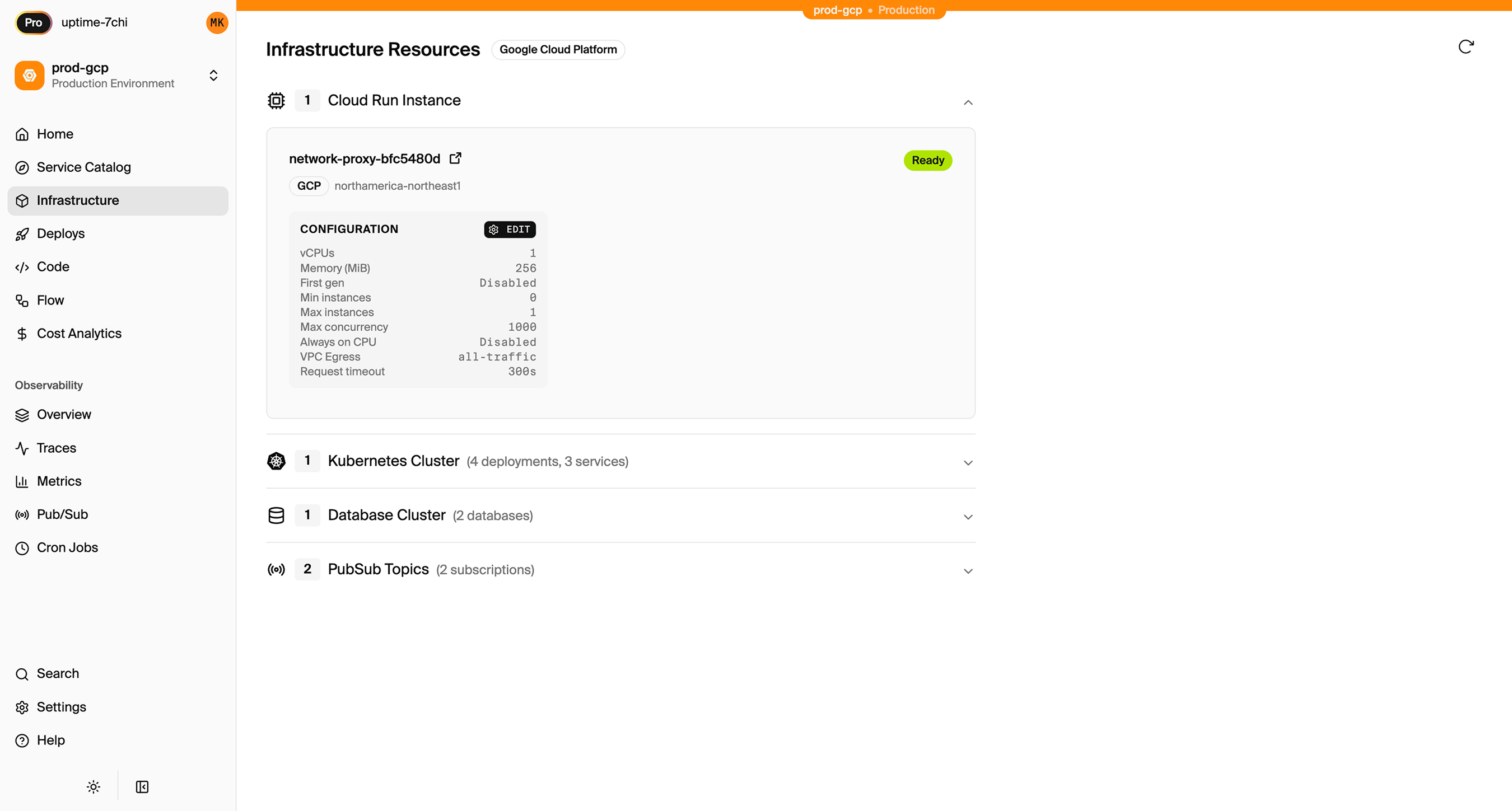
Encore Cloud also gives you a dashboard showing all provisioned infrastructure across environments:
Migration Checklist
- Inventory Railway services
- Export Postgres database
- Create Encore services
- Set up migrations and import data
- Convert cron jobs
- Replace Redis with Pub/Sub or alternatives
- Move secrets
- Test in preview environment
- Update DNS
- Deprecate Railway services
Wrapping Up
Cloud Run provides a similar deployment experience to Railway: fast cold starts, automatic scaling, and no server management. The difference is you own the infrastructure and have access to the GCP ecosystem.
Try deploying a TypeScript backend to your own GCP account:
Want to jump straight to a running app? Clone this starter and deploy it to your own cloud.