Always accurate, always current
Encore generates diagrams directly from your source code. Add a new service, it appears in the diagram. Add a database connection, the relationship shows up automatically.
- ✓Service dependencies
- ✓Database connections
- ✓Pub/sub topic flows
- ✓API call relationships
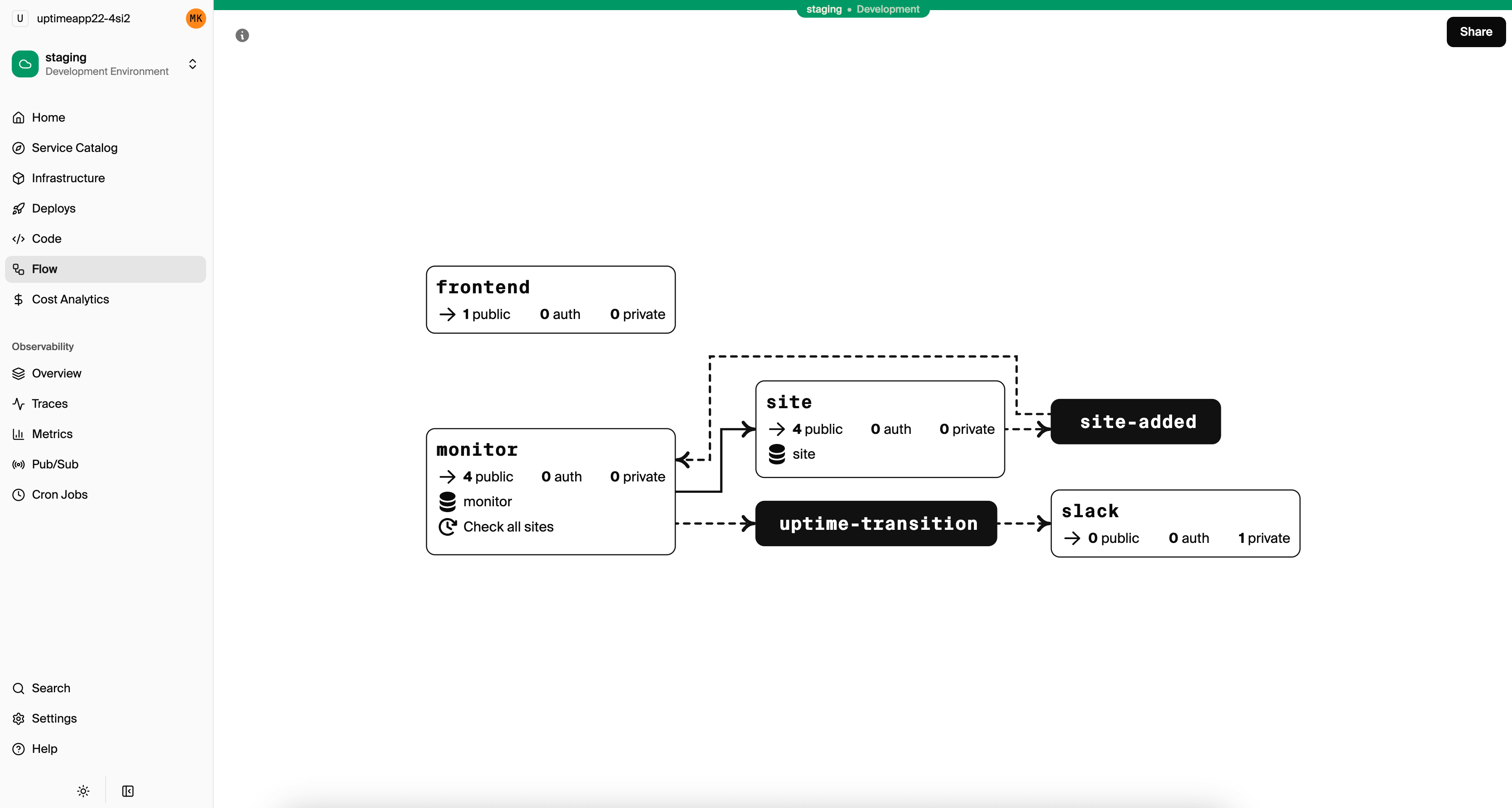
Diagrams that maintain themselves
Encore generates diagrams directly from your source code. Add a new service, it appears in the diagram. Add a database connection, the relationship shows up. The diagram is always accurate because it's derived from your actual code.
- ✓Services and their API endpoints
- ✓Service-to-service dependencies
- ✓Database connections
- ✓Pub/Sub topic relationships
- ✓Cron job triggers
Interactive, not just static
Click on any service to see its endpoints. Click on a connection to understand the relationship. The diagram is a live view of your system, not a static image.
During incidents, use the diagram to quickly understand which services might be affected by an issue. During planning, use it to see how a new feature will fit into the existing architecture.
Useful every day
Onboarding
New developers understand the system in minutes. No more spending days reading code to build a mental model.
Planning
See how new features will fit. Understand dependencies before you start building.
Debugging
Trace issues through the system. See which services might be affected by a problem.