 Ivan Cernja
Top AWS App Runner Alternatives in 2026
A practical comparison of the best AWS App Runner alternatives for deploying containerized apps in 2026.

AWS App Runner recently moved to maintenance mode. No new features, no new customers after April 30, 2026. The service launched in 2021 as AWS's answer to Heroku and Render, a way to deploy containers without touching VPCs, ECS clusters, or task definitions. AWS has now confirmed that ECS Express Mode is the long-term bet instead.
If you're looking for a replacement, there are several options but they work differently from each other. Some keep you entirely inside AWS on managed ECS. Others let you own your AWS account while keeping a simple deployment workflow. Others are fully managed third-party platforms. This guide compares the leading alternatives based on developer experience, infrastructure ownership, and production readiness.
Quick Comparison
| Platform | Type | Infrastructure | Build from source | Scale to zero | Custom domain |
|---|---|---|---|---|---|
| Encore Cloud | Framework + Cloud | Your AWS/GCP | Yes | No | Yes |
| ECS Express Mode | AWS-native | Your AWS | No (needs ECR) | No | Via Route 53 |
| ECS Fargate (standard) | AWS-native | Your AWS | No (needs ECR) | No | Manual |
| Google Cloud Run | Managed | Google Cloud | Yes (Buildpacks) | Yes | Yes |
| Fly.io | Edge platform | Fly's | Yes | Yes | Yes |
| Railway | Managed PaaS | Railway's | Yes | No | Yes |
| Render | Managed PaaS | Render's | Yes | Yes | Yes |
Encore Cloud
Encore Cloud gives you a git push workflow that provisions managed infrastructure in your own AWS or GCP account (powered by Encore, an open-source TypeScript and Go backend framework with 11k+ GitHub stars). You declare infrastructure as type-safe objects in your application code, and Encore provisions the corresponding managed services: ECS, RDS, SQS, S3 on AWS or Cloud Run, Cloud SQL, Pub/Sub, GCS on GCP. Everything else is standard TypeScript or Go.
import { api } from "encore.dev/api";
import { SQLDatabase } from "encore.dev/storage/sqldb";
import { Topic } from "encore.dev/pubsub";

// These declarations are all Encore needs to provision your infrastructure.
// Everything else in your codebase is standard TypeScript (or Go).
const db = new SQLDatabase("main", { migrations: "./migrations" });
const events = new Topic<OrderEvent>("events", { deliveryGuarantee: "at-least-once" });

// Each API endpoint gets built-in tracing, metrics, and API docs automatically.
export const createOrder = api(
  { method: "POST", path: "/orders", expose: true },
  async (req: CreateOrderRequest): Promise<Order> => {
    const order = await db.queryRow<Order>`
      INSERT INTO orders (customer_id, total) VALUES (${req.customerId}, ${req.total})
      RETURNING *
    `;
    await events.publish({ orderId: order.id, type: "created" });
    return order;
  }
);
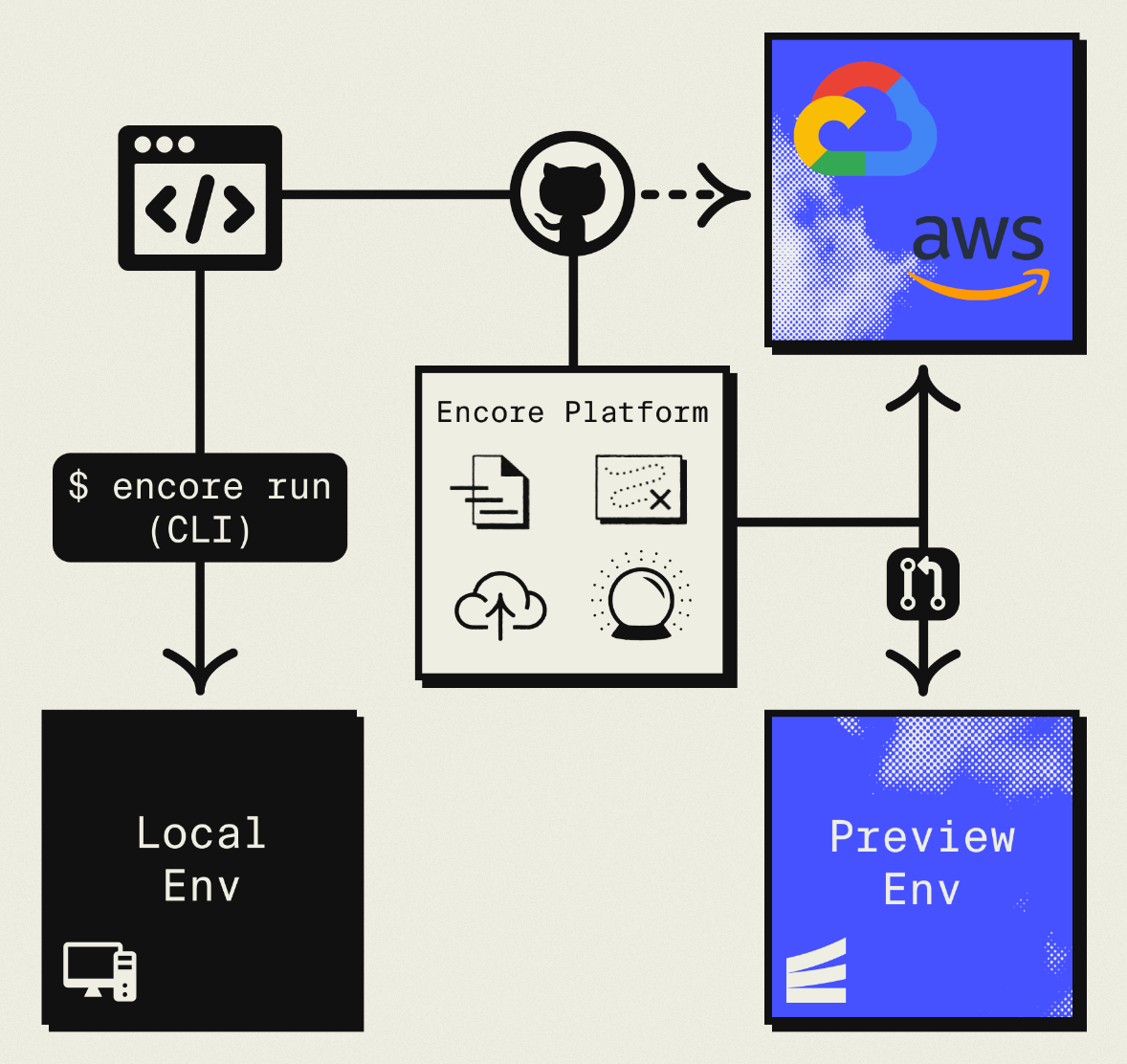
Deployment works like App Runner: git push encore main. Every push builds, tests, and deploys. Pull requests get automatic preview environments, local development runs everything with encore run, and built-in distributed tracing, metrics, and a service catalog come included. Unlike App Runner, Encore builds directly from your source code, so there's no separate Docker pipeline or ECR repository to maintain.
The only Encore-specific part of your codebase is the few encore.dev imports shown above. Everything else, your business logic, libraries, tests, ORM of choice, is standard TypeScript or Go, so you're not locked in. Infrastructure-from-code doesn't mean you lose control either: Encore handles the common primitives (databases, queues, cron, storage, secrets) in code, and for anything beyond that you can configure resources directly in the Encore Cloud dashboard or in your own AWS/GCP console. Because everything runs in your account, any resource you add through the cloud console, VPC peering, private endpoints, DynamoDB tables, is fully accessible from your Encore services.
Companies like Groupon already run production workloads on it. Encore supports TypeScript and Go, deploying to both AWS and GCP (Azure is not yet supported).
For teams using AI agents like Cursor and Claude Code for development, infrastructure-from-code means infrastructure doesn't drift from application logic. When AI changes your code, infrastructure updates automatically to match, and guardrails like type validation and compile-time checks are built in so there's no separate Terraform or YAML falling out of sync.
Migrate: App Runner to ECS via Encore
ECS Express Mode
Amazon ECS Express Mode is AWS's official recommendation for App Runner users. It's the same underlying compute (Fargate), but Express Mode automates the parts you previously avoided by using App Runner: cluster creation, ALB provisioning, HTTPS, security groups, auto-scaling, and CloudWatch setup.
The migration path is straightforward if your workload already runs as a container. You point Express Mode at an ECR image and click create, and it handles the rest. ALBs are shared across up to 25 services to keep costs reasonable.
The main gap versus App Runner is source builds: Express Mode only deploys pre-built images, so you need a Docker build and push pipeline (typically GitHub Actions). And unlike App Runner, there's no scale-to-zero.
ECS Fargate (Standard)
If you need more control than Express Mode offers, standard ECS Fargate gives you complete power: custom task definitions, blue-green deployments, multi-container tasks, sidecars, fine-grained IAM.
The tradeoff is obvious: you're back to configuring VPCs, ALBs, target groups, security groups, and IAM roles yourself, or through Terraform/CloudFormation. This is the "proper" AWS path but significantly more complex than what App Runner offered.
Google Cloud Run
Cloud Run is the closest conceptual match to App Runner on a different cloud. Point at a container image or source repo, get a running service with HTTPS, automatic scaling, and scale-to-zero. It supports Buildpacks for source-based deploys, which App Runner users will find familiar.
The move is straightforward if you're not committed to AWS specifically. If your workload already connects to AWS services like SQS or DynamoDB, moving to GCP means re-architecting those integrations.
Fly.io
Fly.io runs your apps as lightweight VMs (Machines) in 30+ regions. The deployment workflow has a similar feel to App Runner (fly deploy and your app is live), with fast cold starts, scale-to-zero, and automatic placement near users.
Fly.io is well-suited for latency-sensitive applications and teams that want a global footprint without managing it. You're on Fly's infrastructure rather than AWS, so integrations with AWS services go over the public internet.
Railway
Railway focuses on modern developer experience. Clean dashboard, fast deploys, and support for any language via Docker or Nixpacks. It stands out for teams: paid plans include unlimited seats, and monorepos and multi-service projects are well-supported.
Like Fly.io and Render, you're on Railway's infrastructure. It's a managed platform with the same category of tradeoffs around ownership and portability.
Render
Render is a close App Runner replacement for teams that don't need to stay on AWS. The concepts map nearly identically: web services, background workers, managed Postgres, cron jobs, environment groups. You connect a Git repo, define services in render.yaml or the dashboard, and push to deploy.
Render handles SSL, load balancing, and auto-deploys from your branch, and preview environments work well. The main tradeoff is infrastructure ownership, your apps run on Render's platform, and per-service pricing can add up with microservices.
Decision Framework
Choose Encore Cloud if you want to own your AWS (or GCP) infrastructure, you're building with TypeScript or Go, you need compliance controls, or you're using AI agents for development. You get an App Runner-style deployment workflow with built-in observability while keeping everything in your cloud account, and you don't need to build and push Docker images yourself.
Choose ECS Express Mode if you want to follow AWS's official migration path, you're comfortable with Docker and CI/CD, and you want to stay 100% within the AWS ecosystem.
Choose ECS Fargate (standard) if your team has DevOps experience and you need fine-grained control over networking, IAM, and deployment strategies.
Choose Cloud Run if you're open to leaving AWS, you want scale-to-zero, and your workload doesn't depend heavily on other AWS services.
Choose Fly.io if global latency is a priority or you want fine-grained control over VM placement.
Choose Railway or Render if you want a fully managed PaaS experience and don't need your infrastructure to live in your own cloud account.
Want to jump straight to a running app? Clone this starter and deploy it to your own cloud.