 Ivan Cernja
How to Migrate from AWS App Runner to ECS
Move from App Runner to ECS on your own AWS account with a simple deployment workflow.

AWS App Runner offered simple deployments: point at a container image or source repo and get a running service. With App Runner now in maintenance mode and AWS recommending ECS Express Mode as the replacement, teams need to migrate. The direct path to ECS means setting up ECR repositories, a Docker build and push pipeline (typically GitHub Actions), and a CI/CD flow to trigger Express Mode deploys. That's more operational overhead than App Runner ever asked for.
This guide takes a different approach: migrating to ECS on your own AWS account using Encore and Encore Cloud. Encore is an open-source TypeScript backend framework (11k+ GitHub stars) where you define infrastructure as type-safe objects in your code: databases, Pub/Sub, cron jobs, object storage. Encore Cloud provisions these resources in your AWS account using managed services like ECS on Fargate, RDS, SQS, and S3, and builds from source so there's no Docker pipeline to maintain.
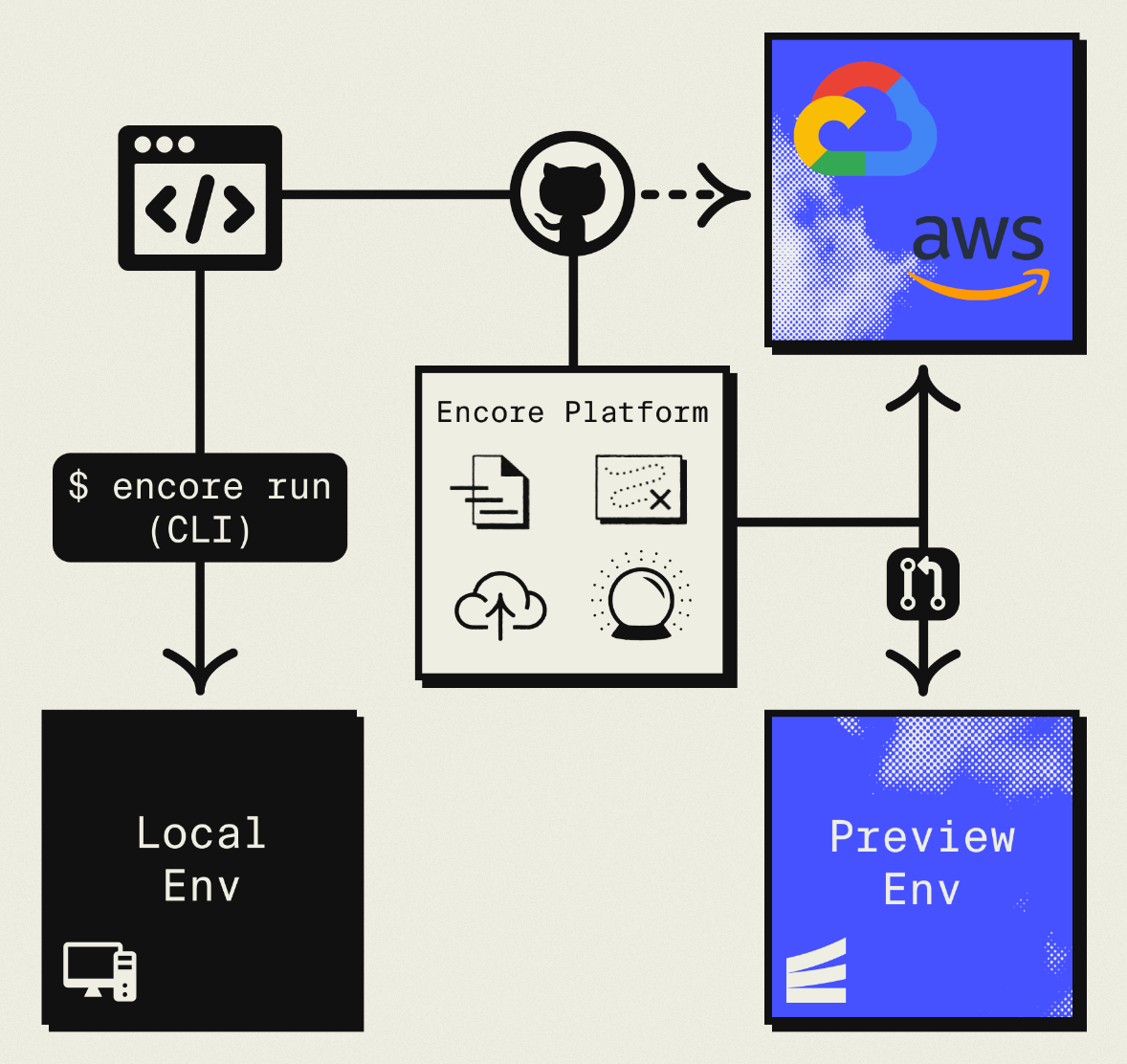
The result is ECS infrastructure you own and control, with the App Runner-style workflow you had before: push code, get a deployment. No Dockerfiles, no ECR setup, no GitHub Actions pipeline to maintain. Companies like Groupon already use this approach to power their backends at scale.
What You're Migrating
| App Runner Component | AWS Equivalent (via Encore) |
|---|---|
| Service (container or source) | ECS Fargate service |
| Auto-scaling config | Fargate auto-scaling |
| Built-in HTTPS | ALB + ACM |
| VPC connector | Private VPC placement |
| Environment variables | Encore Secrets |
| Custom domains | Route 53 + ACM |
| Observability | CloudWatch logs + built-in tracing |
| ECR auto-deploy | git push encore main |
The concepts map cleanly. App Runner ran on Fargate under the hood, so what changes is the control surface: instead of a single App Runner resource, you're explicitly running on ECS Fargate with an ALB in front, and the scaffolding is generated from your code rather than configured in the AWS console.
Why Migrate Now
App Runner stops accepting new customers on April 30, 2026, and existing services are no longer receiving new features. AWS's official recommendation is ECS Express Mode, and ECS Fargate is clearly the long-term bet. Starting the migration while there's no time pressure is the smart move, and running your workload directly on ECS gives you full access to the AWS ecosystem (VPC peering, IAM policies, VPC endpoints, SQS, DynamoDB) without going through App Runner's limited abstraction.
What Encore Handles For You
When you deploy to AWS through Encore Cloud, every resource gets production defaults: private VPC placement, least-privilege IAM roles, encryption at rest, automated backups where applicable, and CloudWatch logging. You don't configure this per resource, it's automatic.
Encore follows AWS best practices and gives you guardrails so you can review infrastructure changes before they're applied, and everything runs in your own AWS account so you maintain full control.
import { api } from "encore.dev/api";
import { SQLDatabase } from "encore.dev/storage/sqldb";
import { Bucket } from "encore.dev/storage/objects";
import { Topic } from "encore.dev/pubsub";

// Encore parses these declarations at compile time and provisions the
// matching AWS resources: RDS for the database, S3 for the bucket,
// and SNS + SQS for the Pub/Sub topic.
const db = new SQLDatabase("main", { migrations: "./migrations" });
const uploads = new Bucket("uploads", { versioned: false });
const events = new Topic<OrderEvent>("events", { deliveryGuarantee: "at-least-once" });
This provisions ECS Fargate, RDS, S3, and SNS/SQS with proper networking, IAM, and monitoring. You write TypeScript or Go, Encore handles the infrastructure. The only Encore-specific parts of your codebase are the encore.dev imports, everything else is standard TypeScript, so you're not locked in. For teams using AI agents like Cursor or Claude Code, this means infrastructure doesn't drift from your application logic.
Infrastructure-from-code doesn't mean you give up control. Encore covers the common primitives (databases, queues, cron, object storage, secrets) in code, and for anything beyond that, custom VPC peering, DynamoDB tables, additional CloudWatch alarms, SQS queues attached to legacy systems, you can configure resources either in the Encore Cloud dashboard or directly in your AWS console. Everything runs in your own AWS account, so any resource you add through the console is accessible from your Encore services the same way it would be from a hand-configured ECS task.
Step 1: Inventory Your App Runner Services
Start by listing what you have:
aws apprunner list-services --region us-east-1
For each service, document:
- Source type (ECR image or source code repository)
- CPU and memory configuration
- Environment variables and secrets
- Auto-scaling configuration (min/max concurrency)
- VPC connector settings
- Custom domain mappings
- Health check configuration
Step 2: Define Your Services in Code
App Runner services become Encore services. If you had one App Runner service, you get one Encore service. If you had several that communicated with each other, you create separate Encore services that can call each other with type-safe clients.
// api/encore.service.ts
import { Service } from "encore.dev/service";
export default new Service("api");

// billing/encore.service.ts
import { Service } from "encore.dev/service";
export default new Service("billing");
Inside each service, your HTTP endpoints are defined with the api helper:
import { api } from "encore.dev/api";

// Each endpoint gets built-in tracing, metrics, and auto-generated API docs.
export const hello = api(
  { method: "GET", path: "/hello/:name", expose: true },
  async ({ name }: { name: string }): Promise<{ message: string }> => {
    return { message: `Hello, ${name}!` };
  }
);

export const health = api(
  { method: "GET", path: "/health", expose: true },
  async () => ({ status: "ok", timestamp: new Date().toISOString() })
);
No Dockerfile, no ECR repository, no CI pipeline to maintain. Encore analyzes your code to understand what infrastructure it needs, and on deploy it provisions ECS Fargate tasks, an ALB, target groups, and auto-scaling.
If you had multiple App Runner services calling each other, replace the HTTP calls with typed clients:
import { billing } from "~encore/clients";

// Call the billing service, fully type-safe, no HTTP boilerplate
const invoice = await billing.getInvoice({ orderId: "123" });
Step 3: Move Environment Variables to Secrets
App Runner lets you set environment variables directly on the service. In Encore, sensitive values become secrets:
App Runner (via console or CLI):
aws apprunner update-service \
  --service-arn <arn> \
  --source-configuration 'ImageRepository={ImageConfiguration={RuntimeEnvironmentVariables={STRIPE_SECRET_KEY=sk_live_...}}}'
Encore:
encore secret set --type=production StripeSecretKey
encore secret set --type=production SendgridApiKey
encore secret set --type=production JWTSecret
Access them in code:
import { secret } from "encore.dev/config";

const stripeKey = secret("StripeSecretKey");
const stripe = new Stripe(stripeKey());
Secrets are environment-specific (development, staging, production) and encrypted at rest.
Step 4: Reproduce Auto-Scaling Behavior
App Runner scales based on concurrent requests per instance, with configurable min and max sizes. ECS Fargate scales on CPU, memory, or request count via ALB target tracking. For most web workloads, the migration is straightforward: pick an equivalent target concurrency or CPU threshold and let Encore provision the ECS auto-scaling policy.
Encore provides production defaults that match typical App Runner configurations out of the box. You can tune these per-service in the Encore Cloud dashboard once your migration is running.
Note: unlike App Runner, ECS Fargate does not scale to zero. If your workload relied heavily on scale-to-zero for cost, consider Cloud Run on GCP instead, or provision a small baseline and use auto-scaling to handle spikes.
Step 5: Add Databases, Queues, and Cron
If your App Runner service was backed by RDS, DynamoDB, or SQS that you provisioned separately, you can fold them into Encore. This is often the biggest win of the migration, since you no longer need Terraform or the AWS console for these resources:
import { SQLDatabase } from "encore.dev/storage/sqldb";
import { Topic, Subscription } from "encore.dev/pubsub";
import { CronJob } from "encore.dev/cron";

// Provisions RDS PostgreSQL with migrations, backups, and CloudWatch logging.
const db = new SQLDatabase("main", { migrations: "./migrations" });

interface EmailJob { to: string; subject: string; body: string }

// Provisions an SNS topic + SQS queue with a dead-letter queue and retries.
const emails = new Topic<EmailJob>("emails", { deliveryGuarantee: "at-least-once" });

// Subscribers run as Fargate tasks that process messages as they arrive.
const _sendEmails = new Subscription(emails, "send-emails", {
  handler: async (job) => {
    await sendEmail(job.to, job.subject, job.body);
  },
});

// Provisions a CloudWatch Events rule to hit the endpoint on schedule.
const _cleanup = new CronJob("daily-cleanup", {
  schedule: "0 2 * * *",
  endpoint: cleanup,
});
This provisions RDS, SNS/SQS, and CloudWatch Events in your AWS account, with proper networking and IAM.
Step 6: Deploy to AWS
-
Connect your AWS account in the Encore Cloud dashboard. You'll set up an IAM role that gives Encore permission to provision resources. See the AWS setup guide for details.
-
Push your code:
git push encore main -
Migrate data (database dump/restore, object storage sync if applicable)
-
Test in a preview environment. Each pull request gets its own environment.
-
Update DNS to point to your new ALB (blue-green via Route 53 weighted routing is recommended)
-
Delete the App Runner service after verification:
aws apprunner delete-service --service-arn <arn>
What Gets Provisioned
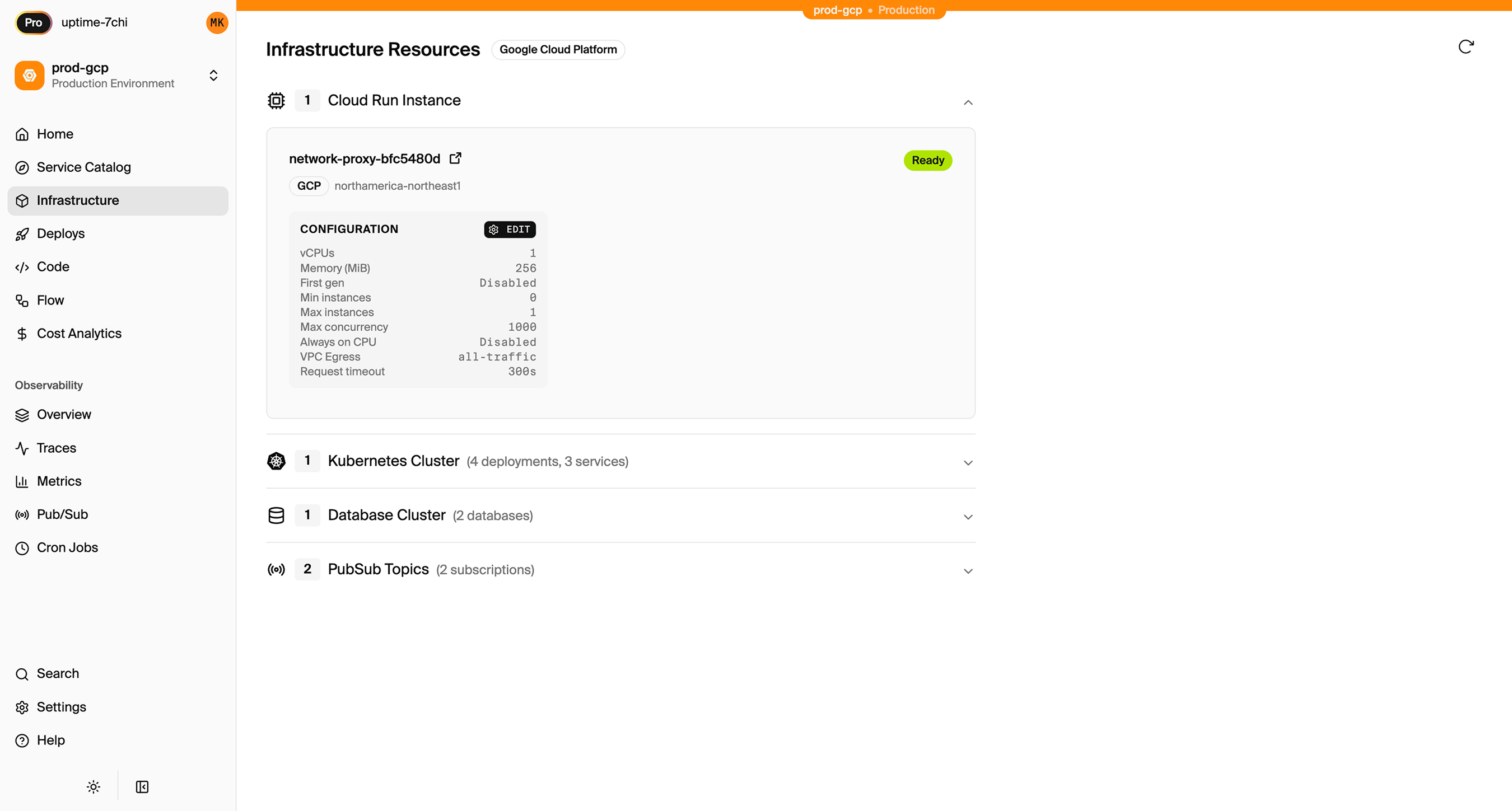
Encore creates in your AWS account:
- ECS on Fargate for running your application
- Application Load Balancer for HTTP routing, with ACM-managed TLS
- RDS PostgreSQL for any databases you define
- S3 for any object storage (if you define buckets)
- SNS/SQS for Pub/Sub messaging
- CloudWatch Events for cron scheduling
- CloudWatch Logs for application logs
- IAM roles with least-privilege access
You can view and manage these resources directly in the AWS console.
Migration Checklist
- Inventory all App Runner services and their configuration
- Create Encore app with service structure matching your App Runner services
- Port endpoints to
apihandlers - Move environment variables to Encore secrets
- Define databases, Pub/Sub topics, and cron jobs in code
- Connect AWS account to Encore Cloud
- Deploy to a preview environment and validate
- Migrate data to RDS (if applicable)
- Blue-green DNS cutover via Route 53
- Monitor for issues
- Delete the App Runner service
Wrapping Up
Migrating from App Runner to ECS gives you full access to the AWS ecosystem while keeping the simple deployment workflow App Runner was built around. Doing it via Encore means you skip the parts of the ECS migration that App Runner users usually want to avoid: writing Dockerfiles, managing ECR, wiring up GitHub Actions, and configuring VPCs and ALBs by hand.
Try deploying a TypeScript backend to your own AWS account:
Want to jump straight to a running app? Clone this starter and deploy it to your own cloud.