
 Ivan Cernja
Deploying to AWS in 2026 looks different than it did five years ago. The ecosystem has matured, new tools have emerged, and the "right" approach depends more than ever on your team's size, experience, and what you're building.
This guide covers the main options for deploying backend applications to AWS, from clicking around in the console to fully automated infrastructure-as-code. We'll look at the trade-offs, show code examples, and help you pick the right approach.
Option 1: AWS Console (Click-Ops)
The AWS Console is where most developers start. You log in, click through wizards, and configure services manually.
When it works:
- Learning AWS concepts
- Quick experiments and prototypes
- One-off tasks that don't need to be repeatable
When it doesn't:
- Anything you need to reproduce (staging, production, disaster recovery)
- Team environments where multiple people need to understand the setup
- Compliance requirements that need audit trails
The console is fine for learning, but you'll quickly hit limits. There's no version control, no way to review changes, and no easy path to reproduce what you built. Most teams graduate to something else within months.
Option 2: Infrastructure from Code (Encore)
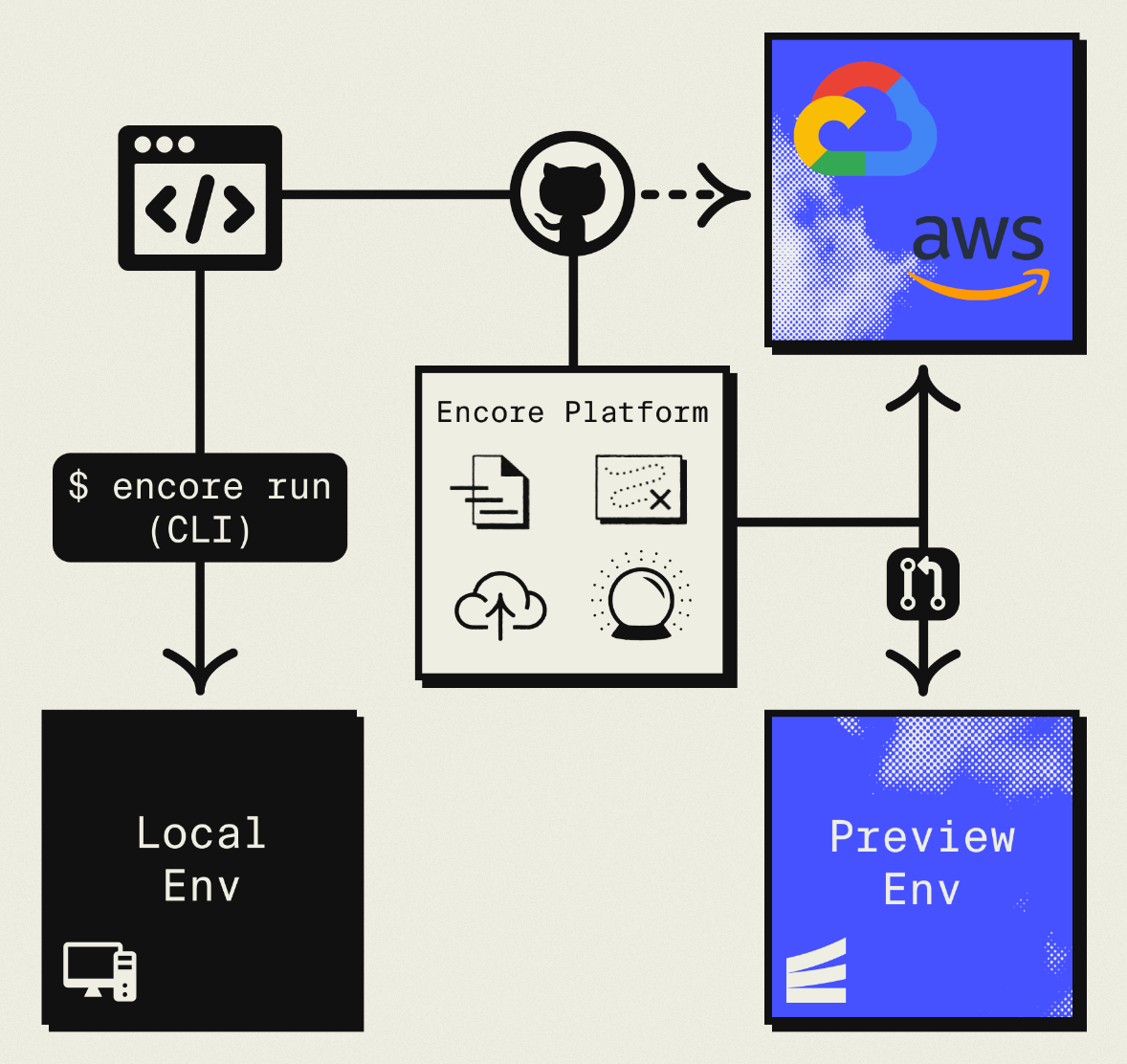
Encore takes a different approach than traditional infrastructure-as-code. Instead of writing separate infrastructure definitions, you declare what your application needs directly in your backend code. Encore Cloud then provisions AWS resources automatically.
import { api } from "encore.dev/api";
import { SQLDatabase } from "encore.dev/storage/sqldb";
import { Topic } from "encore.dev/pubsub";

// This creates an RDS PostgreSQL database
const db = new SQLDatabase("users", {
  migrations: "./migrations",
});

// This creates SNS/SQS
const signups = new Topic<SignupEvent>("signups", {
  deliveryGuarantee: "at-least-once",
});

// This creates a Fargate service or Lambda
export const createUser = api(
  { method: "POST", path: "/users", expose: true },
  async (req: CreateUserRequest) => {
    const user = await db.exec`INSERT INTO users ...`;
    await signups.publish({ userId: user.id });
    return user;
  }
);
When you push code, Encore analyzes it and provisions the corresponding AWS resources: RDS for databases, SNS/SQS for Pub/Sub, Fargate or Lambda for compute, S3 for object storage, CloudWatch for cron jobs.
What you get:
- No Terraform, CloudFormation, or YAML to write
- Infrastructure changes through code review (not manual config)
- Local development with Docker-based versions of AWS services
- Preview environments for every pull request
- Built-in observability (tracing, metrics, logs)
Trade-offs:
- Less granular control over resource configuration than raw Terraform
- Newer ecosystem than Terraform
Encore works well for teams that want AWS infrastructure ownership without becoming infrastructure experts. Companies like Groupon use this approach to power their backends at scale. The open-source framework has 11k+ GitHub stars.
Option 3: AWS CloudFormation
CloudFormation is AWS's native infrastructure-as-code service. You define resources in YAML or JSON templates, and CloudFormation creates and manages them.
AWSTemplateFormatVersion: '2010-09-09'
Resources:
  MyDatabase:
    Type: AWS::RDS::DBInstance
    Properties:
      DBInstanceClass: db.t3.micro
      Engine: postgres
      MasterUsername: admin
      MasterUserPassword: !Ref DBPassword
      AllocatedStorage: 20

  MyLambda:
    Type: AWS::Lambda::Function
    Properties:
      Runtime: nodejs18.x
      Handler: index.handler
      Code:
        S3Bucket: my-deployment-bucket
        S3Key: lambda.zip
What you get:
- Native AWS integration, no third-party dependencies
- Drift detection (CloudFormation can tell if someone changed resources manually)
- Stack management for grouping related resources
Trade-offs:
- Verbose YAML/JSON syntax
- Slow feedback loops (deployments can take minutes)
- Limited programming constructs (no loops, limited conditionals)
- AWS-only (can't manage GCP or other providers)
CloudFormation is reliable but painful to write. Most teams either use a wrapper (like CDK) or switch to Terraform.
Option 4: AWS CDK
The Cloud Development Kit (CDK) lets you write CloudFormation in real programming languages. You write TypeScript, Python, or Go, and CDK synthesizes CloudFormation templates.
import * as cdk from 'aws-cdk-lib';
import * as rds from 'aws-cdk-lib/aws-rds';
import * as lambda from 'aws-cdk-lib/aws-lambda';

export class MyStack extends cdk.Stack {
  constructor(scope: cdk.App, id: string) {
    super(scope, id);

    const database = new rds.DatabaseInstance(this, 'Database', {
      engine: rds.DatabaseInstanceEngine.postgres({
        version: rds.PostgresEngineVersion.VER_15,
      }),
      instanceType: ec2.InstanceType.of(
        ec2.InstanceClass.T3,
        ec2.InstanceSize.MICRO
      ),
    });

    const fn = new lambda.Function(this, 'Handler', {
      runtime: lambda.Runtime.NODEJS_18_X,
      handler: 'index.handler',
      code: lambda.Code.fromAsset('lambda'),
      environment: {
        DATABASE_URL: database.instanceEndpoint.hostname,
      },
    });
  }
}
What you get:
- Real programming language instead of YAML
- IDE autocomplete and type checking
- Reusable constructs and abstractions
- Still generates CloudFormation under the hood
Trade-offs:
- Adds a compilation step (CDK → CloudFormation → AWS)
- Debugging means understanding both CDK and CloudFormation
- AWS-only
- Still requires understanding AWS service configuration
CDK is a significant improvement over raw CloudFormation, but you still need to understand AWS services deeply.
Option 5: Terraform
Terraform is the industry standard for infrastructure-as-code. It uses HashiCorp Configuration Language (HCL) and works across AWS, GCP, Azure, and hundreds of other providers.
// Terraform HCL syntax
provider "aws" {
  region = "us-east-1"
}

resource "aws_db_instance" "main" {
  identifier        = "my-database"
  engine            = "postgres"
  engine_version    = "15"
  instance_class    = "db.t3.micro"
  allocated_storage = 20
  username          = "admin"
  password          = var.db_password
}

resource "aws_lambda_function" "api" {
  function_name = "my-api"
  runtime       = "nodejs18.x"
  handler       = "index.handler"
  filename      = "lambda.zip"

  environment {
    variables = {
      DATABASE_URL = aws_db_instance.main.endpoint
    }
  }
}
What you get:
- Multi-cloud support
- Massive ecosystem (providers for everything)
- State management for tracking what's deployed
- Plan/apply workflow for reviewing changes before deploying
- Large community and extensive documentation
Trade-offs:
- Learning HCL (it's not hard, but it's another language)
- State file management (remote state, locking, etc.)
- Can get complex for large infrastructures
- Separate from your application code
The trade-off is that you're maintaining two codebases: your application and your infrastructure. This adds overhead but gives you more control over individual resource settings.
Option 6: Pulumi
Pulumi is like Terraform but uses real programming languages instead of HCL. You write TypeScript, Python, Go, or C# to define infrastructure.
import * as pulumi from "@pulumi/pulumi";
import * as aws from "@pulumi/aws";

const database = new aws.rds.Instance("database", {
  engine: "postgres",
  engineVersion: "15",
  instanceClass: "db.t3.micro",
  allocatedStorage: 20,
  username: "admin",
  password: config.requireSecret("dbPassword"),
});

const fn = new aws.lambda.Function("api", {
  runtime: "nodejs18.x",
  handler: "index.handler",
  code: new pulumi.asset.FileArchive("./lambda"),
  environment: {
    variables: {
      DATABASE_URL: database.endpoint,
    },
  },
});
What you get:
- Real programming language (loops, conditionals, functions)
- Type safety and IDE support
- Multi-cloud support
- Can share code between infrastructure and application
Trade-offs:
- Smaller ecosystem than Terraform
- Still requires understanding cloud service configuration
- Separate from your application code
Pulumi offers an alternative to Terraform's HCL syntax if you prefer using TypeScript or Python for infrastructure definitions.
Option 7: SST (Serverless Stack)
SST focuses on serverless AWS deployments. It's built on CDK but optimized for Lambda, API Gateway, and related services.
import { Api, Table } from "sst/constructs";

export function API({ stack }: StackContext) {
  const table = new Table(stack, "users", {
    fields: { id: "string", email: "string" },
    primaryIndex: { partitionKey: "id" },
  });

  const api = new Api(stack, "api", {
    routes: {
      "POST /users": "packages/functions/src/create.handler",
    },
  });

  api.bind([table]);

  return { api };
}
What you get:
- Optimized for serverless (Lambda, DynamoDB, etc.)
- Live Lambda development (code changes without redeploy)
- Good developer experience for serverless patterns
Trade-offs:
- Serverless-focused (less suited for containers or traditional servers)
- Built on CDK, so inherits some of its complexity
- AWS-only
SST targets serverless applications on AWS. It's built on CDK, so you'll still need to understand AWS concepts.
Comparison
| Approach | Learning Curve | Flexibility | Maintenance | Best For |
|---|---|---|---|---|
| Console | Low | High | None (not repeatable) | Learning, experiments |
| Encore | Low | Medium | Low | Teams wanting AWS without DevOps |
| CloudFormation | High | High | High | AWS-native shops |
| CDK | Medium | High | Medium | Teams comfortable with AWS |
| Terraform | Medium | Very High | Medium | Multi-cloud, large infra |
| Pulumi | Medium | Very High | Medium | Developers who prefer real code |
| SST | Low-Medium | Medium | Low | Serverless applications |
Which Should You Choose?
Choose the Console if:
- You're learning AWS
- It's a one-time experiment
Choose Encore if:
- You want to focus on backend code, not infrastructure
- You want AWS ownership without becoming an AWS expert
- You value fast iteration and built-in observability
- Your infrastructure needs are covered by databases, queues, cron, storage
Choose CloudFormation/CDK if:
- You're already invested in the AWS ecosystem
- You need fine-grained control over every AWS setting
- Your organization mandates AWS-native tooling
Choose Terraform if:
- You need multi-cloud support
- You have complex infrastructure requirements
- Your team has (or wants to build) infrastructure expertise
- You need to manage non-AWS resources
Choose Pulumi if:
- You want Terraform's flexibility with real programming languages
- Your team prefers TypeScript/Python over HCL
Choose SST if:
- You're building serverless applications
- You want the best Lambda development experience
- You're okay being AWS-only
Getting Started
Most teams should start with the simplest option that meets their needs, then evolve if necessary. If you're building a backend application and don't want to become an infrastructure expert, Encore is worth trying. If you need maximum flexibility or multi-cloud support, Terraform is the industry standard.
Whatever you choose, avoid the console for anything you need to reproduce. Infrastructure-as-code isn't optional in 2026—it's how professional teams ship software.
Want to jump straight to a running app? Clone this starter and deploy it to your own cloud.