 Ivan Cernja
How to Migrate from AWS Amplify to Your Own AWS Account
Move from Amplify's managed services to infrastructure you fully control

AWS Amplify promises to simplify backend development on AWS. It bundles DynamoDB, AppSync, Cognito, Lambda, and S3 behind a CLI that generates code and handles deployment. For simple apps, it works. But as your application grows, Amplify's abstractions start getting in the way.
The generated code is hard to customize. The CLI workflow is slow. Debugging issues means digging through multiple AWS services to figure out what Amplify did. And you're locked into Amplify's conventions even when they don't fit your use case.
The alternative is writing Terraform or CloudFormation yourself, but that means learning infrastructure-as-code and managing hundreds of lines of config. That's trading one set of problems for another.
This guide takes a different approach: migrating from Amplify to standard AWS services using Encore and Encore Cloud. Encore is an open-source TypeScript backend framework (11k+ GitHub stars) where you define infrastructure as type-safe objects in your code: databases, Pub/Sub, cron jobs, object storage. Encore Cloud then provisions these resources in your AWS account using managed services like RDS, SQS, and S3.
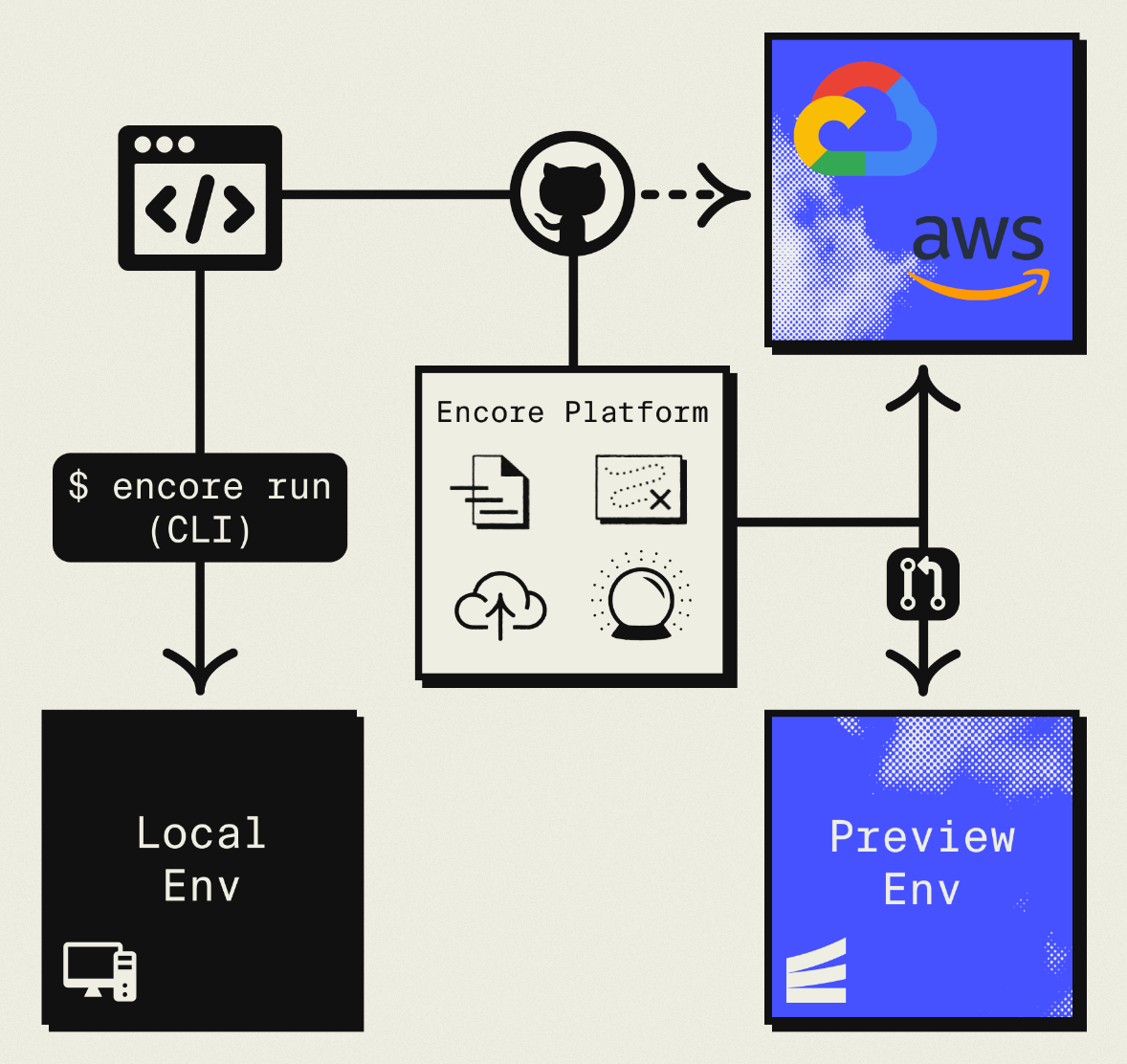
The result is standard AWS services you can inspect and customize, but without the DevOps overhead. Companies like Groupon already use this approach to power their backends at scale.
What You're Migrating
| Amplify Component | Standard AWS (via Encore) |
|---|---|
| Amplify Data (AppSync/DynamoDB) | RDS PostgreSQL |
| Amplify Auth (Cognito) | Encore Auth (or Clerk, WorkOS, etc.) |
| Amplify Storage | S3 |
| Amplify Functions | Fargate |
| Amplify API (REST/GraphQL) | Fargate with API Gateway |
You're staying on AWS. You're just removing the Amplify layer and managing services directly.
Why Teams Migrate from Amplify
Database flexibility: Amplify pushes you toward DynamoDB and AppSync. DynamoDB works for specific access patterns but makes relational modeling painful. PostgreSQL offers more flexibility with joins, aggregations, and the full SQL ecosystem.
Cost transparency: Amplify spreads costs across DynamoDB, Lambda, AppSync, and other services. It's hard to understand what you're paying for. Direct AWS services give clear cost attribution.
Escape Amplify conventions: Amplify generates directories, configuration files, and code in specific ways. Changing them means fighting the CLI. Direct services give you architectural freedom.
Simpler deployment: Amplify's CLI and build process adds complexity to deployments. Encore provides simpler git-push deployments to the same AWS services.
Keep using AWS: Unlike migrating to another platform, you stay on AWS with all its benefits. You're just removing an abstraction layer.
What Encore Handles For You
When you deploy to AWS through Encore Cloud, every resource gets production defaults: private VPC placement, least-privilege IAM roles, encryption at rest, automated backups where applicable, and CloudWatch logging. You don't configure this per resource. It's automatic.
Encore follows AWS best practices and gives you guardrails. You can review infrastructure changes before they're applied, and everything runs in your own AWS account so you maintain full control.
Here's what that looks like in practice:
import { SQLDatabase } from "encore.dev/storage/sqldb";
import { Bucket } from "encore.dev/storage/objects";
import { Topic } from "encore.dev/pubsub";
import { CronJob } from "encore.dev/cron";

const db = new SQLDatabase("main", { migrations: "./migrations" });
const uploads = new Bucket("uploads", { versioned: false });
const events = new Topic<OrderEvent>("events", { deliveryGuarantee: "at-least-once" });
const _ = new CronJob("daily-cleanup", { schedule: "0 0 * * *", endpoint: cleanup });
This provisions RDS, S3, SNS/SQS, and CloudWatch Events with proper networking, IAM, and monitoring. You write TypeScript or Go, Encore handles the Terraform. The only Encore-specific parts are the import statements. Your business logic is standard TypeScript, so you're not locked in.
Encore Cloud visualizes how your services connect, including Pub/Sub topics, cron jobs, and database dependencies:
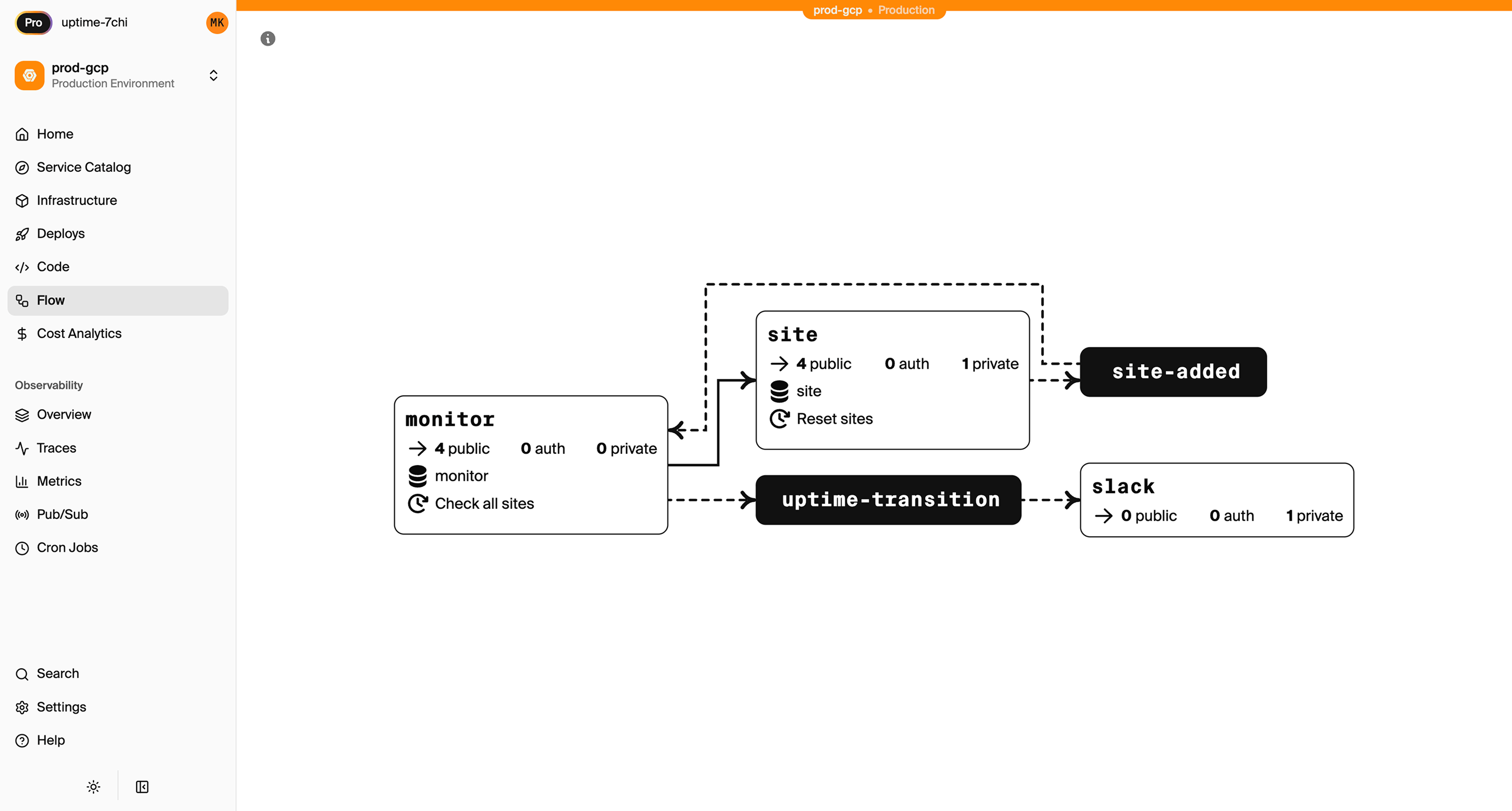
See the infrastructure primitives docs for the full list of supported resources.
Step 1: Migrate from DynamoDB to PostgreSQL
If Amplify provisioned DynamoDB for your data (which is the default with Amplify Data), you'll want to migrate to PostgreSQL for relational modeling.
Understand Your Current Data Model
Amplify Data uses GraphQL schemas that map to DynamoDB:
type Todo @model {
  id: ID!
  name: String!
  description: String
  completed: Boolean!
  owner: String
  priority: Int
  dueDate: AWSDate
}

type Project @model {
  id: ID!
  name: String!
  todos: [Todo] @hasMany
}
Design Your PostgreSQL Schema
Convert to relational tables with proper foreign keys:
-- migrations/001_initial.up.sql
CREATE TABLE projects (
  id TEXT PRIMARY KEY DEFAULT gen_random_uuid()::text,
  name TEXT NOT NULL,
  owner_id TEXT NOT NULL,
  created_at TIMESTAMPTZ DEFAULT NOW()
);

CREATE TABLE todos (
  id TEXT PRIMARY KEY DEFAULT gen_random_uuid()::text,
  project_id TEXT REFERENCES projects(id) ON DELETE CASCADE,
  name TEXT NOT NULL,
  description TEXT,
  completed BOOLEAN DEFAULT false,
  priority INTEGER DEFAULT 0,
  due_date DATE,
  owner_id TEXT NOT NULL,
  created_at TIMESTAMPTZ DEFAULT NOW()
);

CREATE INDEX todos_project_idx ON todos(project_id);
CREATE INDEX todos_owner_idx ON todos(owner_id);
CREATE INDEX todos_due_date_idx ON todos(due_date) WHERE completed = false;
Set Up the Encore Database
import { SQLDatabase } from "encore.dev/storage/sqldb";

const db = new SQLDatabase("main", {
  migrations: "./migrations",
});
That's the complete database definition. Encore analyzes this at compile time and provisions RDS PostgreSQL when you deploy. No Terraform, no CloudFormation.
Migrate Your Data
Export from DynamoDB and import to PostgreSQL:
# Export from DynamoDB (using AWS CLI)
aws dynamodb scan --table-name Todo-xxxx-prod > todos.json
aws dynamodb scan --table-name Project-xxxx-prod > projects.json
Write a migration script:
// scripts/migrate-data.ts
import * as fs from "fs";
import { Pool } from "pg";

const pg = new Pool({ connectionString: process.env.DATABASE_URL });

interface DynamoItem {
  id: { S: string };
  name: { S: string };
  completed?: { BOOL: boolean };
  priority?: { N: string };
  // ... other fields
}

async function migrateTodos() {
  const data = JSON.parse(fs.readFileSync("./todos.json", "utf8"));

  for (const item of data.Items as DynamoItem[]) {
    await pg.query(
      `INSERT INTO todos (id, name, completed, priority, owner_id)
       VALUES ($1, $2, $3, $4, $5)
       ON CONFLICT (id) DO NOTHING`,
      [
        item.id.S,
        item.name.S,
        item.completed?.BOOL ?? false,
        item.priority?.N ? parseInt(item.priority.N) : 0,
        item.owner?.S ?? "unknown"
      ]
    );
  }

  console.log(`Migrated ${data.Items.length} todos`);
}

migrateTodos().catch(console.error);
Replace Amplify Data Operations
Before (Amplify Data):
import { generateClient } from "aws-amplify/data";
import type { Schema } from "../amplify/data/resource";

const client = generateClient<Schema>();

// Create
const { data: newTodo } = await client.models.Todo.create({
  name: "Buy groceries",
  completed: false,
});

// List
const { data: todos } = await client.models.Todo.list({
  filter: { completed: { eq: false } }
});

// Update
await client.models.Todo.update({
  id: "123",
  completed: true,
});
After (Encore):
import { api } from "encore.dev/api";
import { getAuthData } from "~encore/auth";

interface Todo {
  id: string;
  projectId: string | null;
  name: string;
  description: string | null;
  completed: boolean;
  priority: number;
  dueDate: string | null;
  createdAt: Date;
}

export const createTodo = api(
  { method: "POST", path: "/todos", expose: true, auth: true },
  async (req: { name: string; projectId?: string; priority?: number }): Promise<Todo> => {
    const auth = getAuthData()!;

    const todo = await db.queryRow<Todo>`
      INSERT INTO todos (name, project_id, priority, owner_id)
      VALUES (${req.name}, ${req.projectId || null}, ${req.priority || 0}, ${auth.userID})
      RETURNING id, project_id as "projectId", name, description, completed,
                priority, due_date as "dueDate", created_at as "createdAt"
    `;

    return todo!;
  }
);

export const listTodos = api(
  { method: "GET", path: "/todos", expose: true, auth: true },
  async (req: { completed?: boolean; projectId?: string }): Promise<{ todos: Todo[] }> => {
    const auth = getAuthData()!;

    let query = `
      SELECT id, project_id as "projectId", name, description, completed,
             priority, due_date as "dueDate", created_at as "createdAt"
      FROM todos
      WHERE owner_id = $1
    `;
    const params: unknown[] = [auth.userID];

    if (req.completed !== undefined) {
      query += ` AND completed = $${params.length + 1}`;
      params.push(req.completed);
    }

    if (req.projectId) {
      query += ` AND project_id = $${params.length + 1}`;
      params.push(req.projectId);
    }

    query += " ORDER BY priority DESC, created_at DESC";

    const result = await db.query<Todo>(query, ...params);
    const todos: Todo[] = [];
    for await (const todo of result) {
      todos.push(todo);
    }
    return { todos };
  }
);

export const updateTodo = api(
  { method: "PATCH", path: "/todos/:id", expose: true, auth: true },
  async (req: { id: string; completed?: boolean; name?: string; priority?: number }): Promise<Todo> => {
    const auth = getAuthData()!;

    const todo = await db.queryRow<Todo>`
      UPDATE todos
      SET
        completed = COALESCE(${req.completed}, completed),
        name = COALESCE(${req.name}, name),
        priority = COALESCE(${req.priority}, priority)
      WHERE id = ${req.id} AND owner_id = ${auth.userID}
      RETURNING id, project_id as "projectId", name, description, completed,
                priority, due_date as "dueDate", created_at as "createdAt"
    `;

    if (!todo) throw new Error("Todo not found");
    return todo;
  }
);
With SQL, you can also write queries that Amplify would make difficult:
// Get project summary with todo counts
export const getProjectSummary = api(
  { method: "GET", path: "/projects/:id/summary", expose: true, auth: true },
  async ({ id }: { id: string }): Promise<ProjectSummary> => {
    const auth = getAuthData()!;

    const summary = await db.queryRow<ProjectSummary>`
      SELECT p.id, p.name,
             COUNT(t.id) as "totalTodos",
             COUNT(t.id) FILTER (WHERE t.completed) as "completedTodos",
             COUNT(t.id) FILTER (WHERE t.due_date < CURRENT_DATE AND NOT t.completed) as "overdueTodos"
      FROM projects p
      LEFT JOIN todos t ON p.id = t.project_id
      WHERE p.id = ${id} AND p.owner_id = ${auth.userID}
      GROUP BY p.id
    `;

    if (!summary) throw new Error("Project not found");
    return summary;
  }
);
One query instead of multiple AppSync resolvers.
Step 2: Migrate Amplify Auth
Encore has built-in support for authentication through auth handlers. You define an auth handler that validates tokens and returns user data, then mark endpoints as requiring auth.
Here's a complete example with JWT-based authentication:
import { authHandler, Gateway } from "encore.dev/auth";
import { api, APIError } from "encore.dev/api";
import { SignJWT, jwtVerify } from "jose";
import { verify, hash } from "@node-rs/argon2";
import { secret } from "encore.dev/config";

const jwtSecret = secret("JWTSecret");

export const auth = authHandler<{ authorization: string }, { userID: string; email: string }>(
  async (params) => {
    const token = params.authorization.replace("Bearer ", "");

    const { payload } = await jwtVerify(
      token,
      new TextEncoder().encode(jwtSecret())
    );

    return {
      userID: payload.sub as string,
      email: payload.email as string,
    };
  }
);

export const gateway = new Gateway({ authHandler: auth });

export const login = api(
  { method: "POST", path: "/auth/login", expose: true },
  async (req: { email: string; password: string }): Promise<{ token: string }> => {
    const user = await db.queryRow<{ id: string; email: string; passwordHash: string }>`
      SELECT id, email, password_hash as "passwordHash"
      FROM users WHERE email = ${req.email}
    `;

    if (!user || !(await verify(user.passwordHash, req.password))) {
      throw APIError.unauthenticated("Invalid credentials");
    }

    const token = await new SignJWT({ email: user.email })
      .setProtectedHeader({ alg: "HS256" })
      .setSubject(user.id)
      .setIssuedAt()
      .setExpirationTime("7d")
      .sign(new TextEncoder().encode(jwtSecret()));

    return { token };
  }
);
Step 3: Migrate Amplify Storage
Replace Amplify Storage with direct S3 access:
Before (Amplify Storage):
import { uploadData, getUrl, remove } from "aws-amplify/storage";

// Upload
await uploadData({
  key: "photos/photo.jpg",
  data: file,
  options: { contentType: "image/jpeg" }
}).result;

// Get URL
const { url } = await getUrl({ key: "photos/photo.jpg" });

// Delete
await remove({ key: "photos/photo.jpg" });
After (Encore):
import { Bucket } from "encore.dev/storage/objects";

const photos = new Bucket("photos", { versioned: false });

export const uploadPhoto = api(
  { method: "POST", path: "/photos", expose: true, auth: true },
  async (req: { filename: string; data: Buffer }): Promise<{ url: string }> => {
    await photos.upload(req.filename, req.data, {
      contentType: "image/jpeg",
    });
    return { url: photos.publicUrl(req.filename) };
  }
);

export const deletePhoto = api(
  { method: "DELETE", path: "/photos/:filename", expose: true, auth: true },
  async ({ filename }: { filename: string }): Promise<{ deleted: boolean }> => {
    await photos.remove(filename);
    return { deleted: true };
  }
);
Step 4: Migrate Amplify Functions
Amplify Functions become Encore APIs:
Before (Amplify Function):
// amplify/functions/process-order/handler.ts
import type { Handler } from "aws-lambda";

export const handler: Handler = async (event) => {
  const body = JSON.parse(event.body || "{}");
  const total = body.items.reduce(
    (sum: number, item: { price: number; quantity: number }) =>
      sum + item.price * item.quantity,
    0
  );

  return {
    statusCode: 200,
    body: JSON.stringify({ total }),
  };
};
After (Encore):
import { api } from "encore.dev/api";

interface OrderItem {
  productId: string;
  price: number;
  quantity: number;
}

export const processOrder = api(
  { method: "POST", path: "/orders/process", expose: true },
  async (req: { items: OrderItem[] }): Promise<{ total: number }> => {
    const total = req.items.reduce(
      (sum, item) => sum + item.price * item.quantity,
      0
    );
    return { total };
  }
);
No Lambda event parsing. Request validation is automatic based on the TypeScript types.
Step 5: Update Your Frontend
Replace Amplify client calls with fetch or a generated client:
Before (Amplify):
import { generateClient } from "aws-amplify/data";
import type { Schema } from "../amplify/data/resource";

const client = generateClient<Schema>();
const { data: todos } = await client.models.Todo.list();
After (fetch or generated client):
// Option 1: Direct fetch
const response = await fetch("/api/todos", {
  headers: { Authorization: `Bearer ${token}` }
});
const { todos } = await response.json();

// Option 2: Generated client (encore gen client --output=./client.ts)
import Client from "./client";

const client = new Client(import.meta.env.VITE_API_URL);
const { todos } = await client.todos.listTodos();
Step 6: Deploy to Your AWS Account
- Connect your AWS account in Encore Cloud. See the AWS setup guide for details.
- Remove Amplify resources (after testing in preview):
amplify delete - Deploy with Encore:
git push encore main - Run data migration scripts
- Update DNS
What Gets Provisioned
Encore creates standard AWS resources you can access directly:
- RDS PostgreSQL for your database
- S3 for object storage
- Fargate for compute
- API Gateway for HTTP routing
- CloudWatch for logs and metrics
- IAM with least-privilege roles
You can view and manage these in the AWS Console.
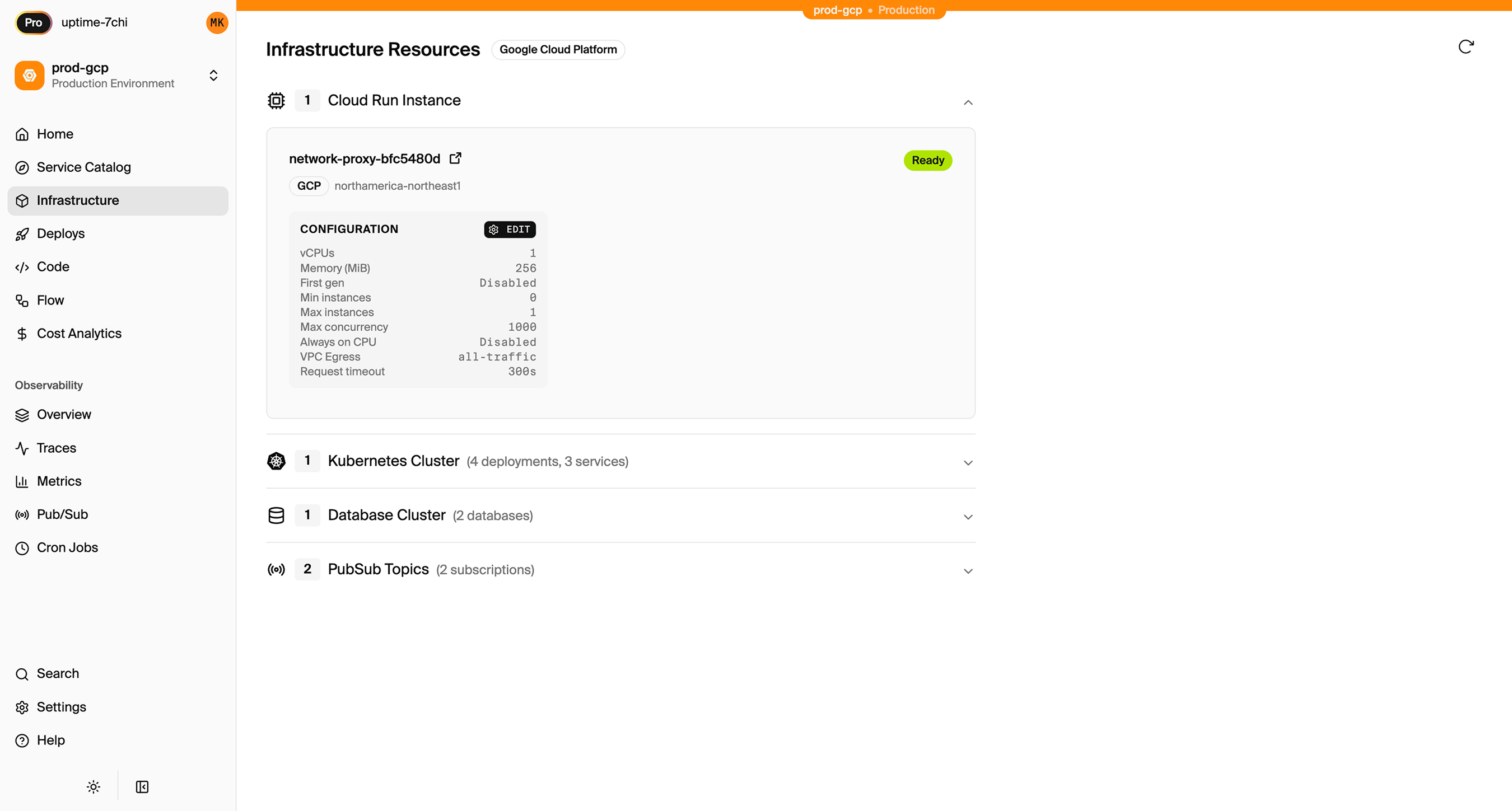
Encore Cloud also gives you a dashboard showing all provisioned infrastructure across environments:
Migration Checklist
- Export data from DynamoDB
- Design PostgreSQL schema with proper relationships
- Write and test data migration scripts
- Implement auth handler
- Update auth handling
- Convert Amplify Storage to S3 bucket
- Migrate stored files
- Convert Amplify Functions to Encore APIs
- Update frontend to use new API
- Test in Encore preview environment
- Deploy to production
- Run data migrations
- Delete Amplify resources after verification
Wrapping Up
Migrating from Amplify to direct AWS services removes the abstraction layer while keeping you on AWS. You get infrastructure control, cost transparency, and architectural freedom.
Encore handles the provisioning so you don't need to become a CloudFormation expert. You write application code, and the infrastructure gets created based on what your code uses.
Try deploying a TypeScript backend to your own AWS account:
Want to jump straight to a running app? Clone this starter and deploy it to your own cloud.