 Ivan Cernja
How to Migrate from Render to AWS
Move from Render's managed platform to your own AWS account

Render's appeal is simplicity: push code, get a running service. You don't think about servers, containers, or load balancers. That works well for getting started, but the simplicity has limits.
As your application grows, you might want more control over networking. You might need VPC peering for compliance. Render's per-service pricing can get expensive with multiple services. Or you might need AWS services that aren't available on Render.
The traditional path to AWS means learning Terraform or CloudFormation, writing hundreds of lines of infrastructure config, and becoming your own DevOps team. That's a big jump from Render's simplicity.
This guide takes a different approach: migrating to your own AWS account using Encore and Encore Cloud. Encore is an open-source TypeScript backend framework (11k+ GitHub stars) where you define infrastructure as type-safe objects in your code: databases, Pub/Sub, cron jobs, object storage. Encore Cloud then provisions these resources in your AWS account using managed services like RDS, SQS, and S3.
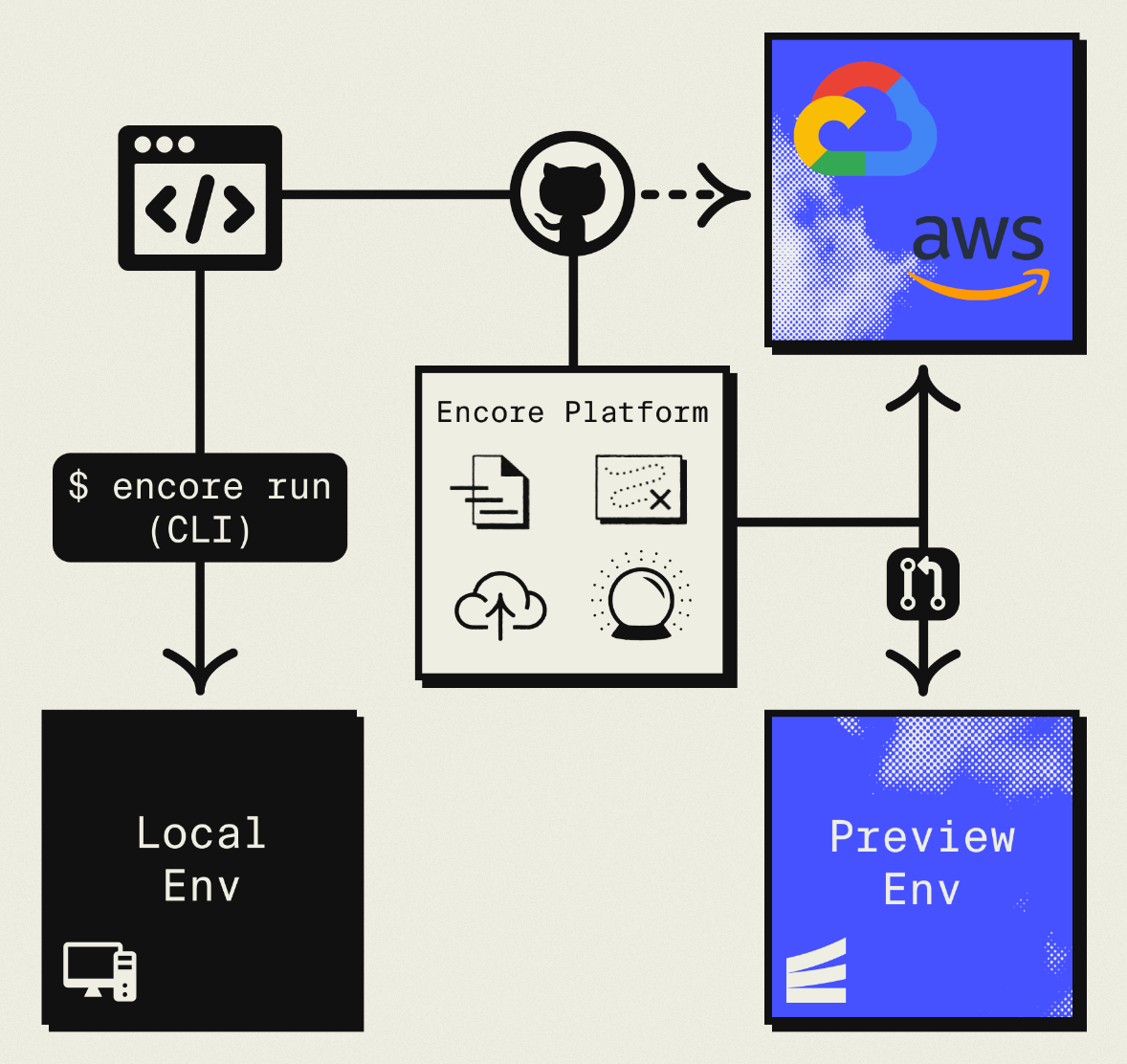
The result is AWS infrastructure you own and control, but with a developer experience similar to Render: push code, get a deployment. No Terraform to learn, no YAML to maintain. Companies like Groupon already use this approach to power their backends at scale.
What You're Migrating
| Render Component | AWS Equivalent (via Encore) |
|---|---|
| Web Services | Fargate |
| PostgreSQL | Amazon RDS |
| Redis | ElastiCache or Pub/Sub |
| Cron Jobs | CloudWatch Events + Fargate |
| Private Services | Internal ALB + Fargate |
| Background Workers | Pub/Sub subscribers |
The mapping is fairly direct. Render services become Encore APIs running on Fargate. Postgres moves to RDS. Background workers become Pub/Sub subscribers.
Why Teams Migrate from Render
Cost at higher scale: Render charges per service. Multiple web services, databases, and workers add up. AWS offers reserved capacity and savings plans that significantly reduce costs for predictable workloads.
Infrastructure ownership: On Render, you get a URL and some configuration options. On AWS, you control VPCs, security groups, IAM roles, and can integrate with existing infrastructure.
AWS ecosystem: If you need SQS, DynamoDB, Lambda@Edge, or other AWS services, using them from Render requires networking configuration. In your own AWS account, they're local.
Compliance: Healthcare, finance, and government projects often require infrastructure in accounts with specific audit capabilities.
What Encore Handles For You
When you deploy to AWS through Encore Cloud, every resource gets production defaults: private VPC placement, least-privilege IAM roles, encryption at rest, automated backups where applicable, and CloudWatch logging. You don't configure this per resource. It's automatic.
Encore follows AWS best practices and gives you guardrails. You can review infrastructure changes before they're applied, and everything runs in your own AWS account so you maintain full control.
Here's what that looks like in practice:
import { SQLDatabase } from "encore.dev/storage/sqldb";
import { Bucket } from "encore.dev/storage/objects";
import { Topic } from "encore.dev/pubsub";
import { CronJob } from "encore.dev/cron";

const db = new SQLDatabase("main", { migrations: "./migrations" });
const uploads = new Bucket("uploads", { versioned: false });
const events = new Topic<OrderEvent>("events", { deliveryGuarantee: "at-least-once" });
const _ = new CronJob("daily-cleanup", { schedule: "0 0 * * *", endpoint: cleanup });
This provisions RDS, S3, SNS/SQS, and CloudWatch Events with proper networking, IAM, and monitoring. You write TypeScript or Go, Encore handles the Terraform. The only Encore-specific parts are the import statements. Your business logic is standard TypeScript, so you're not locked in.
Encore Cloud visualizes how your services connect, including Pub/Sub topics, cron jobs, and database dependencies:
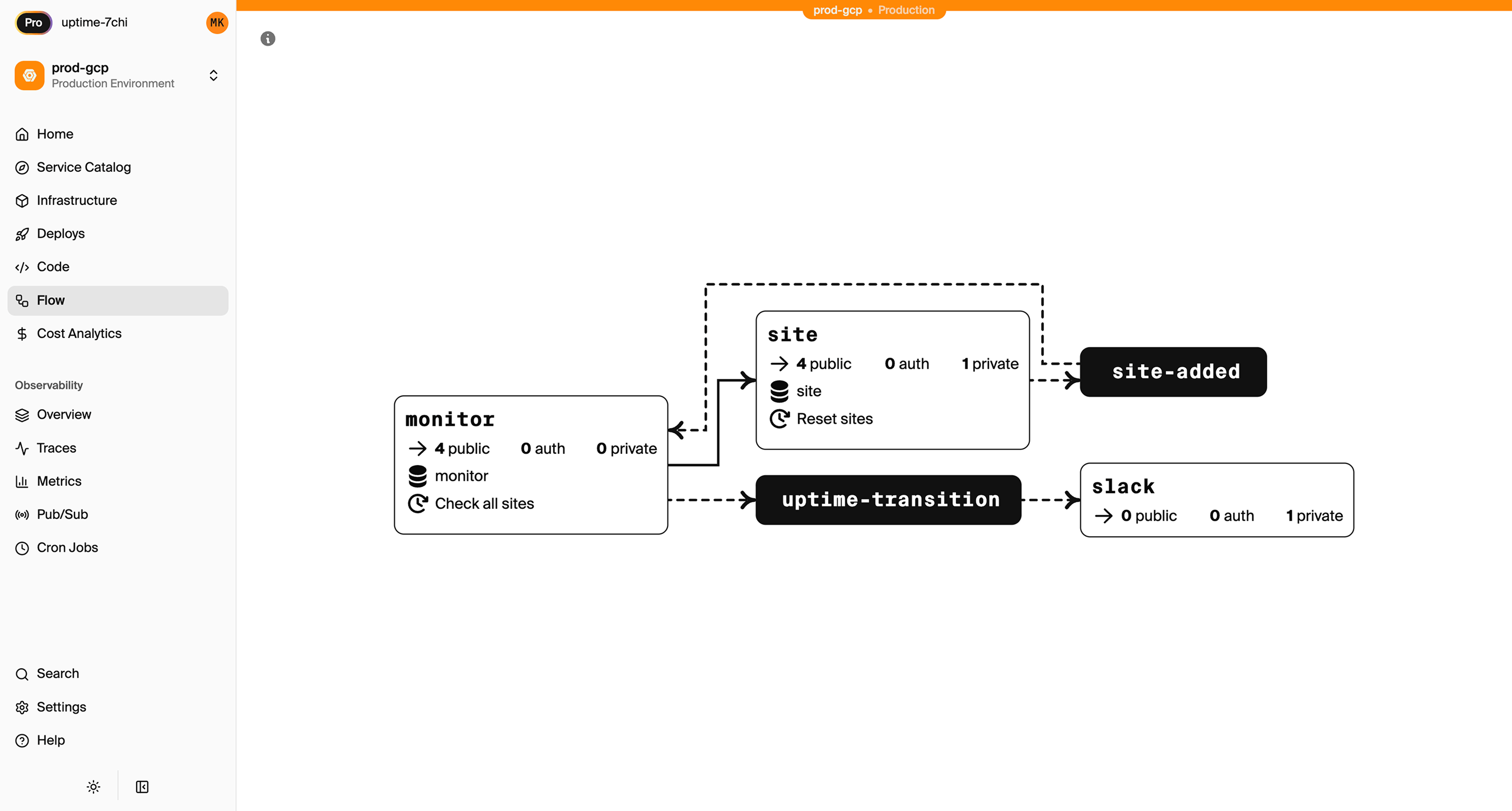
See the infrastructure primitives docs for the full list of supported resources.
Step 1: Migrate Your Web Services
Render uses render.yaml for configuration. With Encore, the infrastructure is defined by your code.
render.yaml:
services:
  - type: web
    name: api
    runtime: node
    buildCommand: npm install && npm run build
    startCommand: npm start
    envVars:
      - key: NODE_ENV
        value: production
Encore equivalent:
import { api } from "encore.dev/api";

export const hello = api(
  { method: "GET", path: "/hello/:name", expose: true },
  async ({ name }: { name: string }): Promise<{ message: string }> => {
    return { message: `Hello, ${name}!` };
  }
);

export const health = api(
  { method: "GET", path: "/health", expose: true },
  async () => ({ status: "ok", timestamp: new Date().toISOString() })
);
No configuration file. Encore analyzes your code to understand what infrastructure it needs. The encore.dev/api import tells it this is an HTTP endpoint. When deployed, it provisions a load balancer, Fargate tasks, and auto-scaling.
If you have multiple Render services, create separate Encore services:
// api/encore.service.ts
import { Service } from "encore.dev/service";
export default new Service("api");

// admin/encore.service.ts
import { Service } from "encore.dev/service";
export default new Service("admin");
Services can call each other with type-safe imports:
import { admin } from "~encore/clients";

// Call the admin service
const stats = await admin.getStats();
Step 2: Migrate PostgreSQL
Both Render and AWS use PostgreSQL, so the migration is straightforward.
Export from Render
Find your connection string in the Render dashboard (Database > Connection > External Connection String), then export:
pg_dump "postgresql://user:pass@dpg-xxxx.render.com/mydb" > backup.sql
For large databases, use the --jobs flag for parallel export.
Set Up the Encore Database
Define your database in code:
import { SQLDatabase } from "encore.dev/storage/sqldb";

const db = new SQLDatabase("main", {
  migrations: "./migrations",
});
That's the complete database definition. Encore analyzes this at compile time and provisions RDS PostgreSQL when you deploy.
Put your existing migration files in ./migrations. If you don't have migration files, you can create them from your current schema:
# Generate schema-only dump
pg_dump --schema-only "your-render-connection" > migrations/001_initial.up.sql
Import to RDS
After deploying with Encore, get the RDS connection string and import:
# Get the production connection string
encore db conn-uri main --env=production

# Import your data
psql "postgresql://user:pass@your-rds.amazonaws.com/main" < backup.sql
Update Your Queries
If you were using an ORM like Prisma or Drizzle, it should work with minimal changes since both are PostgreSQL. For raw queries, Encore provides type-safe tagged template queries:
interface User {
  id: string;
  email: string;
  name: string;
  createdAt: Date;
}

export const getActiveUsers = api(
  { method: "GET", path: "/users/active", expose: true },
  async (): Promise<{ users: User[] }> => {
    const rows = await db.query<User>`
      SELECT id, email, name, created_at as "createdAt"
      FROM users
      WHERE active = true
      ORDER BY created_at DESC
    `;

    const users: User[] = [];
    for await (const user of rows) {
      users.push(user);
    }
    return { users };
  }
);
Step 3: Migrate Redis
If you're using Render Redis, the migration path depends on what you're using it for.
For Job Queues (Bull, BullMQ): Use Pub/Sub
Redis-based job queues map well to Pub/Sub. Encore's Pub/Sub provisions SNS/SQS on AWS, which handles queue semantics natively.
Before (Render with Bull):
import Queue from "bull";

const emailQueue = new Queue("email", process.env.REDIS_URL);

// Producer
await emailQueue.add({ to: "user@example.com", subject: "Welcome" });

// Consumer (separate worker service)
emailQueue.process(async (job) => {
  await sendEmail(job.data.to, job.data.subject);
});
After (Encore):
import { Topic, Subscription } from "encore.dev/pubsub";
import { api } from "encore.dev/api";

interface EmailJob {
  to: string;
  subject: string;
  body: string;
}

export const emailQueue = new Topic<EmailJob>("email-queue", {
  deliveryGuarantee: "at-least-once",
});

// Enqueue from API
export const requestPasswordReset = api(
  { method: "POST", path: "/auth/reset", expose: true },
  async (req: { email: string }): Promise<{ success: boolean }> => {
    await emailQueue.publish({
      to: req.email,
      subject: "Password Reset",
      body: "Click here to reset your password...",
    });
    return { success: true };
  }
);

// Process jobs (runs automatically when messages arrive)
const _ = new Subscription(emailQueue, "send-email", {
  handler: async (job) => {
    await sendEmail(job.to, job.subject, job.body);
  },
});
The subscription handler processes each message. Failed messages retry automatically with exponential backoff.
For Caching: Consider Alternatives
If you're using Redis purely for caching:
-
ElastiCache: Provision separately via AWS Console or Terraform. Connect with the Redis client using a connection string from Encore secrets.
-
Database caching: For simple caching, a PostgreSQL table with TTL works fine. Add an index on the cache key and a cron job to clean expired entries.
-
In-memory caching: For request-scoped or short-lived data, in-process caching might be sufficient.
For Pub/Sub: Use Encore Pub/Sub
Redis pub/sub maps directly to Encore's Topic and Subscription model.
Step 4: Migrate Cron Jobs
Render cron jobs become Encore CronJobs:
render.yaml:
services:
  - type: cron
    name: daily-cleanup
    schedule: "0 2 * * *"
    buildCommand: npm install
    startCommand: node cleanup.js
Encore:
import { CronJob } from "encore.dev/cron";
import { api } from "encore.dev/api";

export const cleanup = api(
  { method: "POST", path: "/internal/cleanup" },
  async (): Promise<{ deleted: number }> => {
    const result = await db.exec`
      DELETE FROM sessions WHERE expires_at < NOW()
    `;
    console.log(`Deleted ${result.rowsAffected} expired sessions`);
    return { deleted: result.rowsAffected };
  }
);

const _ = new CronJob("daily-cleanup", {
  title: "Clean up expired sessions",
  schedule: "0 2 * * *",
  endpoint: cleanup,
});
The cron declaration lives next to the code it runs, making it easy to understand what happens when. On AWS, this provisions CloudWatch Events to trigger the endpoint.
Step 5: Migrate Background Workers
If you have Render background workers (separate services that process jobs), they become Pub/Sub subscribers. See the Redis migration section above for the pattern.
The key difference: instead of a separate render.yaml service definition, the subscriber is just code in your Encore app. It runs in the same deployment but processes messages asynchronously.
Step 6: Migrate Environment Variables
Render environment variables become Encore secrets for sensitive values:
# Set secrets for production
encore secret set --type=production StripeSecretKey
encore secret set --type=production SendgridApiKey
encore secret set --type=production JWTSecret
Access them in code:
import { secret } from "encore.dev/config";

const stripeKey = secret("StripeSecretKey");
const sendgridKey = secret("SendgridApiKey");

// Use in your code
const stripe = new Stripe(stripeKey());
Secrets are environment-specific and encrypted at rest.
Step 7: Deploy to AWS
-
Connect your AWS account in the Encore Cloud dashboard. You'll set up an IAM role that gives Encore permission to provision resources. See the AWS setup guide for details.
-
Push your code:
git push encore main -
Run data migrations (database import, file sync if applicable)
-
Test in preview environment. Each pull request gets its own environment.
-
Update DNS to point to your new endpoints
-
Remove Render services after verification
What Gets Provisioned
Encore creates in your AWS account:
- Fargate for running your application
- RDS PostgreSQL for your database
- S3 for any object storage (if you define buckets)
- SNS/SQS for Pub/Sub messaging
- CloudWatch Events for cron scheduling
- Application Load Balancer for HTTP routing
- CloudWatch Logs for application logs
- IAM roles with least-privilege access
You can view and manage these resources directly in the AWS console.
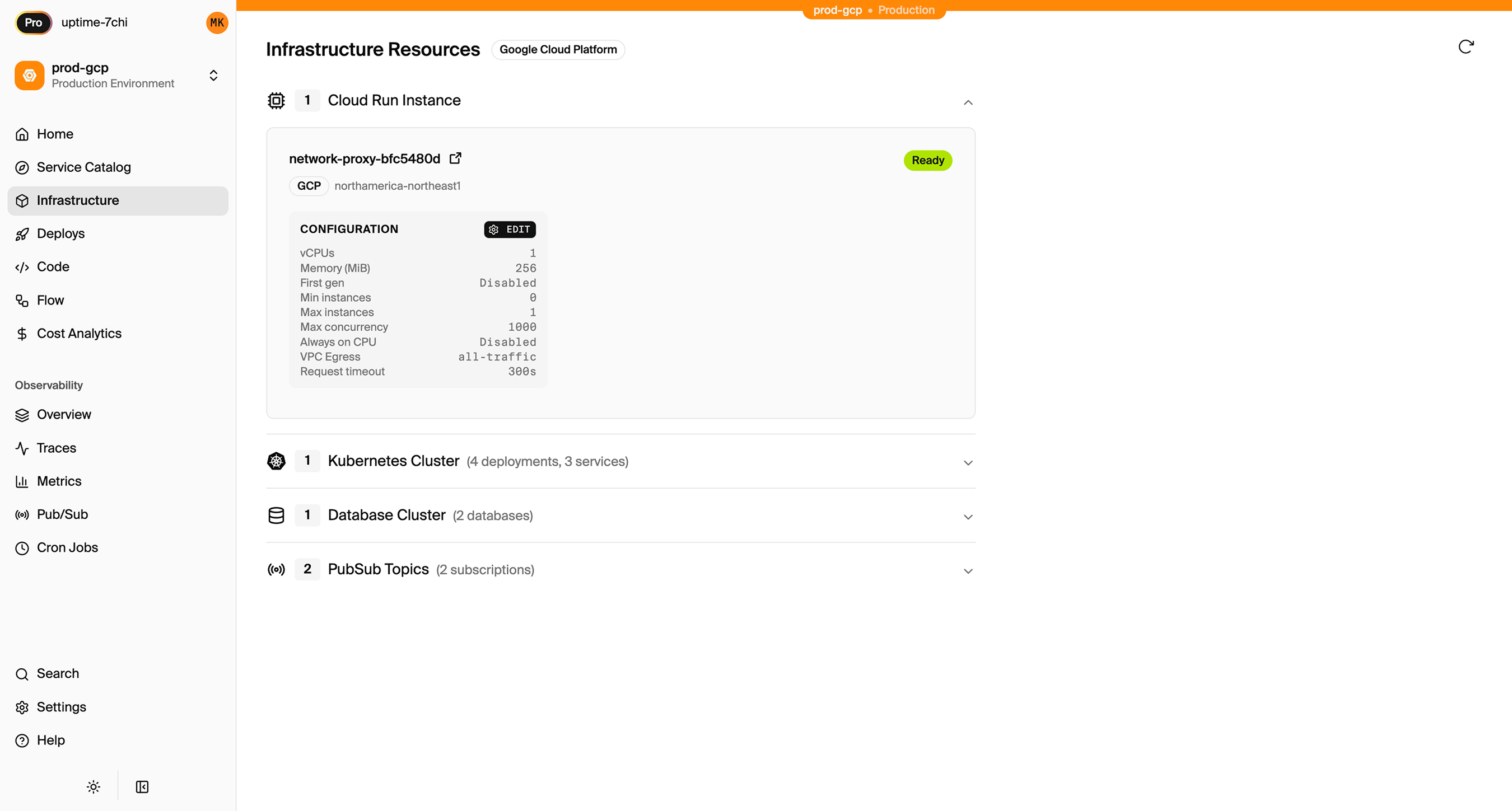
Encore Cloud also gives you a dashboard showing all provisioned infrastructure across environments:
Cost Comparison
Costs vary by usage, but here's a rough comparison for a small-to-medium application:
| Component | Render | AWS (via Encore) |
|---|---|---|
| 2 web services | $14/mo each = $28 | ~$20-40/mo on Fargate |
| PostgreSQL (1GB) | $7/mo | ~$15/mo RDS |
| Background worker | $7/mo | Included in Pub/Sub |
| Redis | $10/mo | ElastiCache or Pub/Sub |
| Total | ~$50/mo | ~$35-60/mo |
At higher scale, AWS reserved capacity and savings plans provide additional savings (up to 50-70% off on-demand).
Migration Checklist
- Inventory all Render services and their dependencies
- Export PostgreSQL database
- Create Encore app with service structure
- Set up database schema and migrations
- Import data to RDS after first deploy
- Convert background workers to Pub/Sub
- Convert cron jobs to CronJob
- Migrate Redis usage (queue vs cache)
- Move environment variables to secrets
- Test in preview environment
- Update DNS
- Monitor for issues
- Delete Render services
Wrapping Up
Migrating from Render to AWS gives you infrastructure ownership and AWS ecosystem access while maintaining a good developer experience. The code changes are minimal since both use similar concepts (services, databases, background jobs), just expressed differently.
The main work is mapping Redis usage to appropriate AWS services. For queues, Pub/Sub is usually a better fit than trying to run Redis on AWS.
Try deploying a TypeScript backend to your own AWS account:
Want to jump straight to a running app? Clone this starter and deploy it to your own cloud.