 Ivan Cernja
How to Migrate from Supabase to AWS
Move your backend to your own AWS account for more control and lower costs at scale

Supabase bundles a lot of backend functionality into one platform: Postgres database, authentication, file storage, edge functions, and real-time subscriptions. That's convenient for getting started, but teams often outgrow it. Maybe the pricing doesn't work at your scale. Maybe you need infrastructure controls Supabase doesn't offer. Maybe you want to avoid platform lock-in.
The traditional path to AWS means learning Terraform or CloudFormation, writing hundreds of lines of infrastructure config, and stitching together RDS, Lambda, S3, and Cognito yourself. That's a big jump from Supabase's integrated experience.
This guide takes a different approach: migrating to your own AWS account using Encore and Encore Cloud. Encore is an open-source TypeScript backend framework (11k+ GitHub stars) where you define infrastructure as type-safe objects in your code: databases, Pub/Sub, cron jobs, object storage. Encore Cloud then provisions these resources in your AWS account using managed services like RDS, SQS, and S3.
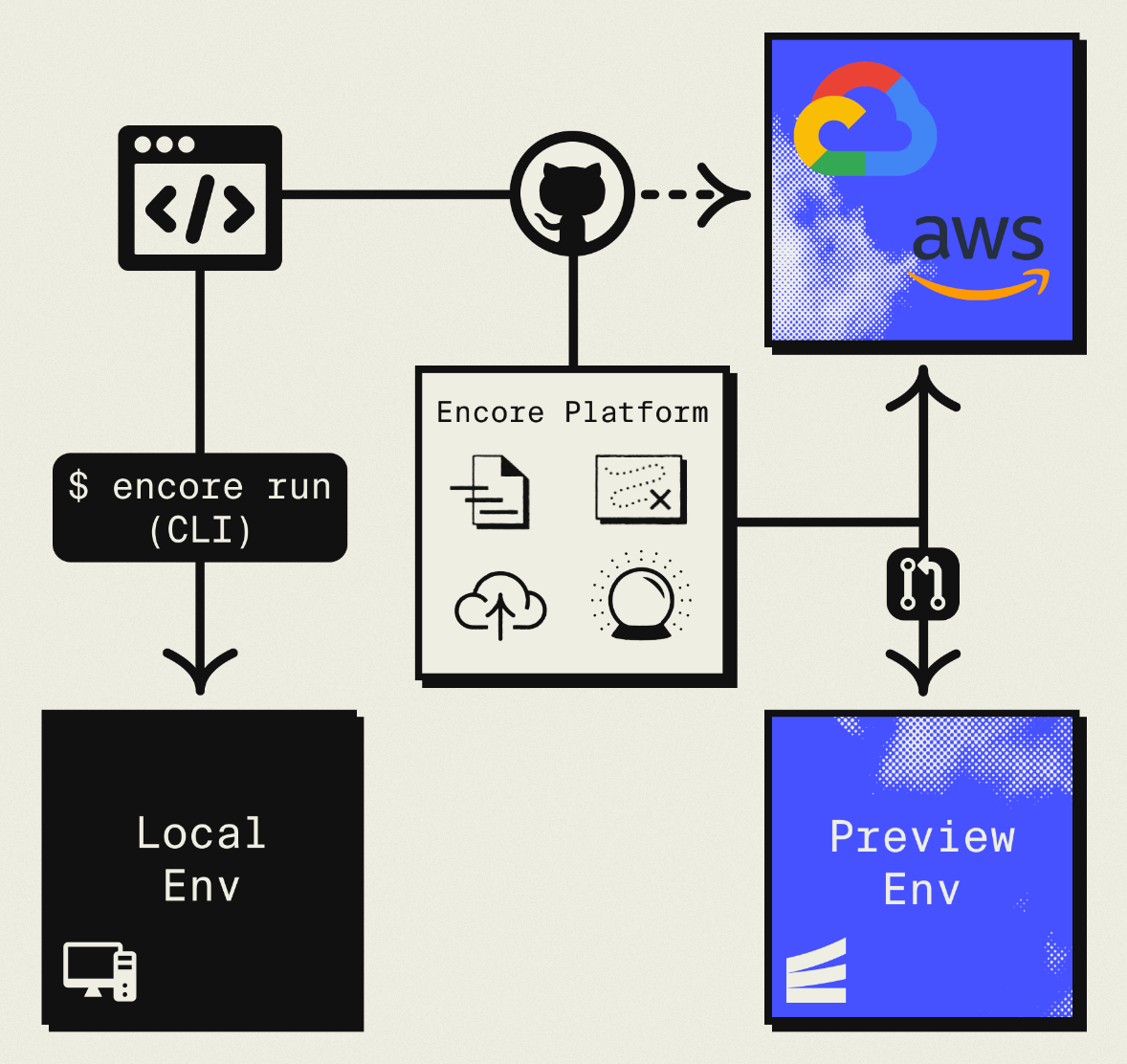
The result is AWS infrastructure you own and control, but without the DevOps overhead. You write backend code, Encore handles the rest. Companies like Groupon already use this approach to power their backends at scale.
What You're Migrating
Supabase is really several services bundled together:
| Supabase Component | AWS Equivalent (via Encore) |
|---|---|
| PostgreSQL Database | Amazon RDS PostgreSQL |
| Auth (GoTrue) | Encore Auth (or Clerk, WorkOS, etc.) |
| Storage | Amazon S3 |
| Edge Functions | Fargate |
| Realtime | Amazon SNS/SQS for Pub/Sub |
The database migration is the easiest since both use Postgres. Auth requires more work since you're replacing GoTrue with your own implementation. Storage maps directly to S3. Edge Functions become Encore APIs.
Why Teams Migrate from Supabase
Cost at scale: Supabase pricing increases with database size, storage, and API calls. A $25/month hobby project can become $500/month as you grow. Running on your own AWS account with reserved instances can cut costs by 50-70% at scale.
Infrastructure control: Supabase gives you a Postgres connection string, but you can't configure RDS parameters, set up VPC peering, or access underlying AWS services directly. With your own AWS account, you control everything.
Compliance requirements: Healthcare, finance, and government projects often require infrastructure in accounts you control with specific audit trails. Supabase's shared infrastructure doesn't meet these requirements.
Avoiding lock-in: Supabase's client libraries and auth system create coupling to their platform. Migrating to standard Postgres and S3 gives you portable infrastructure.
What Encore Handles For You
When you deploy to AWS through Encore Cloud, every resource gets production defaults: private VPC placement, least-privilege IAM roles, encryption at rest, automated backups where applicable, and CloudWatch logging. You don't configure this per resource. It's automatic.
Encore follows AWS best practices and gives you guardrails. You can review infrastructure changes before they're applied, and everything runs in your own AWS account so you maintain full control.
Here's what that looks like in practice:
import { SQLDatabase } from "encore.dev/storage/sqldb";
import { Bucket } from "encore.dev/storage/objects";
import { Topic } from "encore.dev/pubsub";
import { CronJob } from "encore.dev/cron";

const db = new SQLDatabase("main", { migrations: "./migrations" });
const uploads = new Bucket("uploads", { versioned: false });
const events = new Topic<OrderEvent>("events", { deliveryGuarantee: "at-least-once" });
const _ = new CronJob("daily-cleanup", { schedule: "0 0 * * *", endpoint: cleanup });
This provisions RDS, S3, SNS/SQS, and CloudWatch Events with proper networking, IAM, and monitoring. You write TypeScript or Go, Encore handles the Terraform. The only Encore-specific parts are the import statements. Your business logic is standard TypeScript, so you're not locked in.
Encore Cloud visualizes how your services connect, including Pub/Sub topics, cron jobs, and database dependencies:
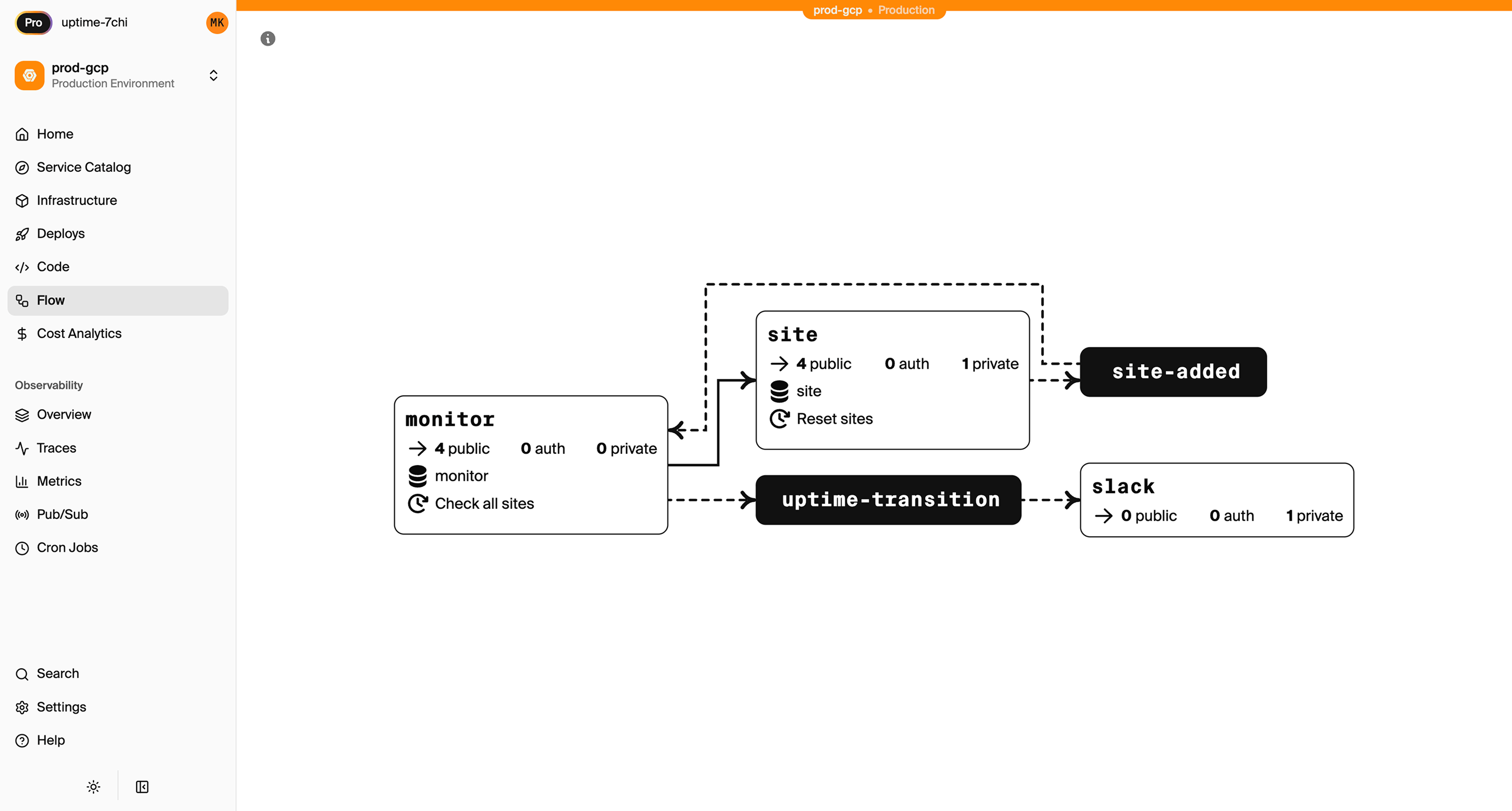
See the infrastructure primitives docs for the full list of supported resources.
Step 1: Migrate Your Database
Supabase uses Postgres, so the database migration is relatively painless. Your schema, data types, and queries all transfer over.
Export from Supabase
Go to your Supabase dashboard, find Settings > Database, and grab your connection string. Then export with pg_dump:
pg_dump -h db.xxxx.supabase.co -U postgres -d postgres > backup.sql
You'll be prompted for the database password from your Supabase settings.
For large databases, use the --jobs flag for parallel export or export tables incrementally. Supabase also offers scheduled backups in their dashboard that you can download.
Set Up the Encore Database
Define your database in code:
import { SQLDatabase } from "encore.dev/storage/sqldb";

const db = new SQLDatabase("main", {
  migrations: "./migrations",
});
That's the complete database definition. Encore analyzes this at compile time and provisions RDS PostgreSQL when you deploy. No Terraform, no CloudFormation.
Put your existing migration files in the ./migrations directory. Encore expects files named like 001_create_users.up.sql, 002_add_posts.up.sql, etc. If your Supabase project used a different migration format, you may need to rename files.
Import Your Data
After your first Encore deploy to AWS, an RDS instance will be ready. Get the connection string and import:
# Get production connection string
encore db conn-uri main --env=production

# Import the backup
psql "postgresql://user:pass@your-rds.amazonaws.com:5432/main" < backup.sql
Update Your Queries
Supabase's JavaScript client uses their REST API layer. With Encore, you write SQL directly in your API endpoints:
Before (Supabase client):
const { data, error } = await supabase
  .from('users')
  .select('*')
  .eq('id', userId);
After (Encore API with SQL):
import { api } from "encore.dev/api";
import { SQLDatabase } from "encore.dev/storage/sqldb";

const db = new SQLDatabase("main", { migrations: "./migrations" });

interface User {
  id: string;
  email: string;
  name: string;
  createdAt: Date;
}

export const getUser = api(
  { method: "GET", path: "/users/:id", expose: true },
  async ({ id }: { id: string }): Promise<User> => {
    const user = await db.queryRow<User>`
      SELECT id, email, name, created_at as "createdAt"
      FROM users
      WHERE id = ${id}
    `;

    if (!user) {
      throw new Error("User not found");
    }

    return user;
  }
);
This is more code than the Supabase client, but you get full control over queries, can write complex joins, and have compile-time type checking on your SQL.
If you prefer an ORM, Encore works with Drizzle, Prisma, and others. See the ORM integration docs.
Step 2: Migrate Authentication
Supabase Auth handles signup, login, password reset, OAuth providers, and session management. Replacing it requires implementing these features yourself or using another auth service.
Option A: Build Custom Auth with Encore
Encore's auth handler lets you verify tokens and attach user data to requests:
import { authHandler, Gateway } from "encore.dev/auth";
import { APIError } from "encore.dev/api";
import { jwtVerify, SignJWT } from "jose";
import { hash, verify } from "@node-rs/argon2";

const JWT_SECRET = new TextEncoder().encode(process.env.JWT_SECRET);

interface AuthParams {
  authorization: string;
}

interface AuthData {
  userID: string;
  email: string;
}

export const auth = authHandler<AuthParams, AuthData>(
  async (params) => {
    const token = params.authorization.replace("Bearer ", "");

    try {
      const { payload } = await jwtVerify(token, JWT_SECRET);
      return {
        userID: payload.sub as string,
        email: payload.email as string,
      };
    } catch {
      throw APIError.unauthenticated("Invalid or expired token");
    }
  }
);

export const gateway = new Gateway({ authHandler: auth });

// Login endpoint
export const login = api(
  { method: "POST", path: "/auth/login", expose: true },
  async (req: { email: string; password: string }): Promise<{ token: string }> => {
    const user = await db.queryRow<{ id: string; passwordHash: string }>`
      SELECT id, password_hash as "passwordHash"
      FROM users WHERE email = ${req.email}
    `;

    if (!user || !(await verify(user.passwordHash, req.password))) {
      throw APIError.unauthenticated("Invalid credentials");
    }

    const token = await new SignJWT({ email: req.email })
      .setSubject(user.id)
      .setIssuedAt()
      .setExpirationTime("7d")
      .setProtectedHeader({ alg: "HS256" })
      .sign(JWT_SECRET);

    return { token };
  }
);
This gives you complete control but requires implementing password reset, email verification, and OAuth yourself.
Option B: Keep Using a Third-Party Auth Service
You can use Clerk, Auth0, or WorkOS with Encore. The auth handler just needs to verify their tokens:
import { createRemoteJWKSet, jwtVerify } from "jose";

// Example with Clerk
const JWKS = createRemoteJWKSet(
  new URL("https://your-clerk-instance.clerk.accounts.dev/.well-known/jwks.json")
);

export const auth = authHandler<AuthParams, AuthData>(
  async (params) => {
    const token = params.authorization.replace("Bearer ", "");
    const { payload } = await jwtVerify(token, JWKS);

    return {
      userID: payload.sub as string,
      email: payload.email as string,
    };
  }
);
Migration Strategy for Existing Users
If you have users in Supabase Auth, you'll need to migrate them:
- Export users from Supabase (they provide an export option in the dashboard)
- Import to your new system with passwords marked for reset, or
- Run parallel auth during transition: try your new auth first, fall back to verifying Supabase tokens for users who haven't migrated
Step 3: Migrate Storage
Supabase Storage is an S3-compatible service. Encore's object storage maps directly to S3:
import { Bucket } from "encore.dev/storage/objects";

const uploads = new Bucket("uploads", {
  versioned: false,
});

export const uploadFile = api(
  { method: "POST", path: "/files", expose: true },
  async (req: { filename: string; data: Buffer; contentType: string }): Promise<{ url: string }> => {
    await uploads.upload(req.filename, req.data, {
      contentType: req.contentType,
    });
    return { url: uploads.publicUrl(req.filename) };
  }
);

export const downloadFile = api(
  { method: "GET", path: "/files/:filename", expose: true },
  async ({ filename }: { filename: string }): Promise<Buffer> => {
    return await uploads.download(filename);
  }
);
Migrate Existing Files
Supabase Storage supports S3-compatible access. You can use the AWS CLI to sync files:
# Download from Supabase Storage
aws s3 sync s3://your-supabase-bucket ./local-backup \
  --endpoint-url https://your-project.supabase.co/storage/v1/s3

# After Encore deployment, upload to your S3 bucket
aws s3 sync ./local-backup s3://your-encore-bucket
Check the Supabase docs for the exact endpoint URL format and credentials.
Step 4: Migrate Edge Functions
Supabase Edge Functions are Deno-based serverless functions. They become Encore API endpoints:
Before (Supabase Edge Function):
import { serve } from "https://deno.land/std@0.168.0/http/server.ts";

serve(async (req) => {
  const { name } = await req.json();
  return new Response(
    JSON.stringify({ message: `Hello ${name}!` }),
    { headers: { "Content-Type": "application/json" } }
  );
});
After (Encore API):
import { api } from "encore.dev/api";

interface HelloRequest {
  name: string;
}

interface HelloResponse {
  message: string;
}

export const hello = api(
  { method: "POST", path: "/hello", expose: true },
  async (req: HelloRequest): Promise<HelloResponse> => {
    return { message: `Hello ${req.name}!` };
  }
);
The main differences:
- Node.js/TypeScript runtime instead of Deno
- Type-safe request/response schemas instead of parsing JSON manually
- Deployed to Fargate instead of Supabase's edge infrastructure
If your Edge Functions use Deno-specific APIs, you'll need to find Node.js equivalents.
Step 5: Migrate Realtime
Supabase Realtime provides WebSocket subscriptions for database changes and broadcasts. The migration path depends on what you're using it for.
For Database Change Notifications
If you subscribe to table changes, replace it with explicit Pub/Sub:
Before (Supabase Realtime):
supabase
  .channel('orders')
  .on('postgres_changes',
    { event: 'INSERT', schema: 'public', table: 'orders' },
    (payload) => console.log('New order:', payload)
  )
  .subscribe();
After (Encore Pub/Sub):
import { Topic, Subscription } from "encore.dev/pubsub";

interface OrderEvent {
  orderId: string;
  status: string;
  customerId: string;
}

export const orderUpdates = new Topic<OrderEvent>("order-updates", {
  deliveryGuarantee: "at-least-once",
});

// Publish when creating an order
export const createOrder = api(
  { method: "POST", path: "/orders", expose: true },
  async (req: CreateOrderRequest): Promise<Order> => {
    const order = await saveOrder(req);

    // Explicitly publish the event
    await orderUpdates.publish({
      orderId: order.id,
      status: order.status,
      customerId: order.customerId,
    });

    return order;
  }
);

// Subscribe to process events
const _ = new Subscription(orderUpdates, "notify-warehouse", {
  handler: async (event) => {
    await notifyWarehouse(event.orderId);
  },
});
This approach is more explicit. Instead of database triggers firing automatically, you publish events where appropriate in your code. It's easier to test and debug.
For Client WebSocket Subscriptions
If your frontend subscribes to real-time updates, you'll need to implement WebSocket support or use polling. Encore supports streaming APIs for this use case. See the streaming docs.
Step 6: Deploy to AWS
With your code migrated:
-
Connect your AWS account in the Encore Cloud dashboard. You'll set up an IAM role that lets Encore provision resources. See the AWS setup guide for details.
-
Push your code:
git push encore main -
Encore provisions everything automatically: RDS for databases, S3 for storage, Fargate for compute, SNS/SQS for Pub/Sub.
What Gets Provisioned
After deployment, your AWS account contains:
- RDS PostgreSQL with your database
- S3 buckets for file storage
- SNS/SQS for Pub/Sub messaging
- Fargate for your API endpoints
- CloudWatch for logs and metrics
- IAM roles with least-privilege access
- Application Load Balancer for HTTP routing
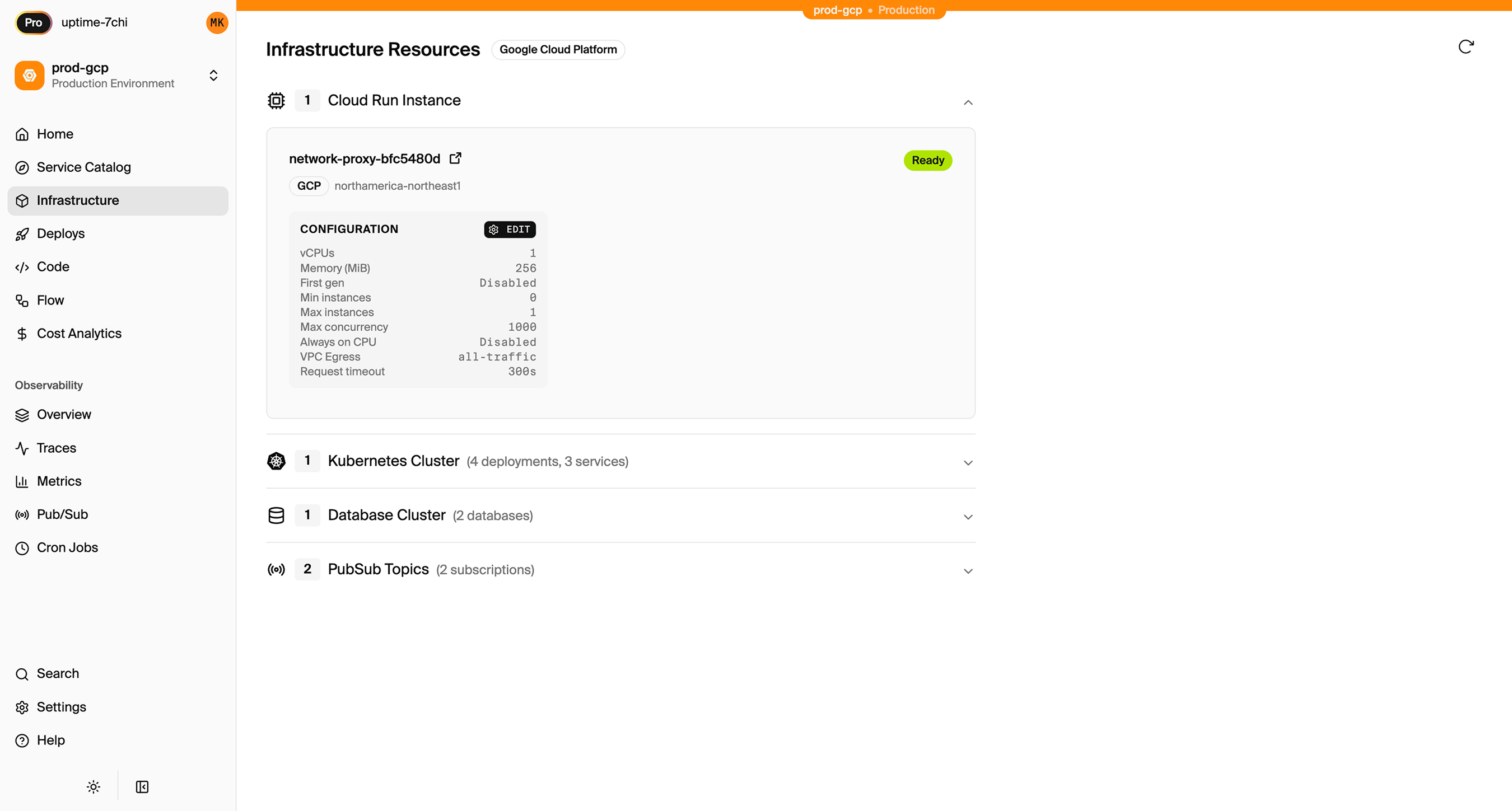
You have full access through the AWS console. You can connect to RDS directly, browse S3 buckets, and configure additional services as needed.
Encore Cloud also gives you a dashboard showing all provisioned infrastructure across environments:
Migration Checklist
- Export Postgres database from Supabase
- Set up Encore database with migrations
- Import data to RDS after first deploy
- Decide on auth approach (custom or third-party)
- Implement auth handler
- Migrate existing users (if applicable)
- Sync files from Supabase Storage to S3
- Convert Edge Functions to Encore APIs
- Replace Realtime subscriptions with Pub/Sub
- Update frontend to use new API endpoints
- Test in preview environment
- Update DNS
- Monitor for issues
Wrapping Up
Migrating from Supabase involves replacing their bundled services with AWS equivalents. The database is the easy part since it's Postgres-to-Postgres. Auth requires the most thought since you're replacing a managed service with either custom code or another provider.
Encore handles the AWS infrastructure so you're not writing Terraform. You focus on the application code, and resources get provisioned automatically based on what your code uses.
Try deploying a TypeScript backend to your own AWS account:
Want to jump straight to a running app? Clone this starter and deploy it to your own cloud.
Related Resources
- How to Deploy to AWS Without Terraform
- Migrate from Supabase to GCP
- Encore vs Terraform
- Groupon Case Study - Enterprise adoption of Encore