 Ivan Cernja
Zero to Production on GCP in 10 Minutes with TypeScript
From TypeScript to a running GCP deployment in under 10 minutes

GCP has strong managed services for backend development: Cloud Run scales containers to zero, Cloud SQL handles PostgreSQL with automated backups, GCP Pub/Sub is one of the more reliable messaging systems available, and Cloud Scheduler runs cron jobs without you managing a scheduler.
Getting a TypeScript backend to actually use all of those together is where the time goes. A single backend with two services needs Terraform configs (or gcloud scripts) for the Cloud SQL instance with a VPC connector, IAM service accounts with the right bindings, a CI/CD pipeline that builds container images and pushes them to Artifact Registry, and Pub/Sub topic and subscription configs with retry policies. Each piece is well-documented individually, but stitching them together across environments is a different kind of work from writing application code.
This guide covers the full path: build a TypeScript backend with API endpoints, a PostgreSQL database, pub/sub messaging, and a scheduled cron job, then deploy it to your own GCP project without writing any Terraform, Docker, or gcloud scripts.
What We're Building
A backend with two services:
- Tasks service: REST API, a PostgreSQL database, publishes events on task completion, runs a daily cleanup cron job
- Audit service: subscribes to task events and logs them
About 60 lines of meaningful code. The infrastructure (Cloud SQL, Cloud Run, GCP Pub/Sub, Cloud Scheduler, IAM) gets provisioned automatically.
1. Create the App
curl -L https://encore.dev/install.sh | bash
encore app create my-app --example=ts/hello-world
cd my-app
2. Build the Tasks Service
// tasks/encore.service.ts
import { Service } from "encore.dev/service";
export default new Service("tasks");
// tasks/tasks.ts
import { api } from "encore.dev/api";
import { SQLDatabase } from "encore.dev/storage/sqldb";
import { Topic } from "encore.dev/pubsub";
import { CronJob } from "encore.dev/cron";

// Declares a PostgreSQL database. Encore provisions Cloud SQL on GCP.
const db = new SQLDatabase("tasks", { migrations: "./migrations" });

// Declares a Pub/Sub topic. Maps to GCP Pub/Sub.
export const taskCompleted = new Topic<TaskEvent>("task-completed", {
  deliveryGuarantee: "at-least-once",
});

interface TaskEvent {
  taskId: string;
  completedBy: string;
}

interface Task {
  id: string;
  title: string;
  status: string;
}

// Defines a type-safe API endpoint. Encore handles routing and validation.
export const create = api(
  { expose: true, method: "POST", path: "/tasks" },
  async (req: { title: string }): Promise<Task> => {
    return (await db.queryRow<Task>`
      INSERT INTO tasks (title, status)
      VALUES (${req.title}, 'pending')
      RETURNING id, title, status`)!;
  }
);

export const complete = api(
  { expose: true, method: "POST", path: "/tasks/:id/complete" },
  async ({ id }: { id: string }): Promise<Task> => {
    const task = (await db.queryRow<Task>`
      UPDATE tasks SET status = 'completed'
      WHERE id = ${id} RETURNING id, title, status`)!;
    await taskCompleted.publish({ taskId: id, completedBy: "api" });
    return task;
  }
);

export const cleanup = api(
  { expose: false },
  async (): Promise<void> => {
    await db.exec`
      DELETE FROM tasks
      WHERE status = 'completed'
      AND created_at < NOW() - INTERVAL '30 days'`;
  }
);

// Declares a cron job. Maps to Cloud Scheduler on GCP.
const _ = new CronJob("daily-cleanup", {
  schedule: "every 24 hours",
  endpoint: cleanup,
});
-- tasks/migrations/001_create_tasks.up.sql
CREATE TABLE tasks (
  id UUID PRIMARY KEY DEFAULT gen_random_uuid(),
  title TEXT NOT NULL,
  status TEXT NOT NULL DEFAULT 'pending',
  created_at TIMESTAMPTZ DEFAULT NOW()
);
API endpoints, a database, a pub/sub topic, and a cron job. One service.
3. Build the Audit Service
// audit/encore.service.ts
import { Service } from "encore.dev/service";
export default new Service("audit");
// audit/audit.ts
import { Subscription } from "encore.dev/pubsub";
import { taskCompleted } from "../tasks/tasks";

// Subscribes to the task-completed topic. Encore handles delivery and retries.
const _ = new Subscription(taskCompleted, "audit-log", {
  handler: async (event) => {
    console.log(`Audit: task ${event.taskId} completed by ${event.completedBy}`);
  },
});
Subscribes to task completion events. That's the whole service.
4. Test Locally
encore run
Real PostgreSQL, real pub/sub message delivery, cron job execution, and a local dashboard at localhost:9400 with distributed traces across both services, an API explorer, a service graph, and a database browser. All without Docker or GCP emulators.

5. Connect GCP and Deploy
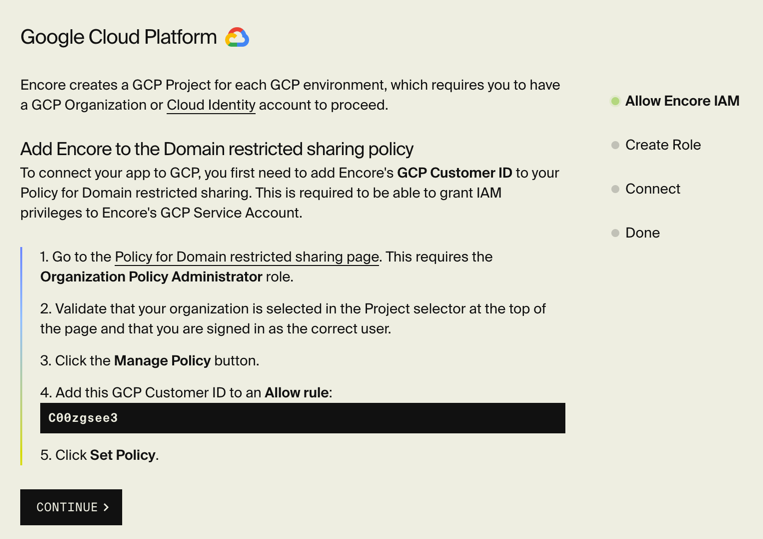
Sign up for Encore Cloud and connect your GCP project through the dashboard.
git add -A && git commit -m "Initial backend"
git push encore
Encore.ts's compiler reads the code and provisions:
| What the code declares | What gets provisioned on GCP |
|---|---|
new SQLDatabase("tasks", ...) | Cloud SQL PostgreSQL with automated backups |
new Topic("task-completed", ...) | GCP Pub/Sub topic |
new Subscription(...) | GCP Pub/Sub subscription with dead-letter topic |
new CronJob("daily-cleanup", ...) | Cloud Scheduler job |
Two services with api() endpoints | Two Cloud Run services |
| Service-to-service access | IAM service accounts with least-privilege bindings |
A few minutes later, everything is running in your GCP project. Cloud Run scales the services to zero when idle. Cloud SQL has automated backups. Pub/Sub handles retry and dead-lettering. Service accounts are scoped so the audit service can only read from its subscription, not access the tasks database.
What GCP Gives You That You Didn't Configure
The infrastructure you're running on is the same managed services you'd configure manually: Cloud Run, Cloud SQL, GCP Pub/Sub, Cloud Scheduler. The difference is you didn't write the glue between your code and those services. The VPC connectors, IAM bindings, Cloud Build triggers, and Artifact Registry config are all handled by the platform.
GCP's services are good at what they do. The configuration layer between your TypeScript and those services was the hard part. When that layer is derived from the code, GCP's strengths come through without requiring you to become a GCP infrastructure specialist.
Want to jump straight to a running app? Clone this starter and deploy it to your own cloud.